Creative Last-Minute Christmas Tricks from Microsoft Designer (Easy Gift Tags & Activities)
Struggling with last-minute Christmas prep? These clever Christmas tricks using Microsoft Designer help you create unforgettable personalized gift tags, fun stickers, and engaging coloring pages in minutes. Perfect for kids and adults alike. Whether you want to add a personal touch for each recipient or keep the little ones entertained, these Designer techniques will save time during the festive rush

Avatars
Put an avatar of the receiver on their Christmas gifts as personal gift cards.
Go to the Avatar page on Designer. Add a text prompt describer the lucky gift receiver.
- Age and sex
- Short description, skin color, hair (short, long, curly etc).
- Interests, sport or other hobbies
- Artistic style.
For example “ten year old girl with short blonde hair wearing a tshirt and riding a skateboard. In anime style” gave us this:

Click on Edit to open the Designer edit pane then switch to Text. Then you can add text labels. Designer has a good selection of fonts and styles.
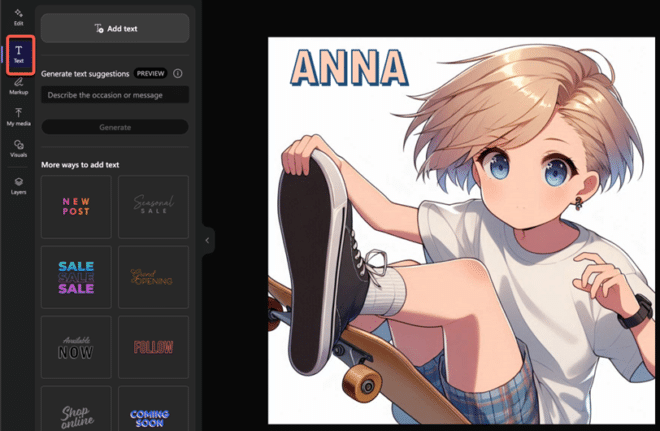
Tip: use the color picker tool to match the text to a color in the graphic. Above, the text fill is the same as the skin color.
(the missing mouth is a little creepy, but that’s a feature of some anime).
Change the style to whatever you like. We were a little surprised that “Disney style” was accepted by Designer. Does Disney Legal know?

If Copilot doesn’t suit, there are other Avatar makers like https://starryai.com/

Stickers
Or use the same description with the Sticker maker which creates similar images but with a transparent background.
“ten year old boy with short brown curly hair wearing a long sleeved tshirt and riding a skateboard. in mosaic style”

Choose Download then add to your own document or email. Or Edit to open in the Designer editor.

Coloring book pages
To keep the little ones occupied — at least for a little while – make a coloring in page of almost anything you like.
Santa delivering gifts on a skateboard as a coloring book page

Go to the Coloring Book page. In our pre-Xmas tests it was necessary to add “as a coloring book page” which seems to be a little glitch in the current Designer.
The default coloring pages are quite intricate, try alternative requests like “…a simple coloring book page for very young child” to get something easier for little ones.

