The AI engine inside your Excel and Outlook may have changed in the last few weeks, and Microsoft never told you. Microsoft has quietly started routing some Copilot prompts to its own MAI models instead of the OpenAI and Anthropic technology that used to do the work. The Copilot button looks identical and sits in the same place, but the machine behind it is increasingly one Microsoft built to cut costs. Here is what the switch means for your results, and why business and IT users should pay closer attention.
According to a Bloomberg report (paywall), Microsoft has started replacing the OpenAI and especially Anthropic models that power some Office AI features with its own MAI models. The reason is money, plain and simple.
Nothing changed on your screen. The Copilot button looks the same, sits in the same place, and does the same job. But behind that button, the machine doing the actual work is increasingly one that Microsoft built itself.
Microsoft grabs prompts for itself
Bloomberg reporter Brody Ford, citing a person familiar with the work, says tens of thousands of AI prompts every week in Excel and Outlook are now being handled by Microsoft’s internal MAI models. Those same tasks used to lean more heavily on OpenAI and Anthropic.
A few things worth pinning down:
- This is only some tasks, not everything. OpenAI and Anthropic still handle most of the AI traffic inside Copilot.
- It covers Excel and Outlook according to this report.
- Microsoft declined to comment, so there’s no official list of which features moved.
- MAI models are also already available in PowerPoint and GitHub Copilot, and Microsoft says its own speech transcription model is coming to Teams in the next few months.
In other words, this is a swap of the parts under the hood, done gradually and without announcement.
The MAI models might turn out to be good for customers but that remains to be proved in the real world. Regardless of the quality, paying customers are entitled to know what’s underlying the AI responses.
What does the “Auto” model choice really mean?
The current model selection in Excel 365 looks like this with “Auto” as the default.
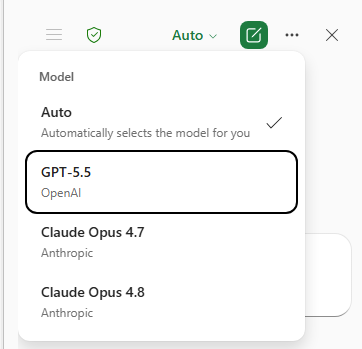
There’s a choice of an OpenAI GPT model and two Claude Opus models or Auto.
Until now the assumption was that “Auto” chose one of the displayed models but now it seems Microsoft is slipping in it’s own cheaper MAI model under the guise of “Auto” selection.
Why Microsoft is doing this
There’s no mystery about the motive – money.
Microsoft’s AI chief Mustafa Suleyman said it out loud at the Build conference in June: “We pay a lot of money to Anthropic, so our goal is to reduce and ultimately eliminate that cost.“
That’s a kill switch on a supplier, stated openly. Microsoft spends a lot of money buying AI tokens (the unit AI providers charge by) to work under the Copilot name.
Right now Microsoft gets OpenAI/ChatGPT technology at a discount thanks to a long partnership, so its main focus, for now, is reducing its spending on Anthropic/Claude services.
Building its own models is how Microsoft avoids being at the mercy of whatever the big AI labs decide to charge.
At Build in June, Microsoft launched seven MAI models covering reasoning, coding, image generation, voice and transcription. It even claimed one of its coding models matches a still popular previous generation Anthropic model, Opus 4.6, at a lower cost.
But that’s Microsoft’s own self-serving claim that should be taken with the proverbial ‘pinch of salt’.
The MAI models are very much ‘works in progress’ and unproven in the real world. It will take some time for Microsoft to catch up with the AI rivals who have a huge headstart in expertise and are more flexible in development.
MAI = Microsoft AI
A clever bit of branding by Microsoft using the MAI name for their AI models instead of something more closely identified with the company like MS.AI or MSAI.
They’ve chosen to somewhat distance themselves from their own AI models. Microsoft is hoping that many customers won’t realize this is a ‘home grown’ AI system instead of a known brand like ChatGPT or Claude.
Microsoft chooses the AI model by stealth
Do not read this as Microsoft dumping OpenAI or Anthropic. It isn’t. The partnerships continue at least for now.
What’s changing is how those models get used and the stealthly way Microsoft is choosing models to save money.
Copilot and Azure are multi model platforms. That means Microsoft picks whichever model is cheapest for it to run first and then what’s best suited for the task.
One request might run on Microsoft’s MAI, the next on OpenAI’s GPT, the next on Anthropic’s Claude. You never see which one answered. That is efficient for Microsoft, but not necessarily best for customers.
The industry term for this is model routing. The engine behind a feature can change at any time for cost, speed or availability reasons while the button you press stays identical.
What does this mean for you?
For everyday Office users, here’s the honest picture:
- Consistency is no longer guaranteed. An AI feature that behaved one way in the spring can behave differently in the summer, even though the app version and button are the same.
- The look and feel won’t change, but the results might. If a formula suggestion in Excel or a summary in Outlook suddenly feels sharper, duller or just different from last month, a quiet model swap is a very plausible reason.
- You have no control over which model answers. There’s currently no user setting to say “always use Claude” or “avoid MAI.” Microsoft decides, task by task, unless there’s a specific model choice available.
- Auto. The Auto (and default) option in many Copilot features is likely weighted towards what’s cheapest for Microsoft, meaning their own MAI models where possible.
- Choose a model yourself. For important or repeated tasks, choose a specific model from the drop-down list offered. That will ensure that the same AI logic is applied each time with no hidden model switches.
If you run a business or manage IT, take this more seriously:
- Test at the feature level, not the app level. A Copilot feature you approved six months ago may now be running on a different model with different output, latency and data handling.
- Governance and compliance reviews need a refresh. If you have regulated workflows, you’ll want Microsoft to disclose which model handles which task, and ideally offer tenant level controls. Neither exists in a clear form yet.
This is Microsoft protecting its profit margins across hundreds of millions of Office and Teams seats. Cheaper internal models help Microsoft’s numbers whether or not you ever pay extra for AI features.
Caveat
One caveat before you treat this as settled fact: the core reporting rests on a single Bloomberg source and an anonymous insider, and it is explicitly limited to some app tasks. So read “Microsoft replaces OpenAI and Anthropic” as a direction of travel, not a finished switch.
The direction, though, is not in much doubt. The move to in-house models was predictable even before Microsoft told us its plan in June, and now it’s carrying it out.
Microsoft’s MAI Playground: Test Microsoft’s Own AI Models Free
Copilot Model Choices Explained: Which One to Pick and Why
Best Copilot AI Model for Excel: A Plain English Guide
PowerPoint AI Image Models in Copilot: Which One to Choose
Best AI for Spreadsheets: Why Claude and ChatGPT Beat Gemini and Copilot
What Is Microsoft Scout? The AI That Runs Office Tasks Without Being Asked
Microsoft 365 Copilot App vs Copilot App: What’s the Difference?
