64-bit or 32-bit Office: Which Microsoft 365 Version Should You Choose?
Choosing 64-bit or 32-bit Office sounds like a decision that matters, but for almost everyone it does not. Since around 2020, Microsoft 365 and Microsoft Office have installed as 64-bit software by default, and that is the right choice for nearly every Windows PC. The 64-bit version is faster, uses more memory and is more secure. Here is the plain English answer on which one to pick, how to check what you already have, and the one situation where 32-bit Office still makes sense.
Most people will not notice the difference between 32-bit Office and the 64-bit version. The latter is faster, uses memory above 4GB and is more secure. Back in 2019 Microsoft changed the default Microsoft 365 and Microsoft Office install to 64-bit software from 32-bit software.
Let’s start with what’s important for 99% plus of the people reading this …
Should you care about 32/64 bit?
Stay with the Microsoft 365/Office for Windows you have either 32-bit or 64-bit, unless you have a specific reason to change. If you installed the software anytime since about 2020, you’ll almost certainly have 64-bit software.
As simple as that, stick with the ‘devil you know’.
Maybe moving from 32-bit to 64-bit Office will be faster, but any small combined time savings could be less than the time taken uninstalling and reinstalling Office!
Move to 64-bit Office
Choose the 64-bit Office option if you’re installing Microsoft 365 or MS Office on a new computer or doing a full reinstall on an existing computer.
Check first that there’s no add-in or VBA compatibility problems. They should be rare these days.
From your Microsoft account, choose Install Office then More options. Choose Microsoft 365 or Office 64-bit.
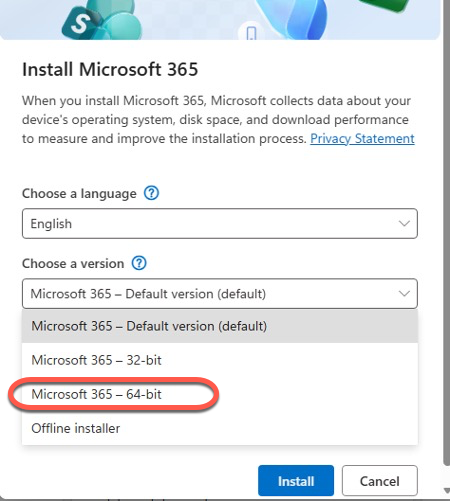
The “default version” is 64-bit these days but we prefer to choose that option directly rather than rely on Microsoft’s vague wording.
You won’t be able to install 64-bit Office on 32-bit Windows so you won’t worry about compatibility. The installer will stop with an error message very early in the process if that’s a problem (just go back and choose ‘Microsoft 365 32-bit’ instead). Windows 8.1/10 32-bit versions do exist but it’s increasingly rare, see below for details.
32 vs 64 bit doesn’t matter on a Mac
There’s no 32/64-bit option to worry about with Microsoft 365 or Office for Mac.
It also doesn’t apply to mobile apps for iPhone, iPad or Android.
Confusion is understandable
Microsoft has changed their mind about 32/64-bit several times over the years. At one stage it looked like they were moving everyone to 64-bit Office but they changed tack and stuck with 32-bit software.
Pushing 32-bit Office seems aimed at reducing support costs for Microsoft rather than what’s best for customers. At the time, there were more 64-bit incompatibility problems than should be around now.
The company also kept these moves quiet. It seems they are overly worried about confusing customers about 32 vs 64-bit while overlooking the trouble caused by non-disclosure.
Which one do I have, 32-bit or 64-bit?
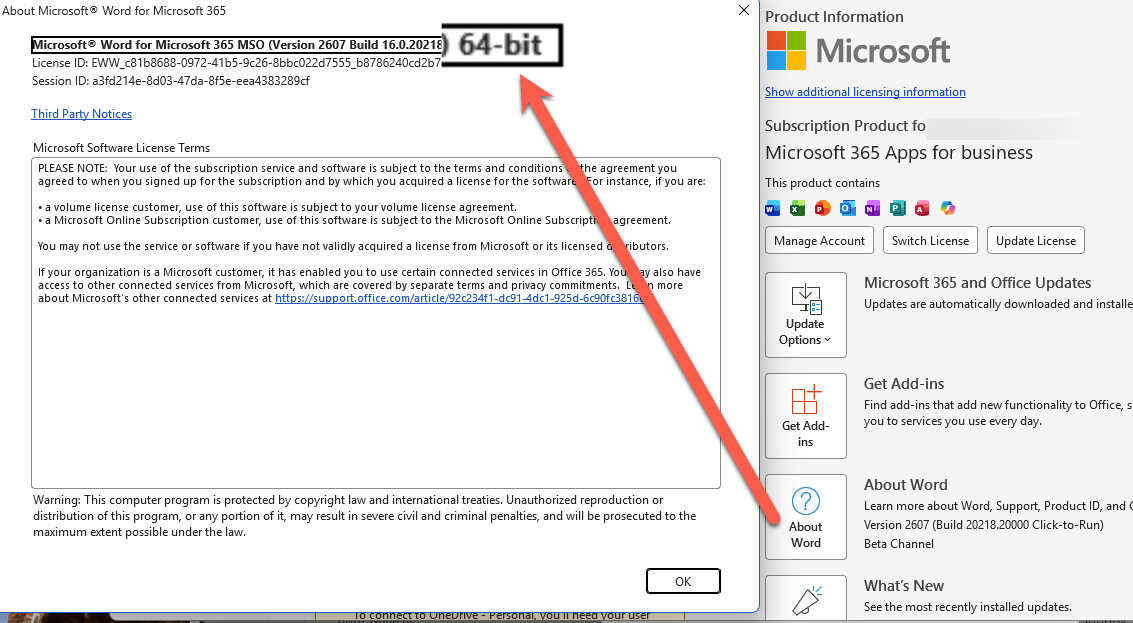
Microsoft hides the ‘bitness’ of Office at File | Account | About then look on the top line of the box with all the legalese.
What’s the difference – 32 vs 64 bit?
64-bit Office makes better use of computer resources and especially computer memory.
32-bit Office can’t fully access memory over 4GB on many computers, it also needs a special translation layer in Windows to work with 64-bit Windows. That translation layer slows down Office a little.
The main advantage of 64-bit is with really large Excel worksheets which can make good use of the memory available and faster processing.
That large lumbering beast called ‘Microsoft Outlook classic’ can take advantage of the 64-bit benefits. New Outlook is a separate web app without any 32/64 bit distinction.
But in most cases, it’s hard to tell the difference between 32-bit and 64-bit Office. It’s nothing like the noticeable and sometimes jaw-dropping improvement when switching to SSD solid-state drives.
Can I use 64-bit Office?
Almost certainly yes. Most, if not all, new computers should be 64-bit and have been for many years. Any machine with over 4GB of RAM should be 64-bit.
64-bit software needs to run on a 64-bit operating system. Windows has defaulted to 64-bit software for many years/versions now.
The downside of 64-bit Office
The concern with 64-bit Office is compatibility with add-ins but that problem should have disappeared after the passing of many years.
Some add-ins or VBA code may still be limited to 32-bit Office. That should NOT happen now, developers have had many years to make their wares 64-bit compatible.
Installing Microsoft 365 or Office? Do These Two Things
Microsoft Office support end dates checklist
Office 2021 Support Ends October 13: Your 5 Options Before the Deadline
Microsoft Kills Office 2019 for Mac: Apps Stop Working July 13, 2026
New Outlook Is Slow and a Memory Hog: More Reasons to Avoid It
Best AI for Spreadsheets: Why Claude and ChatGPT Beat Gemini and Copilot