Outlook search has vastly improved with Immersive Search, and if your mailbox has a Copilot plan attached, it is worth trying today. Instead of hunting for exact keywords, you can type a plain English question like and get a real answer, complete with links back to the source emails. It works in new Outlook, classic Outlook, Outlook for Mac, and Outlook on the web, and it is a genuine step up from the search box we have all struggled with for decades.
Look for the “ask Copilot” label in the Outlook Search box.

Immersive Search uses AI to let you ask human questions and even vague questions to get clearer answers.
Individual users can search their mailboxes with Immersive Search. Corporate users have “Copilot Search” which extends into OneDrive and SharePoint files plus Teams data.
It’s available to anyone with an eligible Microsoft 365 Copilot license. It can be accessed through Outlook (new, classic, Mac or web).
You can continue to use Outlook Search the way we all have for decades, by typing keywords or the name of a sender/recipient. Or give the AI enhanced search a try because it’s really useful.
Immersive Search Example
Here’s how the smarter Copilot search works in Outlook.
Type a question into the title bar search box. Instead of keywords, ask a ‘natural language’ question like “Find messages about my next visit to London”.
A regular search result list will appear plus a “Search with Copilot” option.
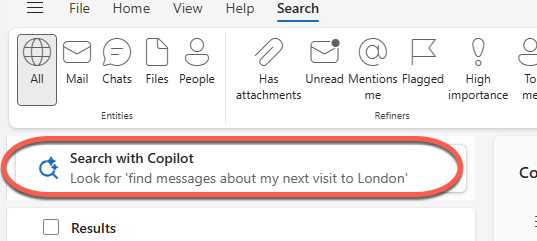
Or type a question into the Search box.

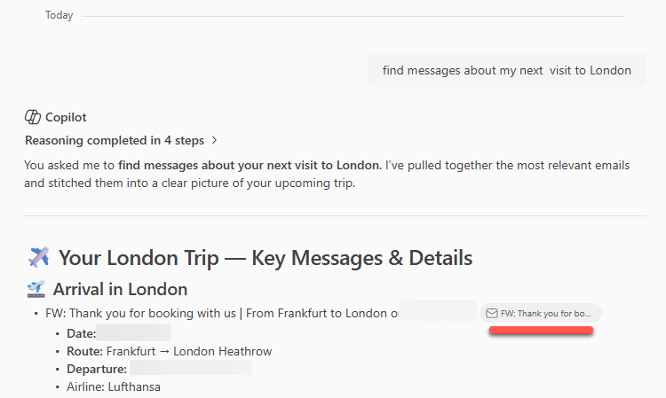
A list of relevant messages will appear but also check out the Copilot side-pane.
In the Copilot side-pane is a more complete answer than just a list of messages. There are links to the source messages so you can see where Copilot got its information.
Smarter Outlook Questions
With Immersive Search searches are done as standard questions.
Show me emails from Sherman about Q4 forecasting sent last weekFind emails in the last 60 days that involve both Frodo and Gimli in the same thread.Or do searches that have been long requested by Outlook users such as the SQL NEAR option.
List any email that mentions the words ‘Merry’ and ‘Lobelia’ near each other.Questions can be vague, not dependent on specific keywords.
Show me messages about my motorcycle having problemsOr ask for answers or details inside messages
What is my seat allocation for the flight to London?What date did the school say term starts?Summarize
There’s a Summarize option in Outlook with Copilot for individual messages. Search can find the thread or threads and then summarize.
Summarize the message threads about the family reunion and tell me what was decidedPull the key dates out of the school newsletter threadsCombine Conditions
Combine conditions into a single request.
Find emails from my accountant with a PDF attached sent in the last month about taxQuick Parts in New Outlook: Reuse Email Text in Two Clicks
Outlook Reusable Content: Templates and Quick Parts Explained (and Why It’s a Mess)
New Outlook’s 5 “Productivity” Features: What Microsoft Isn’t Telling You
New Outlook Is Slow and a Memory Hog: More Reasons to Avoid It
Why Outlook’s Two Email Template Tools Are Almost Useless
Microsoft’s MAI Playground: Test Microsoft’s Own AI Models Free
