How to Type the Square Root (√) Symbol in Word, Excel, PowerPoint and Outlook
Need to insert the square root symbol (√) in Microsoft Office? Whether you’re working in Word, Excel, PowerPoint or Outlook, there are several quick and easy ways to add √ to your document, spreadsheet or email. From keyboard shortcuts and Alt codes to Equation tools and symbol menus, here’s how to insert the square root sign in every major Office app. Bonus: Cube and Fourth Roots too!
Square Root √ symbol is sometimes called a radical symbol, radical sign, root symbol, radix, or even a surd.
The symbol can include a horizontal overline or not, depending on the font. To use in a formula, it’s better to use the Office Equation Editor to get good formatting, see below.
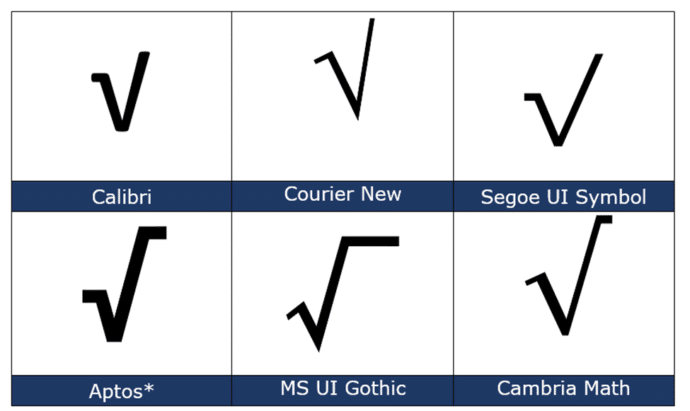
How Square Root √ looks in different fonts.
There are a wide range of looks for the Square Root symbol.
For a Square Root sign without the overline, choose a font like Calibri, Courier New of Segoe UI Symbol
Other fonts like the Aptos fonts, MS UI Gothic or Cambria Math have the horizontal overline version.
Square Root √ codes
These are the important code numbers or values you’ll need to enter the Square Root or √
Decimal: 8730 Hex: 221A
Web: √ √ or √ √
(web codes aren’t used in Microsoft Office, we’ve included them for the sake of completeness.)
Word and Outlook
The Square Root √ sign does NOT have an inbuilt shortcut in Word.
Use the standard Word Alt + X symbol shortcut 221A + Alt + X
Once in a document you can copy it to AutoCorrect and make your own shortcut.
Word, Excel, PowerPoint and Outlook
Insert | Symbols | Symbol and look for the Square Root symbol.
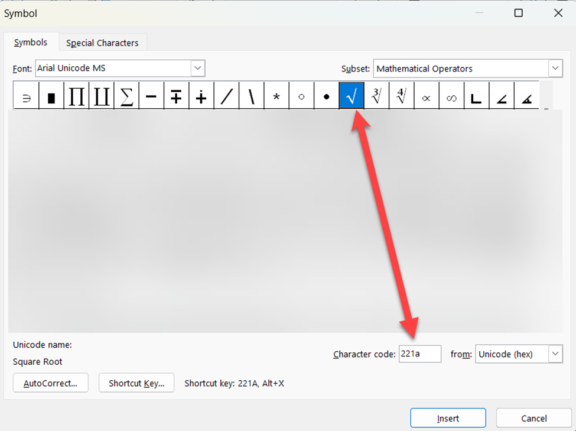
Cube Root ∛ and Fourth Root ∜
The Cube Root ∛ and Fourth Root ∜ symbols are next to the Square Root sign.
Cube Root ∛ is Hex 221B
(no relation to Sherlock Holmes 🔎😎)
Fourth Root ∜ is Hex 221C
Equation
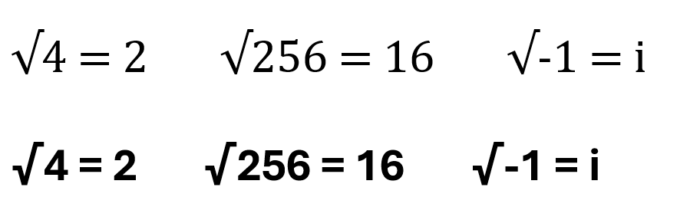
The Square Root symbol, typing square roots with numbers doesn’t look good because the overline can’t go over the number. See these examples using Cambria Math or Aptos fonts:
The Microsoft Office Equation feature (aka Office Math) is a better way to make even simple formulas. Go to Insert | Equation then choose one of the Radical options.
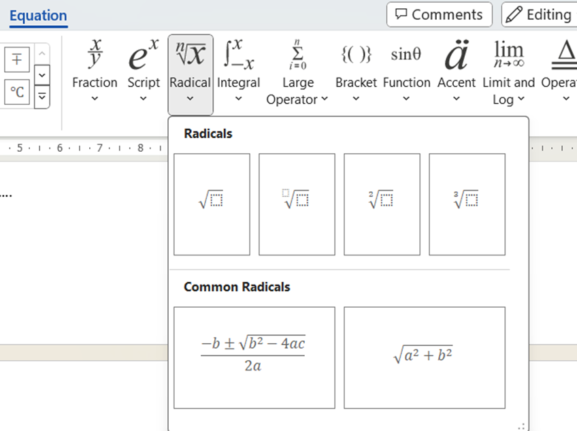
With Equation you get nicely formatted square roots with an overline above the number.

Equation automatically use the Cambria Math font unless you choose another font.
Window 11/10 Emoji Panel
The Windows 11/10 Emoji Panel has the Square Root √ character buried in the Symbols | Math Symbols section. Use Win + . (period/fullstop) to open the panel.
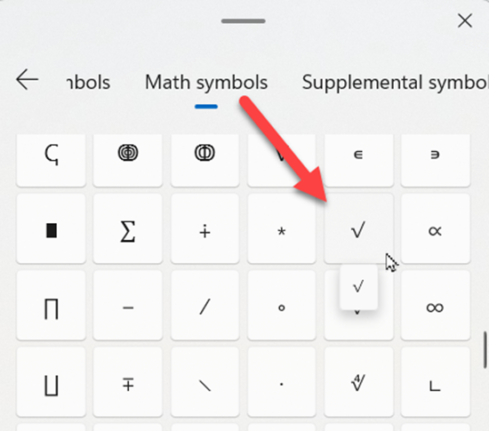
There’s no search option for symbols in the Emoji Panel, see Emoji Panel is part of Windows 11/10 that totally sucks
MacOS and Office for Mac inserting characters
On a Mac, to enter the Square Root √ symbol:
- Command + Control + Spacebar shortcut to open the Character Viewer.
- Search for “ Square Root “ and the Viewer should find the symbol you need.
Despite the name Character Viewer, the Apple system tool will also insert characters into any program, including Office for Mac.
Symbols and Emoji in Microsoft Office -Windows or Mac
What is “Office Math” and where is it in Microsoft Office?
Vertical Bar | symbol in Word, Excel, PowerPoint and Outlook
Omega upper Ω or lower ω symbols in Word and Office