Using a Jailbroken or Rooted Phone? Microsoft Authenticator Will Soon Block You
Microsoft is tightening security for work and school accounts in Microsoft Authenticator, introducing automatic detection of jailbroken iPhones and rooted Android devices. From now, the app will warn users, then block sign-ins, and eventually remove stored work or school credentials from compromised devices. The phased rollout aims to protect Microsoft accounts from potential data theft on modified operating systems plus an unintentional joke for Aussies to enjoy 😉.
This is a significant change if you use Microsoft Authenticator for two-factor login at work or through school, and it happens automatically with no IT admin involvement required.
Two-factor authentication is vital and sometimes required for many core online accounts and email login. Using an authentication app is more secure than other methods like SMS, phone calls etc.
What Are Jailbreaking and Rooting?
These terms are used interchangably but strictly mean the same thing on different platforms. Jailbreaking refers to iPhones; Rooting refers to Android phones (with some confusion in Australia, see below).
Both involve bypassing the manufacturer’s built-in security restrictions and core operating system to gain deeper control over the operating system.
People do this to install unofficial apps, remove carrier bloatware, or customize things that Apple and Google normally lock down. The tradeoff is that the device’s security model is fundamentally weakened, which is exactly why Microsoft is taking this step.
iPhone/iPad jailbreaking is more difficult and less common. Android rooting is a little easier and thus done more frequently. That said, most people don’t bother with this major hack.
What This Means for You
If your personal phone is jailbroken or rooted and you use it for work authentication, you will lose access to your work or school accounts in Authenticator. This is not optional and your IT department cannot turn it off.
Personal accounts (like a personal Microsoft account) are not affected. Only work and school accounts are targeted with this change.
How the Rollout Works
Microsoft is not throwing a sudden switch. The change rolls out in three stages, completing in July 2026:
Warning mode You can still use Authenticator, but you will see a warning telling you the device is jailbroken or rooted and that you will eventually lose access.
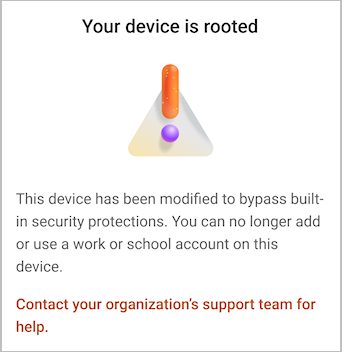
The above and all the images in this article are real from Microsoft’s announcment.
Blocking mode You can no longer add or use work or school accounts. Existing accounts are still there but non-functional.
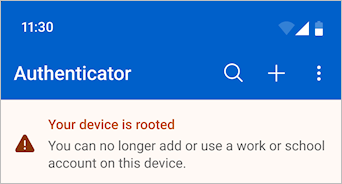
Wipe mode Your work or school accounts are deleted from the app entirely.
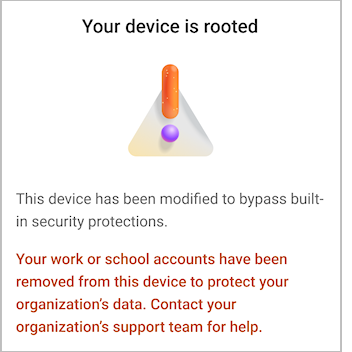
“Your device is rooted”
Microsoft message “Your device is rooted” was obviously not checked by any of their Australian staff, see below.
What Should You Do?
A reminder that this change only applies to work/school accounts – not personal accounts. You have a few options:
- Remove the jailbreak or root modification. This is easier said than done on some devices and may require a full factory reset. Contact your organization’s IT support for guidance.
- Use a different device for work authentication. If you keep your personal phone jailbroken by choice, consider using a standard unmodified phone for work-related authentication.
- Do nothing, and lose work access. If your jailbroken phone is the only device registered for Authenticator, you will need to re-enroll through your organization’s IT team.
Microsoft is treating a jailbroken or rooted device as an unacceptable security risk for workplace accounts. If your phone falls into that category, you need to act before July 2026 or plan for disruption to your work login process.
Rooting/Jailbreaking a device has always been a security risk because it allows apps that haven’t been properly checked to get more access than they should.
While personal devices aren’t included in this change by Microsoft, anyone with a hacked device might want to reconsider using that for authentication.
No word from other authentication apps (Google, Authy, Proton etc) about them adding similar blocks. All the authentication apps might consider at least adding a warning about a device with a non-standard and possibly compromised operating system.
Bonus language lesson: Rooted
This and all the above images are real from Microsoft’s announcment, though the company might change the wording once they realize what they’ve done.
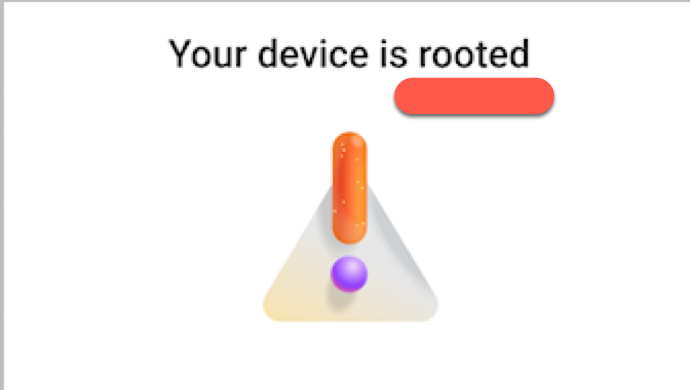
In Australian slang, “root” and “rooting” often crudely mean sex, nothing to do with smartphones or gardening. Down Under, maybe don’t shout “I’m rooting for you!” unless you want some surprised looks.
A “rooted” object is completely busted.
- “Rooting” = Sex.
- “Rooted” = Broken, exhausted, or ruined.
As usual with slang, it’s all about the context.
Microsoft is a master of euphemisms and could come up with a form of words to avoid “rooted” which is both a unofficial technical term and rude. Off the top of my head: “Modified firmware” “Non-stock Android” “Unofficial bootloader”. The terms rooted/jailbroken could be moved to the text instead of the heading.