Microsoft 365 – the subscription / annual fee plan for Microsoft Office on Windows, Mac, iPhone, iPad and Android.
Includes Word 365, Excel 365, PowerPoint 365, Outlook 365 and many other ‘365’ programs, apps and services.

Word’s Similarity Checker warns about plagiarism
Microsoft Word’s ‘Similarity Checker’ compares Word document text with online sources. That can warn the writer / student or reader / teacher about plagiarism or accidental copying. Word Similarity Checker uses Bing search to compare the text with online sources. It shows a percentage of text similar to text found online. It’s an extension of […]

Excel the full history of rows and columns
How many rows and columns does Excel have now and in the last 25 years of Excel for Windows and Mac? All the talk about 64-bit versions of Office has raised the issue of maximum rows and columns in Excel. A few readers seem to believe that 64-bit Excel will have more rows or columns […]
See multiple calendars in Outlook
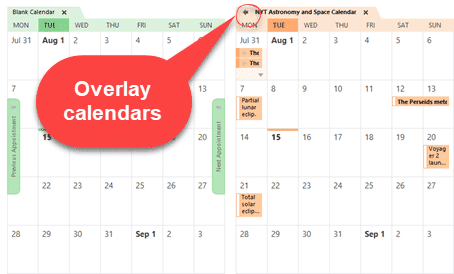
In Microsoft Outlook you can view two calendars ‘side-by-side’ or overlaid to look like a single calendar. Select two calendars from the left-side pane of a Calendar view. Choose from ‘My Calendars’ or ‘Other Calendars’. The selected calendars appear ‘side-by-side’ in different colors. Overlaid with other calendars Click on the little ‘left arrow’ button on […]

Six choices for removing formatting and more in Excel
Excel has six different choices for removing content, formatting, comments or everything from cells. Five are on the ribbon plus another hidden away. Plus three useful keyboard shortcuts, one obvious and two very obscure. Home | Clear On the right of the Home tab is a selection of five ‘Clear’ options under the little eraser […]

All your Clear Formatting options for Microsoft Word
Microsoft Word has three different keyboard shortcuts to clear formatting, each with its own special variation on how to remove things like bold, italics etc. from text. Choose from Ctrl + Space , Ctrl + Q or Ctrl + Shift + N depending on exactly what you want to remove and what to leave behind. […]

How to clear all formatting in Office documents
Sometimes text formatting can get confusing in Word, PowerPoint, Outlook, Publisher and OneNote. There are several ways to clear the additional formatting and return to original settings. The formatting styles in your text can be easily restored to their default settings by clearing all formatting. Users can waste a lot of time trying to change […]
How to protect your accounts from a password spray attack
A recent attack on Microsoft 365 organizations has highlighted the danger of ‘password spray’ attacks that try to get into your account and perhaps get a foothold into an organization. There’s a simple fix that can protect you and your organization. Regular Office Watch readers will know what we’re going to say! Password Spray is […]
Five ways to make summary or paraphrasing of Word documents
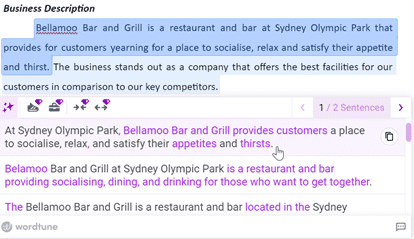
There are many online tools that will summarize or paraphrase a long Word document into something shorter and more readable. These five tools also have other uses. Originally, Word 2007 had an Auto Summarize feature, but it was dropped in Word 2010, so Word users will need to rely on external paraphrasing services. A paraphrase […]

Premium Stock Images now in Office for Apple devices
Good news iOS users, if you’re a Microsoft 365 subscriber, you now have access the premium content library. Take your Word, Excel, and PowerPoint creations to the next level with thousands of royalty-free images, icons, stickers, and illustrations. Here’s how it works Tap Insert | Pictures | Stock Images on your iOS device, then choose the visuals that […]

Make better Office SmartArt by adding pictures
There are several ways to add images into an Office SmartArt graphic; the official Microsoft way plus some others that aren’t usually mentioned for Word, PowerPoint and other Office apps. In the introductory piece, Much better lists with SmartArt , we looked at the SmartArt basics which are much the same in Word, Excel and […]
How to open a mystery file with no extension
What can you do with a file attachment that has no file extension? Sometimes you get a file, probably an email attachment, that has no file extension. Without something after the dot/period (.doc .docx .xlsx .pptx etc.) Windows doesn’t know what program to use. This is most likely to happen with files sent from Mac […]
Not just Facebook having trouble this week, Microsoft too
All the talk about the major outage at Facebook overwhelmed the news that Microsoft had connection troubles of their own. The six hours offline at Facebook, Instagram and WhatsApp rightly attracted all the attention. It wasn’t just an inconvenience but crippling for many businesses that rely on Facebook to connect to customers. Sites that use […]

Changing text and icons on Office Quick Access Toolbar
Improve your Word, Excel, Outlook or PowerPoint Quick Access Toolbar (QAT) beyond the small changes allowed by Microsoft directly. This works in all modern Office for Windows including Microsoft 365, Office 2016/2019/2021/LTSC. You’ll be able to shorten the overly long text labels or change icons (because too many are the same) with a short list […]

All about Windows 11 compatibility and switching
All about Windows 11 software and accessory compatibility, promises of better and fewer updates and our view on whether Windows 11 is worth switching. See all the Office-Watch.com coverage of Windows 11 Software and accessory compatibility Underneath the changed desktop lies much the same core technology that’s in Windows 10. Windows 11 uses the same […]

New look for Microsoft 365 and Office 2021
From Tuesday 5 October 2021, a new look is be available to Microsoft 365 and Office 2021. Don’t worry, it’s not a major change. Everything on the tabs, ribbon and dialogs remains exactly where they are. Microsoft grandly calls it a ‘visual update’ we call the changes ‘a new coat of paint’. 5 October is […]
How to Easily Create Numbered or Bullet list in Word without indents
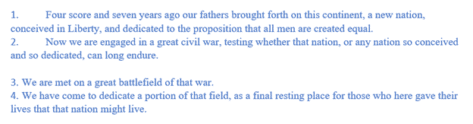
Numbered or bullet lists don’t have to look the way Microsoft sets automatically here’s how to change them to suit your needs and style. In Microsoft Word, it is simple to create a numbered or bullet list. Simply select your text | Home Tab | Paragraph Group| Select the Numbering or Bullets icon. From there […]