Microsoft 365 – the subscription / annual fee plan for Microsoft Office on Windows, Mac, iPhone, iPad and Android.
Includes Word 365, Excel 365, PowerPoint 365, Outlook 365 and many other ‘365’ programs, apps and services.

Save now on Microsoft 365 before the price increase
Organizations need to start work now to reduce the impact of coming price rise. Microsoft 365 enterprise licenses can increase by up to 25% on 1 March 2022 . Here’s some tips to keep the costs of Microsoft 365 down, despite Redmond’s efforts to get more money from customers. Individuals and small businesses can also […]

Skype surprise improvements are ‘buttery smooth’
Skype is getting a surprise makeover with improved group calling views, display customization, two camera support and even translation on calls to regular phone lines. Microsoft calls these changes, we’re not kidding, ‘buttery smooth’. The announcement is a surprise because all the indications have been that Skype is on its way out, being replaced by […]

Exponential calc choices and trap in Excel
There are two exponential function options in Excel. Like many things in Excel, what looks simple has some traps for the unwary. We’ll explain why the Power() and ^ don’t always give the same or even correct result. Exponentiation is an operation in mathematics, written as an, involving the base a and an exponent n. […]
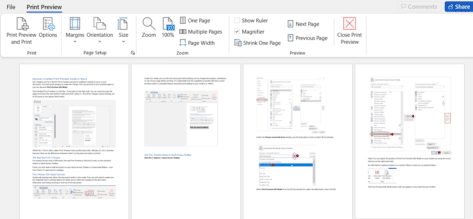
Discover a better Print Preview mode in Word
Let’s imagine you’re in Word’s Print Preview and you’ve suddenly noticed an error in your document. You close print preview to make the change, then you go back to print preview again or you can discover Print Preview Edit Mode. Print Preview in Word has all sorts of goodies for making the final adjustments to […]

Excel data types like Stocks, coming to Search box
The Search box in the title bar of Excel 365 is getting access to Stock and other linked data types with Word 365 and PowerPoint 365 promised soon. You’ll be able to find and insert linked data direct from the top Search box. The modern Office Search box doesn’t just find text in a document. […]

How to use XMatch() in Excel
XMatch() function in Excel locates an item in an array or range of cells, then returns its position relative to the item. It’s similar to XLookup() which returns the cell value while XMatch returns a relative position in the array. Syntax =XMATCH(lookup_value, lookup_array, [match_mode], [search_mode]) Arguments Lookup_value – the value to find. Lookup_array – the range/table to search […]

How to do your own modelling in Excel with Forecast
Excel can use past data to project possible future results with the Forecast feature. It’s a very simple version of statistical ‘modelling’. The Forecast function will let you predict future values and data trends, such as consumer trends, future sales and or inventory needs, based on seasonality. Here’s a simple guide on how to use the Forecast feature. Although the data below looks fairly complicated, […]

The best way to add drop-down list in Excel
Previously we talked about How to add a Drop-down List in Word, but you can also work more efficiently in Excel worksheets by making use of drop-down or pull-down lists. We will show you how to use Microsoft Excel’s data validation function to create useful lists within your spreadsheets. How to avoid the trap that lies waiting for the unwary who follow Microsoft’s ‘simple’ instructions. […]

Understanding the new Lambda helper functions
As if Lambda() was already a great addition to Excel 365, Microsoft is adding what they call ‘helper’ functions to add even more abilities. Here’s a very short overview of each helper function with links to more information. In some cases, the helper functions are a new and better way to do things already possible in Excel. Some others add […]

New Lambda options and helper functions for Excel
Excel 365’s nifty LAMBDA feature is getting an interesting, literally optional, improvement plus ‘Helper’ functions to extend its usefulness. LAMBDA, a powerful tool that allows users to create their own Excel 365 custom functions without VBA. The feature allows longer formulas to be written once then referenced in a worksheet to a shorter name of the user’s choosing. LAMBDA isn’t just another Excel function, it’s an important change in how Excel works. With Lambda() Excel understand functions as […]

Easy adding check boxes to a Word document
Interactive checkboxes can easily be added to your Word document for a variety of uses. Perhaps you need to create a to-do checklist to help monitor the completion of tasks on top of a collaboration document, or make it simpler for users to read and complete surveys or forms. Either way, we will provide you with a simple and easy […]

Shared editing of encrypted docs now possible but not for everyone
Microsoft has announced that Office desktop apps (Windows and Mac) can now co-author encrypted documents. Until now, encrypted docs could only have shared editing using Office on the web. What’s in the fine print is often overlooked, this feature isn’t for everyone. The announcement in bold from Microsoft has got all the media attention, as […]

Get the patch now for the latest Office security hole
Microsoft has released a patch for the MSHTML security bug that’s being used with Office documents to infect computers. The bug is in MSHTML, the browser rendering engine used by Microsoft Office. If someone is tricked into opening a hacked Office document with ActiveX control, they could infect their computer with some virus, ransomware or […]
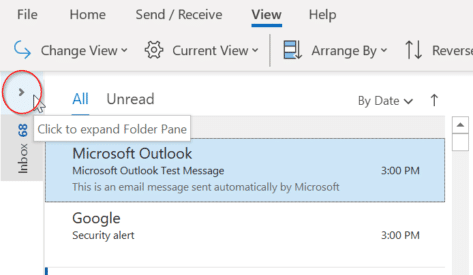
How to keep the Folder Pane expanded in Outlook
Outlook’s Folder Pane displays all folders which lets you quickly move between folders and views. Minimise the Folder pane, you will no longer be able to see your folders. As a result, some users get puzzled as to how they can bring back the expanded Folder Pane view. There are a few ways that you can do this: Change […]

Tips for better and easier printing emails
Printing email messages is something that we all do at various times, and in theory it should be as simple as clicking the Print icon in your email program – but what if the message won’t print out properly? Sometimes the printed version of an email message (or web page) comes out with strange formatting. […]

There are two official document standards – why?
Here’s what you need to know about the two official international document formats, Microsoft’s OpenXML (.docx .xlsx etc) and Open Document Format (.odt .ods etc) both supported in Microsoft Office and most other office suite software. Each format has been recognized by international bodies so there are two ‘official’ document standards for Planet Earth. Both […]