Microsoft 365 – the subscription / annual fee plan for Microsoft Office on Windows, Mac, iPhone, iPad and Android.
Includes Word 365, Excel 365, PowerPoint 365, Outlook 365 and many other ‘365’ programs, apps and services.
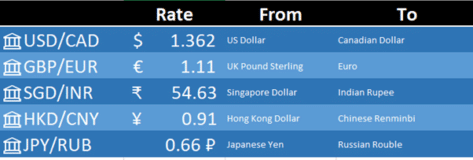
Exchange Rate support in Excel 365
The latest global exchange rates can go directly into Excel 365 for Windows and Mac. No plugins or extras are necessary because it’s in Excel 365 though it’s hiding away. Foreign exchange rates are part of the Stock data type. They weren’t part of the original Stocks data feed but have been added very quietly. […]

When Microsoft’s AI takes over, watch out
When Microsoft announced it was firing news human editors and replacing them with ‘Artificial Intelligence’, it was only a matter of time before the AI system would get it wrong. No-one expected it to happen so soon, even before all the humans had left the building. There’s a lesson in that for all Microsoft Office […]
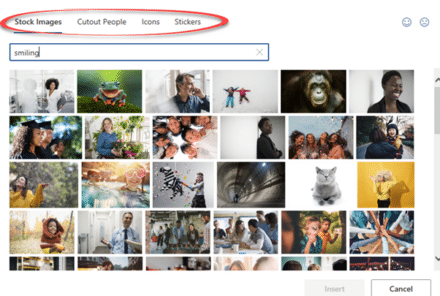
What’s new in Office for Windows – May 2020
Some useful new features have now been rolled out to the public versions of Microsoft 365 (Office 365) for May 2020. Word, Excel, PowerPoint and Outlook all have improvements. Two we’ve already told you about, the other is new. Stock Images, Cutout People and Stickers Or what Microsoft calls “New images to bring your documents […]

Recovering lost Word for Mac documents
If you’ve lost or accidently deleted a Word for Mac document (or Excel or PowerPoint) there are various places to look for it some might not occur to you. This article is also helpful if you’re trying to find and delete any files or documents that must be removed for privacy reasons. Time Machine MacOS […]

More Rounded Corner tricks for Office
Some more tricks for improving or fixing rounded corner boxes in Office. Change the corner angle or roundness even to a stadium shape. Alter the border line a little or a lot. Make a Word text box with rounded corners explains the basics of making the rectangular box into something with ‘soft’ corners. This article […]

‘Tell me’ help now in Mac Office 365 with the same limitations
‘Tell me’ help box is now in Microsoft/Office 365 for Mac as a way to find features on the ribbon. However it continues to have the same limitations that are in the Windows version. Look for the lightbulb and ‘Tell me’ box beside the ribbon tabs. Type in a phrase and Office will show relevant […]

Samsung phone subscription includes Microsoft 365
Samsung’s new Access plan lets you pay a set price each month, get a replacement phone every nine months plus a Microsoft 365 ‘subscription’ plan as well. Is the Microsoft 365 element optional or even make sense (especially if you already have ‘Office 365’ as was)? It’s an interesting way to sell phones now that […]

Vmware and Hyper/V work together – at last!
At long last, Microsoft and VMWare have decided to ‘play nice’ and allow their virtual machine products to run on Windows at the same time. Until now, Windows users wanting virtual machines had to choose between Hyper/V (comes with higher end Windows 10) or Vmware Workstation. You could not run both. That was OK for […]

PowerPoint’s ‘Zoom out’ animation option
PowerPoint has an option to ‘zoom out’ on a still image from a close-up view to a wider look at the same picture. It’s not a great option and Microsoft could make it a lot easier. Here’s how to do a ‘Zoom out’ on an image This is an endnote on our series about adding […]

Stop embarrassing template or stock phrases in Outlook emails
A UK politician got caught sending an email with optional stock phrases and guides still in the message. Is there a simple way to stop that happening? Most organizations have standard wording and stock phrases which is understandable but there’s a risk those helpers are left in an email or document that goes out to […]
Time & Expense application for Office 365 – beta 5
Helen Feddema our Access guru is looking for people to test her Time & Expense application … “After a long delay, I have updated my Time & Expense application for Office 365 (it is my Coronavirus project!). The app uses custom Journal items to record time worked and expenses incurred for clients, and produces nicely […]
Fantasy Football ranking and analysis in Excel
Microsoft Excel is the perfect tool to analyze and rank your fantasy football ranking. This article explains how to import players, other rankings and add your own opinion. How to Build Your Own Fantasy Football Rankings “There is no reason to re-invent the wheel by typing out all of the players, positions, teams, and analyst […]

PowerPoint Ken Burns Effect complete – part 3
We continue our look at the options for the ‘Ken Burns Effect’ in PowerPoint by combining the pan and zoom animation features into a complete effect. It adds interest and movement to a still image with two separate animation effects available, in part, in PowerPoint. Ken Burns Effect in PowerPointThe zoom in or zoom in/out […]
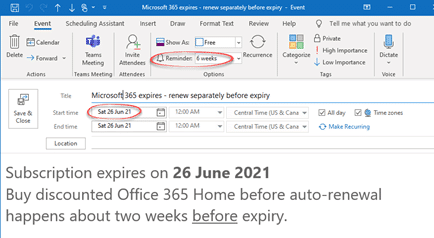
Simple way to save money on Microsoft 365 renewal – use Outlook!
One of our readers just saved over 20% on her Microsoft 365 renewal using one of Microsoft’s own products – Outlook! Julia A. a long-time Office-Watch.com reader took our advice about early renewal of Microsoft 365 (formerly Office 365). She just bought another year of Microsoft 365 from a retailer for less than what Microsoft […]

What’s my Microsoft 365 expiry date?
Not sure when your Microsoft 365/Office 365 plan expires? Go to https://www.office.com/ login with the Microsoft account linked to your Office 365/Microsoft 365 plan. Look for the icon at top right, it looks different for each person and might be your initials. Choose ‘My Account’. Then ‘Services & Subscriptions’ on the top row. Look for […]

Pinned Save folders in Microsoft 365
Word, Excel and PowerPoint 365 for Windows are getting better control over what appears on the new-style Save dialog. Folders can be ‘pinned’ to always be show up in the list and a quick way to share a document. But a major annoyance remains unchanged. On the ‘Save this file’ dialog under Choose a location […]