Microsoft 365 – the subscription / annual fee plan for Microsoft Office on Windows, Mac, iPhone, iPad and Android.
Includes Word 365, Excel 365, PowerPoint 365, Outlook 365 and many other ‘365’ programs, apps and services.
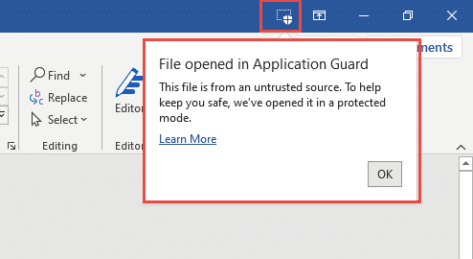
Do you have Application Guard for Microsoft Office?
Microsoft 365 Enterprise customers can now try Application Guard as a new way to protect against malicious documents infecting computers.What is Application Guard and what it means for Office 365 Application Guard is a combination of Windows 10 Defender and Office programs that opens a suspect document in a special way. With hardware virtualization, the […]

Nifty new adaptive mini-toolbar coming to Word 365
Microsoft Word is getting the adaptive mini-toolbar. The extension to the mini-toolbar appeared in preview versions of PowerPoint recently. Now it’s in Word previews as well. The buttons on the right change according to how you use Word. Compare that to the current Word mini-toolbar with a fixed list of buttons. The Word 365 adaptive […]

iOS 14 changes give you improvements in Outlook and OneDrive
Apple’s iOS 14 for iPhone and iPad have some useful new features. Change default mail and web apps, Widgets, Scribble and Translate. Microsoft wasted no time improving Outlook to take advantage and adding a little extra to OneDrive. iOS 14 was released with very little notice to app developers. Most were ready for the change […]

Fill in a PDF form with your signature
There are several ways to fill in a PDF form and add your signature with Microsoft Word, Acrobat Reader or online services. All these tips are free with nothing to pay. It’s possible to ‘sign’ a PDF form and return it without making a paper copy. Paper forms are so 2019 <g>. There’s no need […]

PowerPoint mini-toolbar expands with adaptive extras
PowerPoint for Windows is getting a new mini-toolbar with adaptive extra features. Some of the buttons will change depending on the tools you most commonly use. The mini-toolbar is in all Office apps, it appears whenever you select something. At the moment, the options are the same with basic formatting (font, size, color,bold, highlighting, Format […]

Easy Office document hacking with VBA Stomping or Purging
Common programming tools can be used to make malicious Office workbooks which bypass both online security checks and Microsoft’s own protections in Word, Excel, PowerPoint or Access. We’ll explain what’s happening and what Microsoft could do better. VBA Purging or VBA Stomping are clever tricks to make an Office documents (e.g. .xlsm Excel workbook) with […]

The new iPad Air and Microsoft 365 extra cost
The latest iPad Air is interesting but, like many iPad’s there’s a hidden extra cost because of Microsoft 365 licence rules. The new iPad Air has the usual changes, a faster processor and slightly better screen. The big changes are: Fingerprint login is combined with the Power button USB-C connector instead of Apple proprietary Lightning […]

Customer login now required to use Microsoft 365 apps
There’s a change in the way Microsoft 365 works with a sign-in to a Microsoft account. This applies to Word 365, Excel 365, PowerPoint 365 and other Office apps. Up to recently, Microsoft 365 / Office 365 has worked normally either when signed into a Microsoft account or not. Having a Microsoft account wasn’t required […]
How Microsoft 365 counts your sign-ins, not installs
There was a big change to Office 365 / Microsoft licenses on 1 October 2018. Microsoft 365 counts logins not installations It’s a totally new way of counting and limiting use of Microsoft Office. As long as there’s been Office, licenses have been based on installations of Office. A single Home or Personal plan user […]
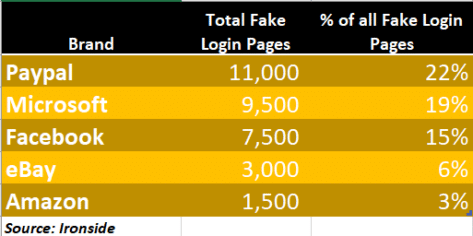
Beware popular but fake Microsoft and Microsoft 365 login pages
Fake login pages for Microsoft 365, OneDrive or Outlook.com are now the second most common phishing targets. Links in emails or messages to these bogus pages which grab your email and password for hackers to steal your secrets, or those of your company. Ironside reports that Microsoft related fake login pages are only second to […]

Two Factor Authentication: Straight Talk
The latest ebook from Office-Watch.com is a little different, it’s a heartfelt ‘Thank You’ to our Office Watch donors. Peter Deegan has been quite astonished and humbled by the generosity of readers to our reader appeal. Both the money and kind remarks have been a considerable morale boost quite beyond the practical help that the […]
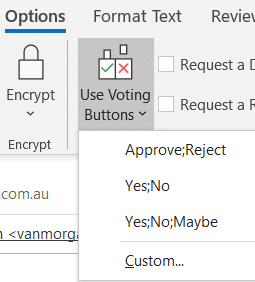
Easy Voting by email in Outlook
Microsoft is releasing a ‘Quick Poll’ option in Outlook ignoring the very similar, voting buttons, option that’s already in Outlook for Windows and Outlook for Mac. Use Voting Buttons to ask a question and Outlook will automatically collect responses. Office Watch also explains how recipient see the voting options and respond. Voting buttons have been […]

Format text with Dictate voice commands in Word
Dictate now has formatting commands with two ways to apply bold, italic, underline and other text formatting as you speak. Dictate with formatting is now available in Word Online (in a web browser) for Microsoft 365 customers. It’ll spread to other Word releases (for Windows, Mac etc) later. To use voice formatting, choose Home | […]
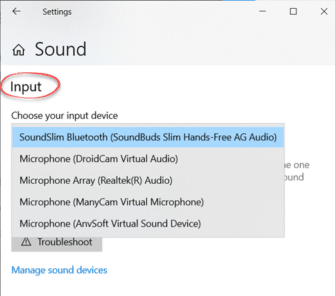
Microphone setup and settings for Dictate and Windows 10
Setting up and testing a microphone to work with Windows 10 is necessary before using Dictate in Office. Go to Windows settings to control which microphone is used by Word 365’s Dictate. Dictate has no microphone settings of its own (in Word for Windows or Word Online). Both use the Windows default recording device. That’s […]
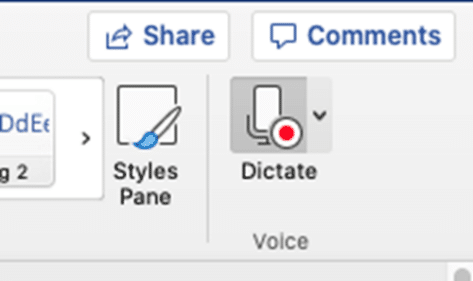
Dictate into documents with Word 365 for Mac
Mac Word 365 and Outlook 365 have the same powerful ‘Speech to Text’ option, Dictate, that’s in the Windows version of Word and Outlook. No compromises or differences except the setup is a LOT easier. Dictate is only available to Microsoft 365 subscribers with Office 365 software for Mac, Windows, iPhone, iPad and Android devices. […]

Discover Spaces, Canvas, Captures & Zoom in Project Moca
Let’s look at the ‘Big Picture’ of Project Moca. Each overall Space has a Canvas, menus and Zoom options. Each Space can contain Bucket, Notes, Tasks, Goal, Weather, Location, Person, Email or Calendar items. See Inside Project Moca – Bucket, Notes, File and many more Spaces Project Moca can have one or more Spaces or […]