Microsoft 365 – the subscription / annual fee plan for Microsoft Office on Windows, Mac, iPhone, iPad and Android.
Includes Word 365, Excel 365, PowerPoint 365, Outlook 365 and many other ‘365’ programs, apps and services.

Microsoft 365 Insiders blog to end .. sort of
The Microsoft 365 Insiders blog is ending, sorta. kinda. Really, it’s just moving to another part of the Microsoft.com web site. For the last five years, the Microsoft 365 Insiders blog has been the place where the company boasts about new and changed features in the Insiders or beta versions of Word, Excel, PowerPoint and […]
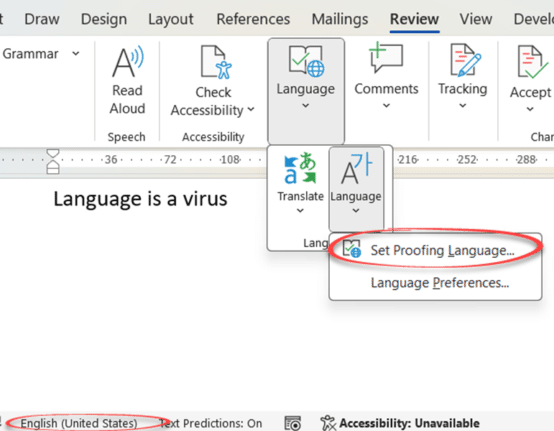
Three ways to switch language in Word and one way to turn it off
Word can spell and grammar check in many languages, here are three ways to switch the language settings plus how to turn off the pesky automatic language switching. Microsoft Word has language settings that can apply to a whole document or just selected text. This is vital for multi-language documents but also has an important […]

Koalas galore in Microsoft Office
We went hunting for koalas in Microsoft Office. Found more than 18 of the cuddly marsupials for Word, PowerPoint or Outlook. There are emoji, Office icons, SVG, online images and more making a colony or cling of koala (either can be the collective noun for koala). None of the endangered species where harmed in the […]

Copilot gets Make Changes inside Word 365
Paid Copilot plans have some innovations in the Word 365 interface with a better way to Make Changes to text plus more paste options too. These changes are in Word 365 public releases linked to a paid Copilot plan. We found them in v2407 build 17830.20138 with Copilot Pro. Auto Rewrite Paid Copilot in Word […]
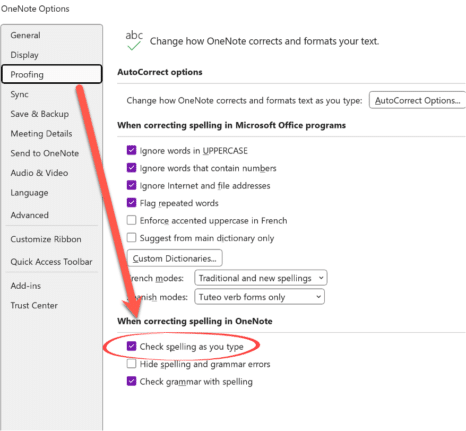
Office crashes while typing – the problem and workaround
Microsoft 365 for Windows might crash while someone is just typing (you read that right). All the Office apps, Word, Excel, PowerPoint, Outlook or OneNote can be affected according to Microsoft, which knows about the problem and offers some workarounds. The problem is caused by an out-of-date language pack which has all the spelling and […]

Outlook security hole needs quick patching
The latest Outlook security hole is quite easy to exploit so it’s a good idea to quickly update Microsoft 365/Office for Windows. The security bug is easy to exploit. Infection occurs simply by downloading a small file from any web site or source and running it. Hackers know plenty of ways of tricking people into […]

Excel gets Regular Expressions for Xlookup and XMatch
As promised, Excel 365’s Regular Expression support has been extended to include both Xlookup() and XMatch() functions. Regex adds a huge amount of power to matching results from a table. Back in July, Excel 365 added three Regular Expression (regex) functions, RegexTEST(), RegexEXTRACT() and RegexREPLACE(). At the time Microsoft promised the obvious extension of Regex. […]

Clipchamp gets background removal with some gotchas
Clipchamp, Microsoft’s video editor is now boasting background removal which is great for tricks like adding a watermark or ‘bug to a video. But there’s some limitations or ‘gotchas’ to watch out for. Add an image to a Clipchamp timeline, right-click then choose ‘Remove Background’. Wait a few moments and the background will be made […]

Change Word Zoom to custom fixed settings
This is how to change Word’s Zoom to your preferred Zoom settings instead of the defaults. Ray R writes … “I have been having some vision problems lately and have found that using Word’s zoom dialog to increase the displayed font size without changing it in the document or email (I use Word as my […]
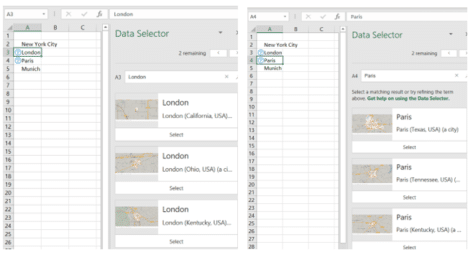
Don’t trust Excel’s Linked Data Types, always verify
Excel 365’s Linked Data Types are technically impressive. However, the reliability of the data is a problem Microsoft doesn’t talk about. We discovered mistakes with the data without actively looking for them. In general, the data sources are ‘scraped’ from sites like Wikipedia which explains some, but not all, of the omissions and oddities. Stock […]

UK vs Great Britain and problems with Excel’s Geography
Excel 365’s Geography data type isn’t totally reliable or accurate. Looking at its results for the UK (United Kingdom) vs Great Britain is just one example of the problems you need to watch out for. If you’re not clear on the difference between United Kingdom and Great Britain, see below. Here’s the current results from […]

BBC TV backgrounds for PowerPoint and online meetings
The BBC has released some high-quality images from their famous TV shows to be used as online meeting backgrounds or in PowerPoint slides. Pick from Doctor Who (old or new), Fawlty Towers, Yes Minster, Match of the Day, Eastenders and more. Consider using these BBC TV backgrounds in PowerPoint for a unique touch. Called ‘The […]

How to fix an imported appointment in Outlook
Some imported Outlook calendar items can’t be changed, here’s why and how to make the imported appointment editable. Understanding issues with an Outlook imported appointment can help you manage calendar inconsistencies. Usually an imported appointment (via a downloaded .ics file) can be edited just like most Outlook calendar items. Often that’s necessary to add more […]

Outlook (new) is NOT ready, ignore what Microsoft says
Microsoft says that the new Outlook for Windows is now generally available, but everyone should ignore that. Outlook (new) isn’t truly ready. It lacks vital features and has serious security shortcomings which are likely to frustrate anyone who relies on it. On 1 August 2024, Microsoft declared that Outlook (new) for Windows is now ‘generally […]

Beware the privacy trap in the Outlook (new)
Microsoft’s eventual replacement Outlook (new) for Windows supports Gmail, Yahoo and other accounts but there’s a privacy trap that Microsoft does its best to hide. Outlook for Windows privacy is a major concern. According to Microsoft, it’s easy to add Gmail, Yahoo and other accounts to the new Outlook, all they show is entering an […]
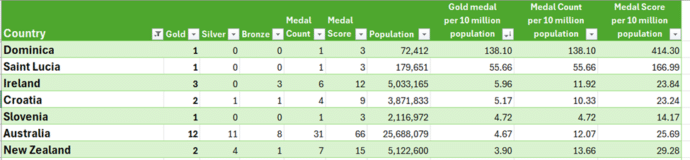
Olympic medal comparisons in Excel
We’ve expanded our live Paris Olympics medal table to compare countries’ performances to their population or wealth. Along the way we explain how to cope with some problems that can arise when Excel theory hits the Real World. Our newsletter readers get a working example workbook to try themselves. We compared population and GDP (Gross […]









