Microsoft 365 – the subscription / annual fee plan for Microsoft Office on Windows, Mac, iPhone, iPad and Android.
Includes Word 365, Excel 365, PowerPoint 365, Outlook 365 and many other ‘365’ programs, apps and services.

Microsoft Office highlights in latest company results
Microsoft shareholders should be happy with the company’s latest financial results for the quarter ending 30 June 2024 (Q4). Here’s a few highlights from an “Office Watch” point of view. Office 365 Commercial Revenue growth was up 13% possibly due to the new Copilot for Microsoft 365 fees. (All these % figures are comparisons with […]

Dictation leaves Outlook mobile apps
The Dictation feature in Outlook for iPhone, iPad and Android will leave the apps in September for no reason Microsoft will share. The announcement was made discreetly so that only Microsoft 365 non-consumer accounts with Admin access are notified. Message MC841218 “We will be retiring the Dictation feature from Microsoft Outlook for iOS and Android […]
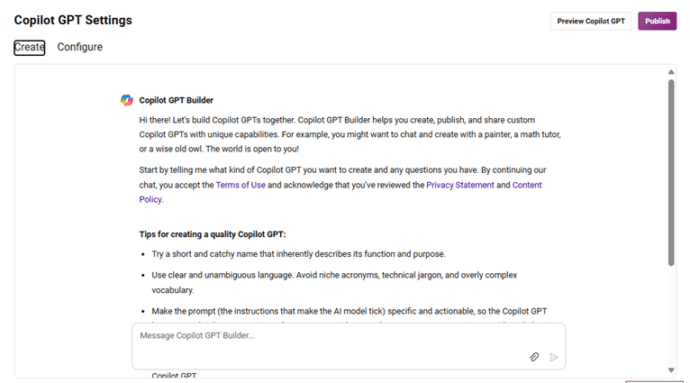
Major benefit removed from Copilot Pro
Paying Copilot Pro customers have lost a major part of what they pay for. Say goodbye to Copilot GPT Builder in early July 2024. It’s only been a few months since Microsoft launched their paid AI plans including Copilot Pro and they are already removing a major component. Copilot GPT Builder was being dropped from […]

Saving Word document with automatic Document Inspector
Here’s how to save a Word document with the private and hidden details automatically removed. Normally, you’re expected to manually go to File | Info | Inspect document to check/remove things like comments, hidden text, header, footers or watermarks. What if you want it to happen automatically, whenever you save a file or just make […]
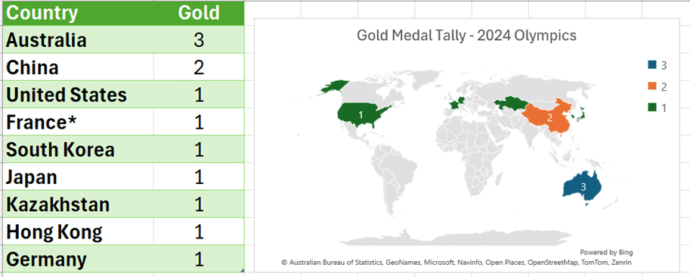
Make your own Medal Table for the 2024 Olympics
Use Excel to get your own automatically updating Medal Table for the 2024 Paris Olympics then make charts and maps too. Our newsletter readers get a working example workbook to try themselves. Not interested in the Olympic medal count? This article and download are a good, working example of how to automatically download from a […]
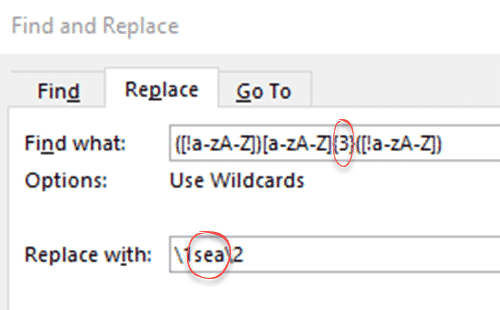
Replace Word document with anonymous text – complete Step by Step
Here’s the complete step-by-step manual method of replacing text with filler or anonymous words in Microsoft Word. This is quite easy, the main thing is to be careful with the Find and Replace expressions. It will work with any version of Word that has the ‘wildcards’ / Regex option which means Word 2003 or later […]
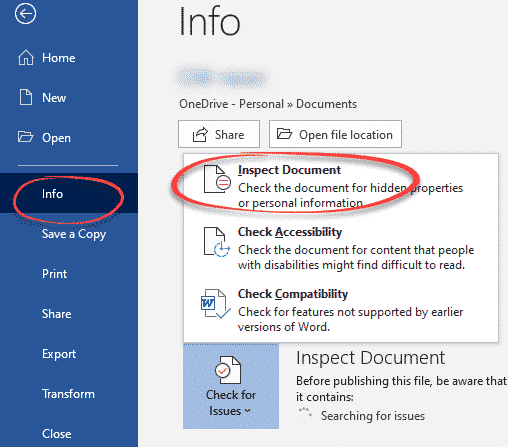
How a file name can reveal your secrets
A US government department has accidentally revealed a secret by overlooking the obvious in Office document security, the file name. Microsoft Office helps you scrub documents of private or secret information before sending. It’s easy to overlook the obvious data leaks that ‘Inspect Document’ doesn’t cover. ‘Inspect Document’ checks for hidden information in the document […]
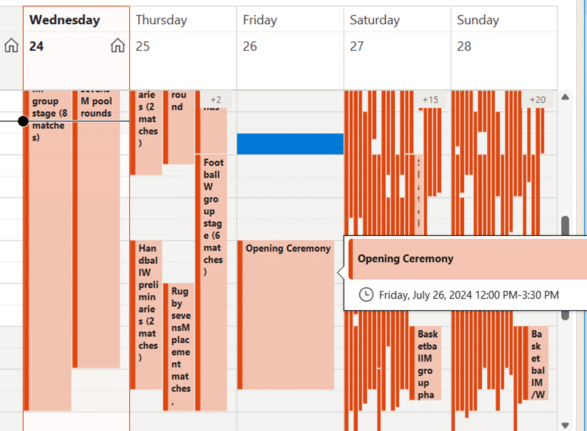
Paris 2024 Olympics complete calendar in Outlook
Add to your Outlook a special Paris 2024 Olympics calendar shows all the events plus opening/closing ceremonies with times in your location and search for favorite events. A special Olympics calendar shows all the events plus opening/closing ceremonies with times in your location. This calendar shows the Olympic calendar in US Central time with the […]
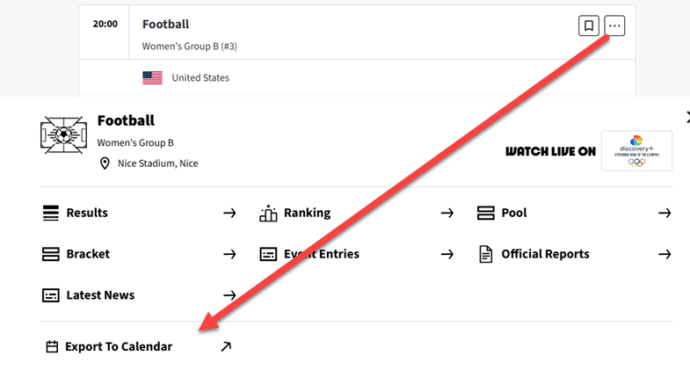
Get a Paris 2024 Olympics event times into Outlook calendar
Here’s how to quickly add events from the Paris 2024 Olympics into your Outlook calendars, showing times in your location. The Paris Olympic organizers have provided an online calendar with .ics calendar files for individual events from their website. Those calendar files can be imported into Outlook for Windows or Mac. They’ve been well made […]
Why Crowdstrike might still strike you
There are two ways the fallout from the Crowdstrike troubles might affect people even if their computers didn’t ‘die’. First, some organizations are still recovering or are dependent on businesses that are recovering. Keep that in mind if there are problems with a company. (On the other hand, some organizations might use Crowdstrike as an […]
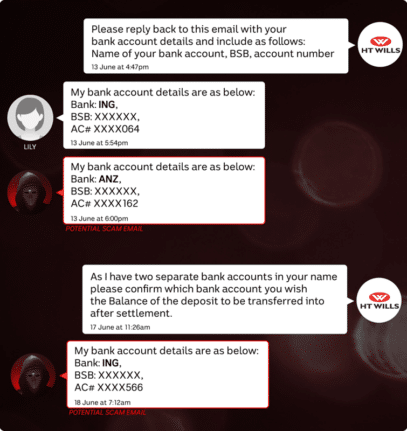
One thing you must do to your email account today
Securing your email account is vital. It’s the one thing that everyone must do unless they want hackers to invade your privacy and possible steal your money. A news story from Australia is yet another lesson in why everyone should properly secure their email account with two-factor authentication. A lady lost $26,000 Aussie dollars (US$17,500) […]

Microsoft Designer has discovered landscape images
Microsoft Designer’s Image Creator can now make landscape (wide) images as well as square and portrait orientations. Unlike Copilot which gives no orientation choice. Go to Image Creator and click on Size to see three options. Square (1024 x 1024) Portrait (1024 x 1792) Wide (1792 x 1024) Designers ‘Wide’ is almost the common 16:9 […]

WebP support available in Microsoft Office
Microsoft added support for WebP images in Microsoft 365, allowing users to insert WebP pictures into Word, Excel, PowerPoint, and other Office applications. WebP images offer high quality with smaller file sizes compared to traditional formats like JPEG and PNG. WebP is an image format unknown to many people but is increasingly used by web sites. […]

Two better ways to Remove Background from images
Microsoft Office has a Remove Background tool for images but there are two better, faster and free ways to do the same job. Background removal lets you get an image with a transparent surround which can be merged/overlaid into any other slide or document more seamlessly (left) than a separate box with non-matching background (right). […]
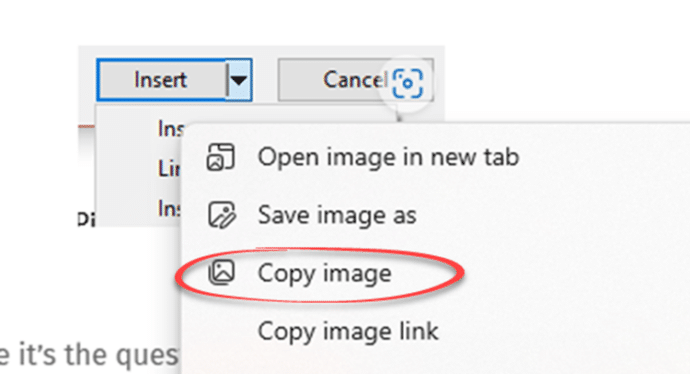
Two faster ways to insert an image from the web into Microsoft Office
There are two quicker ways to insert an image or graphic from the Internet or web page into a Word document, Excel sheet, PowerPoint slide or Outlook email. The method most people are taught is to save an image to their computer then Insert | Picture | from this device to select that file. That […]

How the Background Removal Tool in Office really works.
The Background Removal Tool in Microsoft Office lets you neatly delete the background of images with just one click. It makes the photo subject stand alone with a transparent background. We’ll explain how remove background really works, it’s not quite as simple as Microsoft’s demonstrations make out. Windows 11 Paint is getting a ‘Remove Background’ […]









