Microsoft 365 – the subscription / annual fee plan for Microsoft Office on Windows, Mac, iPhone, iPad and Android.
Includes Word 365, Excel 365, PowerPoint 365, Outlook 365 and many other ‘365’ programs, apps and services.

Printing tricks for Microsoft Word and Office
There’s a lot more printing and money saving options available if you know where to look or use a little cunning to get what you want. Microsoft Word documents with rescaling paper size, saving money in ink or toner, double-sided printing, two pages to a sheet, poster sizes and booklets. There are ways to save […]
Three ways to add a PDF into a Word document
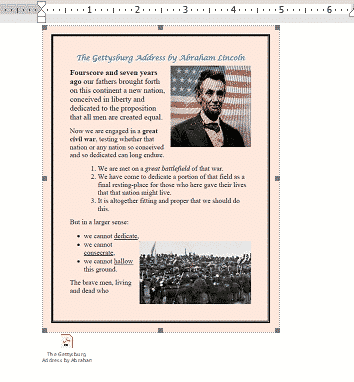
Here’s three ways to add a PDF into your Word document. Like many things in Microsoft Word, there is more than one way to add a PDF file into a Word document. From a simple link to another file to converting the PDF into a Word document. In most cases you’ll link to a PDF […]
Four Word fixes for stretched out last line
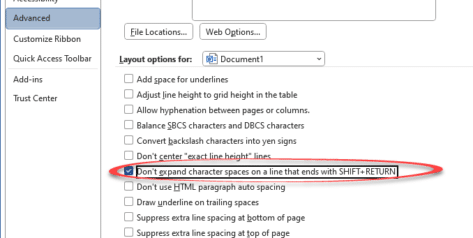
To my horror, I encountered something strange while working on a Word document with “strung out” or ‘stretched’ text on the last two lines with huge gaps of space between them. Here’s the two ways it can happen and the four fixes available. A stretched-out line in a Word document often happens while pasting text […]

Inside Smart Copy and Paste in Word
When Microsoft Word was first released, all those years ago, it had a Paste feature but it was dumb and literal. These days Word’s Paste (Word for Windows and Word for Mac) is a lot smarter and does very useful things that you may not realize or appreciate. Before the ‘Smart Paste’ options came along, […]
Ellipsis … symbol in Word, Excel, PowerPoint and Outlook
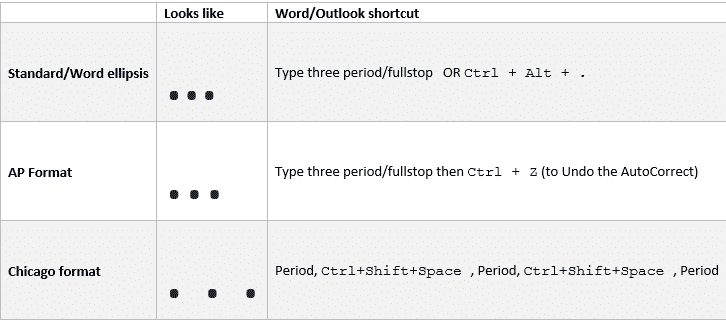
Type the three different types of Ellipsis … marks in Microsoft Word, Excel, PowerPoint or Outlook. Both in Office for Windows and Office for Mac. Ellipsis … symbol is used for a gap or break in some text, usually to drop out some irrelevant text or speech. The same applies in maths e.g. 1,1,2,3 …. […]

Comma Ellipsis ,,, in Word and Office
Like it or loath it but the comma ellipsis has arrived ,,, as an alternative to the more common ellipsis with dots. Here’s how to use it in Word and Office. The comma ellipsis is a modern, more casual version. It’s used as a more dramatic, even annoyed trailing off of a thought, compared to […]

55 seconds of the new Microsoft 365 app
See just 55 seconds of what’s coming in the “Microsoft 365 App” via a video from Microsoft. If the Microsoft 365 App seems familiar, it’s not deja vu … The video had already leaked, as we showed our readers a few days ago. The ‘app’ is very similar to the existing office.com gateway page for […]

Office simplified ribbon with Voice Access
See the Microsoft 365 / Office simplified ribbon combined with Windows 11’s new accessibility feature, Voice Access. Voice Access is a new way to control Windows by voice that’s in the 22H2 release of Windows 11. Windows 11 for Microsoft Office users is already updated for 22H2 features including Voice Access and its counterpart Live […]
See the ‘simplified’ Office toolbar for Microsoft 365
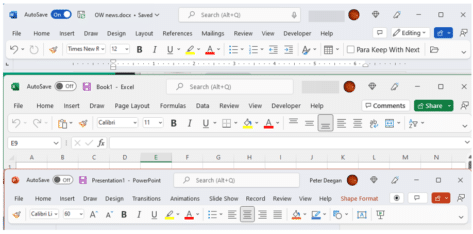
The latest Microsoft Office 365 for Windows has a new and, to date, undocumented, toolbar or “personalized Office experience”. This ‘toolbar just for you’ is both more and less than it appears. The toolbar is an effort to declutter the top or title bar of the Office apps. Microsoft has crowded out the title bar […]
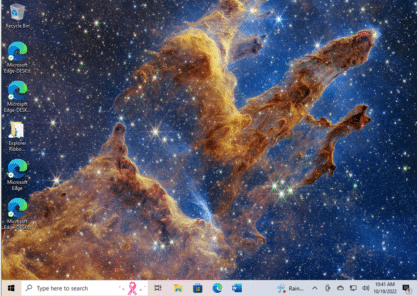
Get the Pillars of Creation on your computer or slide
The latest from the James Webb Telescope is wonderful, a new look at the “Pillars of Creation”. A photo from 6,500 light years away which you can add to your computer or PowerPoint slide in seconds from the original source. The image has appeared on many web sites at reduced sizes and resolutions. Far better […]
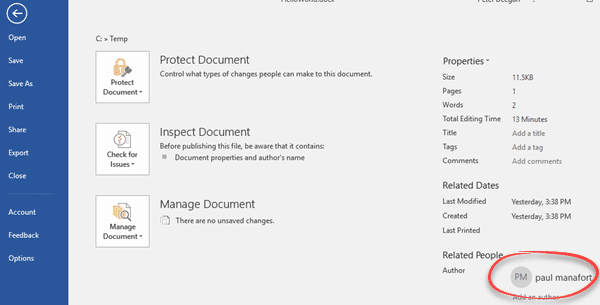
Changing the Author name in an Office document
How can you change the Author name in an Office document? How can you know that the name in a Microsoft Word document is the actual person not an imposter? It’s easy enough to go to File | Info to see and change the document Author name. We did that in a few seconds … […]

Ten Microsoft announcements in brief
Last week Microsoft made a series of announcements of new and changed features in Microsoft Office and Microsoft 365. Here’s a brief roundup of what the main ten promises and what they mean for you (if anything). The important word is ‘announcement’. Almost all the statements are about future arrivals, not available now. A lot […]

Microsoft Office and Oreos combine with Clippy – no joke
If you thought the modern world could not get any stranger, we’ve got bad news. Microsoft Office and Oreos (the chocolate cookie) have combined for a marketing stunt with online events (sorry “snack breaks”), special packs, tchotchke and emoji. Poor old Clippy has been dragged in as well. On the practical side, we’ll show how […]
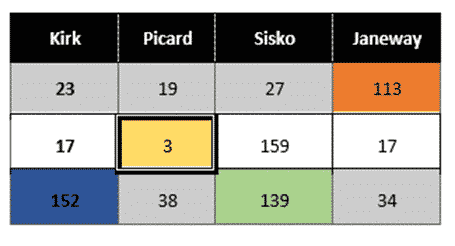
Merge or Split cells in Word and PowerPoint tables
Combine or divide adjacent Microsoft Word or PowerPoint table cells into a merged single cell or split a cell in two. Welcome to ‘Merge Cells’ where you can combine adjacent cells into a single cell. It’s very handy for table formatting tricks and other unusual situations like a longer than common text label. Or a […]

Simple text with day, month and year to Excel date conversion
The simple and easiest way to convert text dates to Excel dates is using Text to Columns on the Data tab. It’s a simple ‘one off’ method that works well and takes you through the steps. If you need something more automated, for new text dates entered from time-to-time use one of the formulas at Converting […]
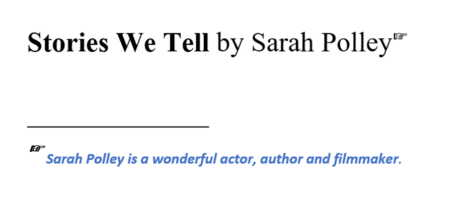
Choose your own Footnote or Endnote symbols in Microsoft Word
Footnote marks aren’t limited to numbers. Microsoft Word has many choices for listing footnotes or endnotes including the standard symbol order for notes or even your choice of custom symbols or emoji. Just one possibility for a footnote mark is a right-pointing hand like this: In-built Footnote/Endnote number choices Go to the Footnote and Endnote […]









