Microsoft 365 – the subscription / annual fee plan for Microsoft Office on Windows, Mac, iPhone, iPad and Android.
Includes Word 365, Excel 365, PowerPoint 365, Outlook 365 and many other ‘365’ programs, apps and services.
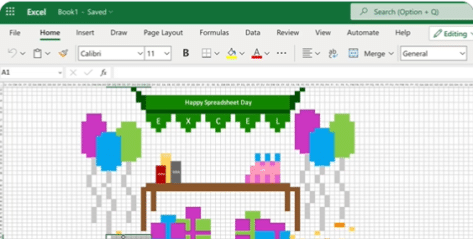
Happy Spreadsheet Day 2022 with Excel
Today, 17 October, is Spreadsheet Day and Microsoft has joined the event with a fun example of what Excel is capable of. #spreadsheetday #spreadsheets #excel Microsoft Excel at Office-Watch.com The hidden trap in Excel’s DateDif()Better Excel formula converts days into Years, Months, DaysFour ways to make text fit in an Excel cellCheck Performance – inside […]
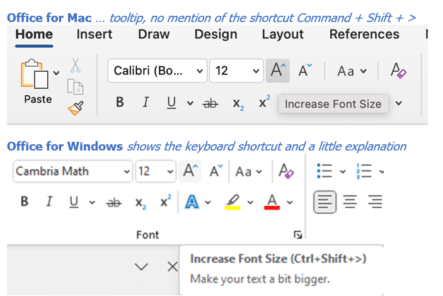
Why keyboard shortcuts are harder on Office for Mac
Office for Mac has keyboard shortcuts to speed up work but they are a lot hard to find than they should be. There’s no direct mapping of Office for Windows shortcuts into Office for Mac. Partly because the Mac has keys that aren’t on a regular Windows keyboard ( ⌘/Command and Option) . Conversely Windows […]

Office is becoming Microsoft 365 – or is it?
Microsoft has announced that “Microsoft Office” is now “Microsoft 365” – big deal. That already happened back in 2019 and the Office name will still be used. Is it really a name change or a bit of hype? What’s really changed? There’s a new logo – that’s all. As I said, “big deal”. Office has […]
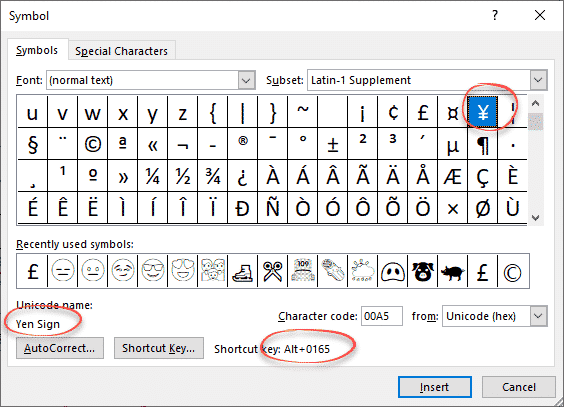
Yen ¥ symbol in Word, Excel, PowerPoint and Outlook
Type the Yen ¥ currency symbol into Microsoft Word, Excel, PowerPoint or Outlook. Both in Office for Windows and Office for Mac. Yen is used for Japanese currency and the Chinese Renminbi / Yuan. Microsoft Excel also offers the Yen symbol for Mongolia even though the tögrög currency uses another symbol. ¥ symbol is easy […]
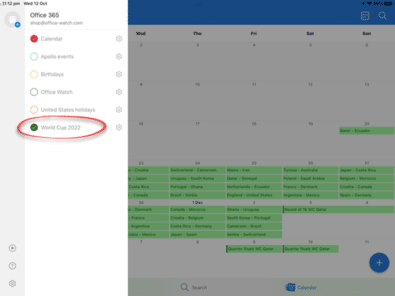
Yes, you can add an online calendar to Outlook for Mac
There is a way to add an online calendar (aka webcal) to Outlook for Mac, even though it’s not directly possible. It’ll also add the subscribed calendar to iPhone and iPad. Subscribed calendars are really useful for adding in events like sports and club meetings. There are webcal:// links available on many web sites. Unlike […]

PowerPoint ending slide ideas
More ideas and a wish list for ending a PowerPoint presentation with a different slide. After our article on the ending slide options for PowerPoint, Vivian from the UK writes: “… it’s really very easy to do what I always do at the end of PPT presentations. Just add a new blank slide – which […]
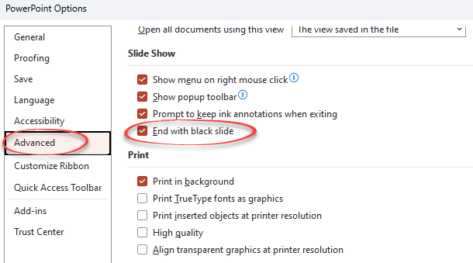
Avoid the black slide at the end of a PowerPoint slideshow
The blank black slide which appears usually at the end of a slideshow is a default setting in PowerPoint. But it can be changed. The blank black slide which appears usually at the end of a slideshow is a default setting in PowerPoint. But it can be changed. Open PowerPoint 365, PowerPoint 2021 back to […]

Murphy Brown look in Word or PowerPoint
Recreate the Murphy Brown TV show’s look as a design inspiration for Word and PowerPoint – the fonts, colors and lines. You may not want to use the exact look of the Murphy Brown title card, but it’s a starting point for design variations of your own. We’ll show how to make a similar look […]
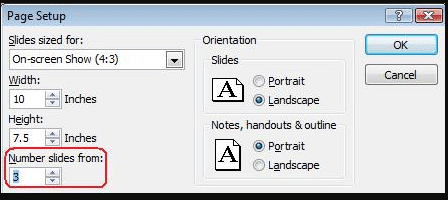
Change default slide number in PowerPoint
How to change the PowerPoint slide numbering to a different start number. In PowerPoint, slides are numbered by default from 1 but that’s not always what you need. For example, you’re working on some slides which are just part of a set of slides eg. working on slides from number 15 to 20 separately. To […]

Record Narration and Timings in PowerPoint
In PowerPoint you can record narration and comments during or after a slideshow. This makes the presentation more interesting and interactive. This feature is especially useful when you convert presentation to video. With narration the video would seem complete and the process of doing this is quite simple and easy. This feature is available in […]

Powerpoint: make your mouse like a Laser Pointer
One of the eye-catching features since PowerPoint 2010 right up to PowerPoint 365 is turning your mouse into a virtual laser pointer. A ‘laser pointer’ transforms the boring mouse pointer to something striking and easier to see on the screen. This is especially useful while delivering presentations as it eliminates the need to carry additional […]

Array Formula with IF filter in Excel
Excel Array formulas are useful for getting the result from a filtered list quickly with a single, simple formula. Continuing our series on Excel array formulas. Here’s a list of stocks with industries aka Table3. How many stocks are in the ‘Shop’ industry? The array formula in G5 has the answer from the formula: =COUNTIF(Table3[Industry],G4) […]
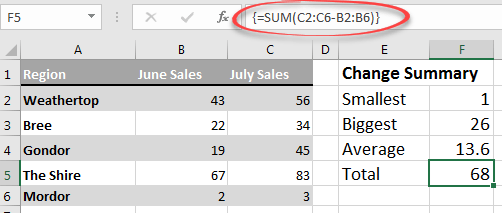
Excel Array formulas for everyone
Array formulas are an important part of Excel and they are a lot more important now that dynamic array formulas are around. Don’t ignore arrays because they’re an unavoidable part of Excel for everyone. This is the start of a series to help you understand arrays in Excel. At the very least, you’ll know what […]
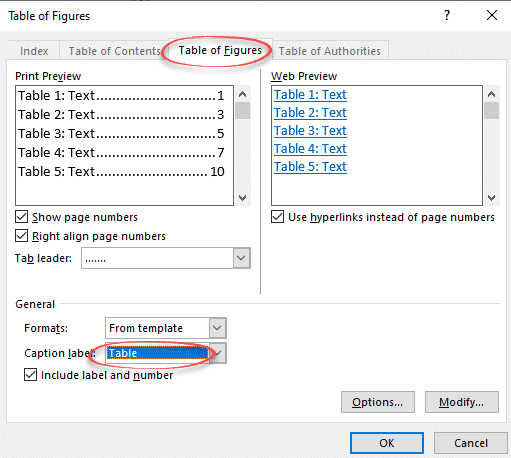
Make a List or Table of tables in a Word document
Word can generate a list of all the tables in a document. Like a Table of Contents, this list of tables or Table of tables can include page references or links to each table. A Table of tables can be useful for creating a proper appendix or reference within more formal documentation. It can be […]
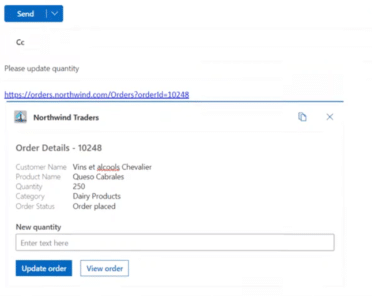
Link unfurling in Outlook
What is ‘link unfurling’, an upcoming feature in Microsoft Outlook An unfurled link appears in an email as an interactive preview card – not just a preview but something the receiver can update. Link unfurling is already in Teams, now it’s coming to Outlook 365 for Windows. Here’s Microsoft’s example where a link has been […]

Three ways to view multiple Outlook calendars
Outlook can handle more than one calendar and has three options for easily viewing them, either individually or combined. Calendars can be displayed side-by-side or the more useful Overlay option. There’s also the ‘New Window’ option. Choosing the Outlook calendars to view In Outlook calendar view, use the check boxes in the calendar list to […]









