All about Microsoft Office Word, Excel, PowerPoint and Outlook, Microsoft 365, Office 2021 and earlier versions.
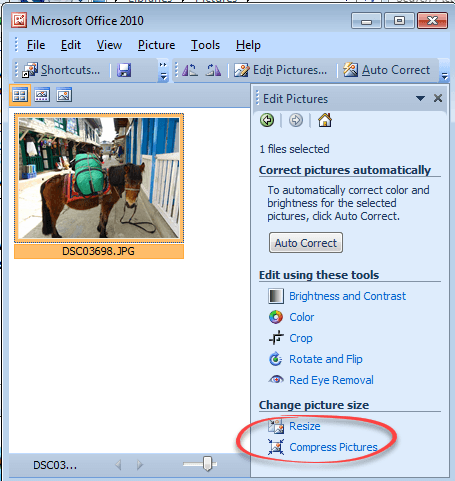
Making pictures smaller – some more options.
There are many ways to make pictures smaller, in both senses of the word. Here are three more options including great news for Windows 11 & Windows 10 users plus an important warning. Converting images into a smaller file size is sometimes essential. The large digital camera images (can be 4-6MB each) can be too […]
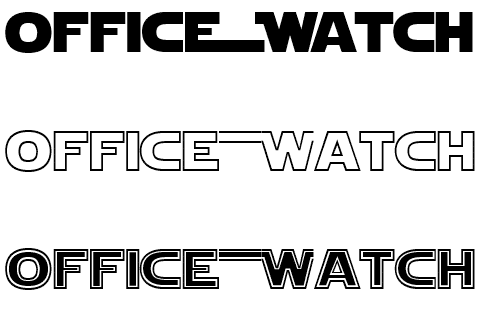
Star Wars look in Word and PowerPoint
Whether you’d like to join the Force or make fun of it, here’s how to get the famous Star Wars look in Word, PowerPoint and Office. See Star Wars movie opening and end credits in PowerPoint Star Wars font There are a few ‘Star Wars’ fonts available. All probably in breach of many copyright rules but […]

Happy Star Wars Day – with Microsoft Office
Office-Watch.com has Star Wars Day covered with a series of articles which add the spirit of the Rebel Alliance or the Empire to your Microsoft Office documents, workbooks and slides. Star Wars Day is 4th May each year … “May the fourth be with you” geddit? Star Wars fonts Star Wars look in Word and […]

How to save an Outlook attachment without knowing it
At an important UK inquiry, a lawyer claims that he didn’t know how to save an email attachment. The evidence suggests that he might be telling the truth about that minor detail. We explain how Outlook prints an email attachment. This is a small part of the inquiry into the British Post Office Scandal were […]
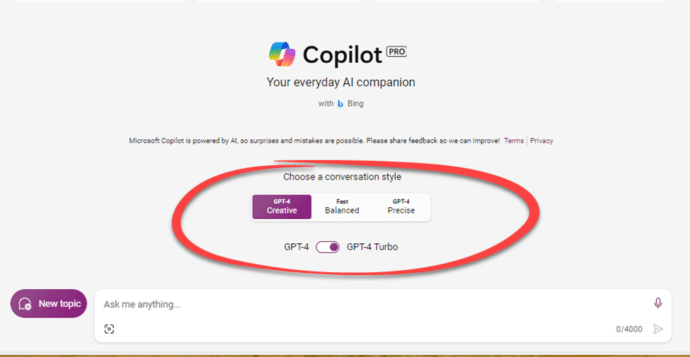
Two ways to pay for Copilot with Microsoft Office
Accessing Microsoft AI technology Copilot with Microsoft Office is possible through two different methods, each tailored to the specific Microsoft 365 plan you have Both Copilot options only work for Microsoft 365 software (Windows or Mac). Not Office 2021, Office 2019 or other versions of Office. Copilot Pro Copilot Pro is the choice for Microsoft […]

PowerPoint trim video reaches the web
The long-standing Trim Video feature in PowerPoint desktop has now reached the browser based version as well as in the desktop Windows and Mac versions. If you’ve ever used Trim Video in either PowerPoint for Windows or Mac, this ‘new’ feature will be familiar in PowerPoint on the web. Any video saved with the presentation […]
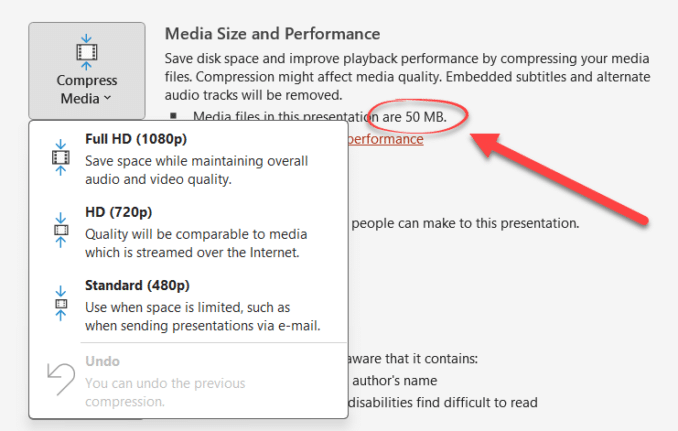
PowerPoint video audio compression tricks and traps
PowerPoint offers compression embedded video and audio files, reducing the overall file size. But these options aren’t where you might expect to find them, aren’t selective and need to be used with care. There is compression option for media files (video or audio) to a suitable quality level and make it compact. This feature will […]
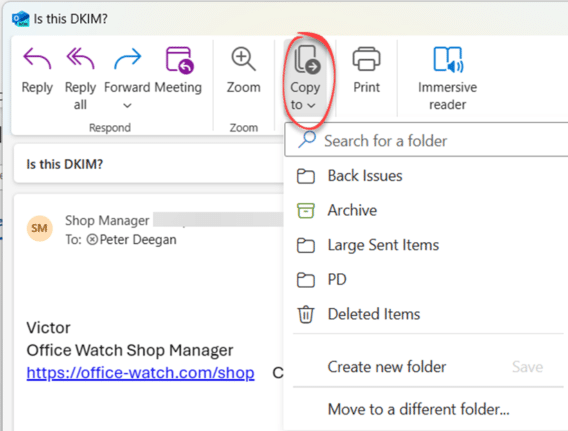
Import EML MSG and OFT files with Outlook (new)
The new Outlook for Windows can now import messages saved in single files as .eml .msg or .opt formats. Like most ‘new’ features in new Outlook for Windows, it’s really a catch-up feature to match something in the existing Outlook for Windows. All three formats are ways to save emails to single files containing the […]
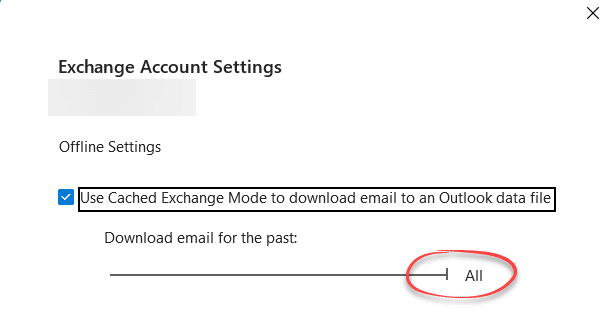
The Outlook setting everyone should check
After setting up Outlook for Windows (classic) maybe your older messages aren’t showing up quickly? That might be because of a hidden default set to suit Microsoft which should be changed to benefit you. For most mailboxes (Outlook.com, Exchange Server etc) Outlook for Windows (classic) can synchronize a copy of some or all your messages, […]
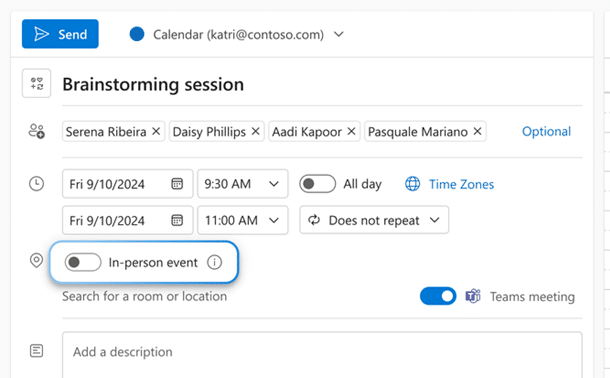
In person vs virtual event option in Outlook
It’s possible to RSVP to an event or meeting and say whether they’ll be attending in the old fashioned way (aka “face to face”) or virtually. Look for an ‘in-person’ event option to appear just above the location line. An event can also be a Teams meeting, making it what Microsoft calls a ‘hybrid’ meeting. […]

Tag your In-person events in Outlook
Outlook can now mark the difference between a virtual and ‘in-person’ event in your calendar. It’s part of Microsoft’s “Hybrid” features intended for the modern world where people mix remote and in-office working. For any calendar event/appointment you might see a switch ‘In-Person Event’. Turn that on for any occasion where you’ll have a physical […]

Generative ‘Smart’ Erase returns to Designer
Smart or Generative Erase in Microsoft Designer has returned after an unexplained absence. Use it for graphics or just to fix a photo. Designers’ Generative Erase can remove people or objects from an image, replacing it with the surroundings. It does a good job doing something that, a few years ago, was only in high-end […]

Eye 👁 emoji in Word, Excel, PowerPoint and Outlook
How to insert the Eye 👁 emoji into Microsoft Word, Excel, PowerPoint or Outlook. Both in Office for Windows and Office for Mac. Eye 👁 symbol is used for decoration “Look Here” or “See this”. Even as a fancy bullet point in Word or PowerPoint. How Eye 👁 looks in different fonts. Two Windows fonts […]

Better Bullets in Word with SVG Icons
Get better and more creative bullet lists in Word using an Icon or SVG graphic in Word or PowerPoint, you just have to be a little sneaky. Icons (Microsoft’s name for SVG graphics) would seem to be ideal for creative bullets. SVG’s can be resized, colored and adjusted without loss of quality. They are available […]
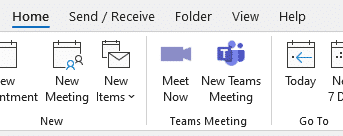
Get rid of Teams buttons from your Office ribbon
Teams button creep into Office and Outlook ribbons because Microsoft tries to promote itself. Here’s how to get rid of it or any other Office buttons you don’t want. Teams icons prominently appear on Office ribbons, like this one on the Outlook Calendar ribbon. or this with Meet Now video conferencing included as well. Or […]
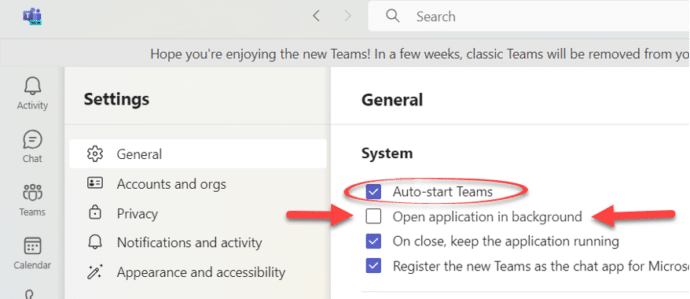
Stop Teams opening at startup Windows or Mac
How to stop Microsoft Teams opening automatically when the computer starts – Windows or Mac. Microsoft wants to push their Teams software to as many people as possible. Part of that is making Teams (free or paid) really obvious or intrusive, depending on your point of view. Teams doesn’t take up a lot of resources […]









