Your email and switching Internet providers
A few questions from readers about their ISP (Internet Service Provider) based email service that comes with their internet access. We’ll try to explain what normally happens. Keep in mind that each ISP has it’s own rules so you should check with them. Michael B writes: “Once I switch to RoadRunner, will Earthlink disappear our Earthlink […]
Outlook App – Preview or not?
The Outlook app for iOS and Android is a ‘preview’ release, meaning it’s not a fully tested release, ready for the general public. But some people at Microsoft don’t realize that and are promoting it as a fully public release. The app itself is called ‘Microsoft Outlook Preview’ and the first notice of the app’s […]
How to lose your job and $17 million via email
If you thought email scams were all about Nigerian princes and unknown lottery wins, think again. An Omaha man has lost his job after being tricked into sending $17 million of company funds to scammers. The tricksters sent emails that appeared to come from the CEO and its auditors, but not his usual email address. […]
Outlook app for Apple and Android devices
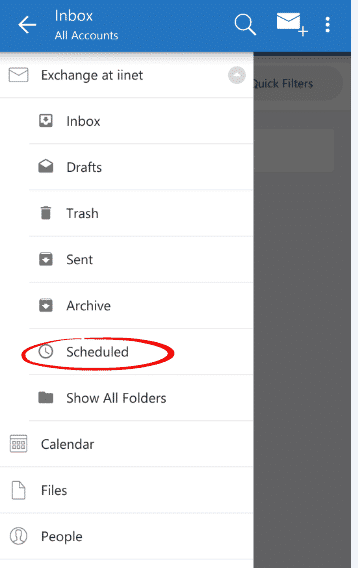
We ignored all the hype and spin to spend some time ourselves with the new Outlook app on various devices. Here’s what we’ve found so far … Microsoft has released its own Outlook app, it’s hyped as a combined email, calendar and contacts app. You might like to get the Outlook app and try a […]
Troubleshooting Outlook email connections
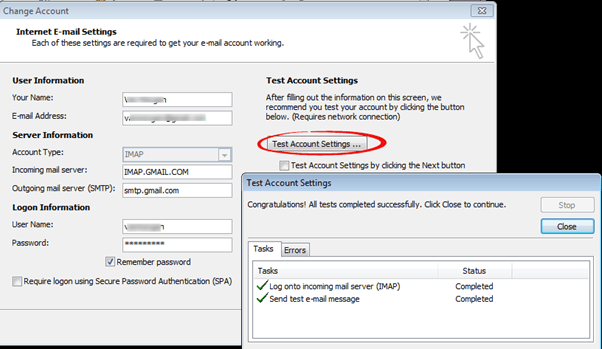
Here’s how to troubleshoot your Outlook connections to POP, IMAP and SMTP accounts. Outlook has a ‘Test Account Settings’ button that makes testing a lot easier (also Auto Configuration for many accounts). It’s there when you setup or change account settings. Click on the button and Outlook will try to receive and send messages using […]

Moving from your old email address made easier
It’s hard to move from an email account you’ve used for years, but there’s a simple way to make the move easier. The main reason why Internet Service Providers give email accounts with all their connections (dial-up or broadband) is to make it harder for you to switch to another connection. If you’ve used their […]
‘Outlook’ hacked by Chinese government?
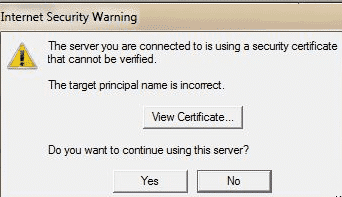
Many reports about hacking into ‘Outlook’ had many regular Outlook software users rightly worried, especially if they are in China, Hong Kong or Macau. Don’t panic – a lot of the reporting was poorly worded and showed an ignorance of the difference between Outlook software (as sold/rented with Microsoft Office) and Outlook.com, Microsoft’s free email […]

SMTP and sending messages on the road
It’s been a long-standing problem for laptop users – you have Outlook running nicely at home but when you travel it’s impossible to send messages. Here’s what’s happening and how to avoid it. The fix, that should work for most situations is to change the Outlook account settings to login for both receiving and sending […]

IMAP problems in Outlook after Microsoft updates
It’s happened again … Microsoft releases updates for Outlook which break the important IMAP feature that many people rely upon. After installing some of the November 2014 updates, some Outlook users find their IMAP or Exchange Server connections stop synchronizing. And Microsoft’s response has been typical – almost complete silence. You won’t find a Knowledge […]
Winmail.dat – what it is and how to fix it
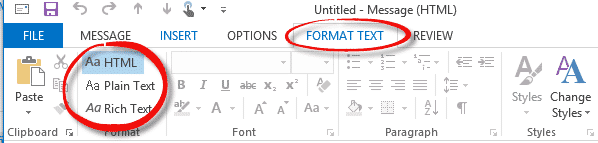
It’s an old problem that keeps coming up – an email arrives with a winmail.dat attachment. We’ll explain and how to fix it from receivers and senders point of view. Winmail.dat problems were once common. They don’t happen a lot these days because Microsoft Outlook and Exchange Server both have default options to stop it. […]

Winmail.dat – what to do if you get one
It’s an old problem that keeps coming up – an email arrives with a winmail.dat attachment. We’ll explain and how to fix it from receivers point of view. Winmail.dat problems were once common. They don’t happen a lot these days because Microsoft Outlook and Exchange Server both have default options to stop it. But Office-Watch.com […]

How to stop sending winmail.dat
Here’s what to do if someone complains that you’re sending winmail.dat attachments with your emails. The problem is in Outlook and you need to change some settings. The setting might be global for all emails but you may need to check the settings for an individual contact or email address. Overall Setting New messages are […]

Is AutoCorrect making you boring or stupid?
The BBC has an interesting piece on the effect of AutoCorrect and word suggestions for quicker typing. I dunno about ‘boring’ but AutoCorrect in Office does have a downside – it makes you and your typing fingers stupid. If you type stupdi into Word it will fix it to stupid as soon as you […]
Send Outlook emails when not on the Internet
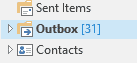
Of course, you can’t fully send emails from Outlook if the computer isn’t connected to the Internet … but it’s surprising how many people don’t know they can write and click Send any time – whether the computer is connected to the Internet or not. We often use the relatively interruption free time on planes […]
Read Jeb Bush’s emails in Outlook
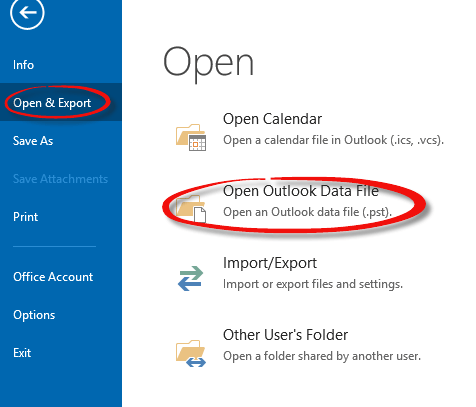
The Florida Center for Investigative Reporting has released the emails of Governor Jeb Bush during his tenure as Florida’s governor. That’s of interest to us since the information is available in its original Outlook data file form. Before anyone gets angry with us … we are not making any political comment here nor any statement […]

FedEx email that isn’t
A friend is expecting a parcel via Fedex and got the email shown below, so they wondered if it was really from the courier company or not. This particular email got past both the Gmail and Outlook spam filters. We thought it was a good example to use of the tell-tale signs to look for […]









