
Copilot loses an AI writing competition
The Washington Post has done an interesting comparison of AI services and their email drafts for some difficult situation. Microsoft’s Copilot came last. Check out “We asked 5 AI helpers to write tough emails. One was a clear winner.” (login may be required) The headline is a little misleading. Copilot came last in this comparison, […]

Group and Ungroup objects in Word, PowerPoint and Office
Shapes, images, and other items can be grouped together and often should be in Word, PowerPoint and other Microsoft Office apps. When you group shapes or objects, you can move, resize, rotate, flip them all at once, as if they were a single object. If you’ve ever had trouble moving something in Office but found […]

Fix for Apple Mail bug with Microsoft mailboxes
For the last three days (since 3rd March) the Apple Mail app for iPhone and iPad hasn’t always been able to connect to Microsoft hosted mailboxes. While Microsoft delays, here’s the fix they won’t mention. Since Monday, many Apple Mail users have been pestered with login requests for their Microsoft hosted mailboxes. No matter what […]

Outlook (new) gets “Mail Merge” sorta, kinda
The new Outlook for Windows has what Microsoft calls “Mail Merge” which could be useful but bear NO relation to the standard Word/Outlook “Mail Merge” to send many emails. In the new message Options for Outlook (new) is an enticing button “Start Mail Merge” but don’t get too excited. This button is not related to […]

Outlook classic dropped from Microsoft 365
Outlook (classic) for Windows, the one we’ve all used for many years has been dropped from some Microsoft 365 installations even though the replacement Outlook (new) is still a “work in progress”. Here’s how to still get the ‘real’ fully-functioning, classic Outlook. Outlook (new) is the eventual replacement for what’s now called Outlook (classic). This […]
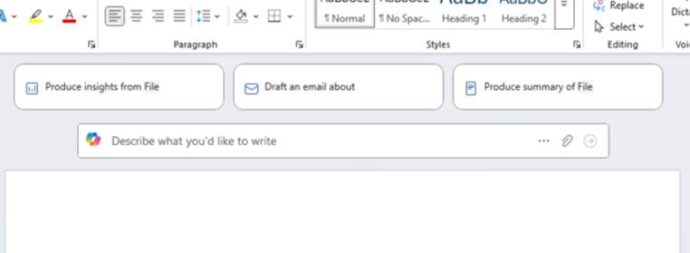
Stop Copilot appearing in Microsoft 365
Here’s how to stop Copilot prompts appearing in your documents, sheets and slides. Microsoft 365 customers are now seeing “Copilot Clutter” appearing in their Microsoft 365 apps, Word, Excel and PowerPoint. There is now a way to Disable Copilot available to some Microsoft 365 customers A Microsoft executive expressed surprise that customers didn’t want Copilot […]

Two new features in Outlook mobile apps
Outlook mobile for Apple iPhone and Android devices have two new features. Minimizing draft emails and, at last, Recall sent messages. Minimize draft emails It’ll soon be possible to minimize a draft email then resume writing the new or reply message later. This is a good change but not a big innovation because draft emails […]
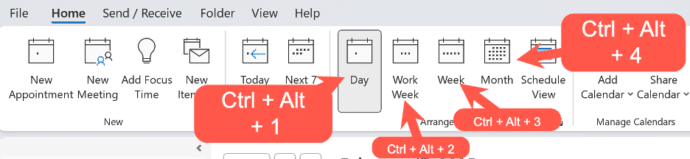
Fast change Outlook calendar views
The Outlook Calendar views can change quickly with some shortcuts that work for both Outlook for Windows (classic and new) plus Outlook for Mac. The shortcuts follow the order of the Home | Arrange buttons in Outlook for Windows. Day – Ctrl + Alt + 1 Work Week – Ctrl + Alt + 2 Week […]

Outlook for Windows essential shortcuts
Fast access to important Outlook features! The ribbon in Outlook isn’t the only way to efficiently things done. Use the keyboard shortcuts that have been available in Outlook (Windows or Mac) for Microsoft 365 or Office 2024 and many earlier versions. Outlook for Windows Here are some keyboard shortcuts that are worth using with any […]
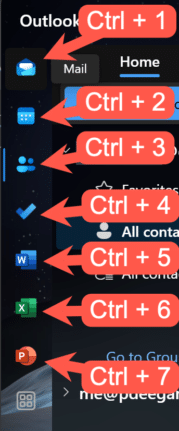
Quick View shortcuts for Outlook
Quickly change between Outlook views using these keyboard shortcuts that work for three different Outlook’s, Windows classic and new plus Outlook for Mac. With all the changes in Outlook for Windows or Mac, it’s nice to see that some keyboard shortcuts have survived all the upheavals. This works with both Outlook for Windows classic and […]

How to recall an email message in Outlook
Outlook for Windows and now Mac have a ‘Recall Message’ option for messages already sent but is now not needed, been replaced or you’ve realized was a mistake. But Recall isn’t all that Microsoft says it is. A ‘recall’ request message either to delete the message or sometimes replace it. How the recall request is […]
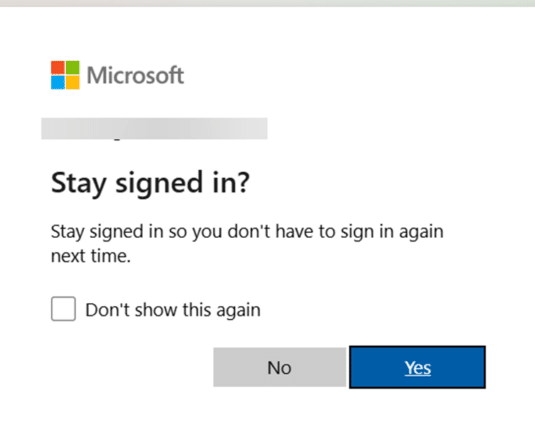
Keep safe after this change to Microsoft account logins
There’s important change in the way Microsoft handles browser logins to Microsoft accounts. If you’re using someone else’s computer or a public terminal, you need to know about this new security hole. Whenever you’ve signed into a Microsoft account for a web site, you’ve almost certainly seen this box. Stay signed in ?Stay signed in […]

Copilot Pro brings AI into Microsoft Office
AI technology without limits is available in Microsoft Office with Copilot Pro. AI features are integrated into Word, Excel, PowerPoint and Outlook for personal customers. Here’s how to get Copilot Pro and the secrets to getting it working. Copilot is Microsoft’s name for their AI based cloud services. They have been around for a little […]
HUGE changes to Microsoft 365 happening now
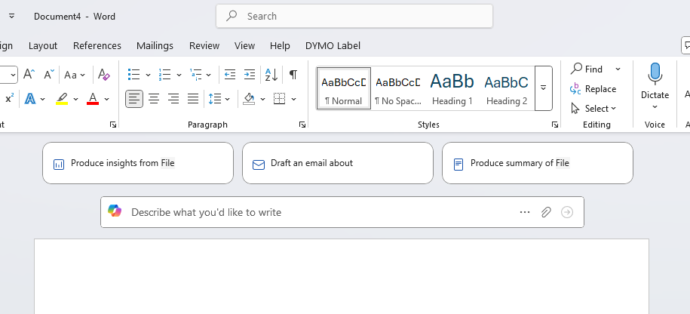
Microsoft 365 customers around the world are waking up to a new look in their Word, Excel, PowerPoint and Outlook apps. It’s part of Microsoft’s huge changes to Microsoft 365 Family and Personal plans which include a very limited Copilot AI service and a big price rise. Microsoft 365 users might first notice these changes […]
Stop new Outlook landing on Windows 10
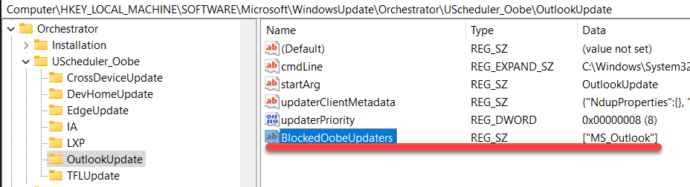
There is a way to stop Outlook (new) from being forced onto Windows 10 computers, but you have to act now before Microsoft does. There’s a registry entry that will block the February 2025 security update from forcing Outlook (new) onto your Windows 10 computer. See New Outlook coming to Windows 10, like it or […]
How to stop migration to new Outlook
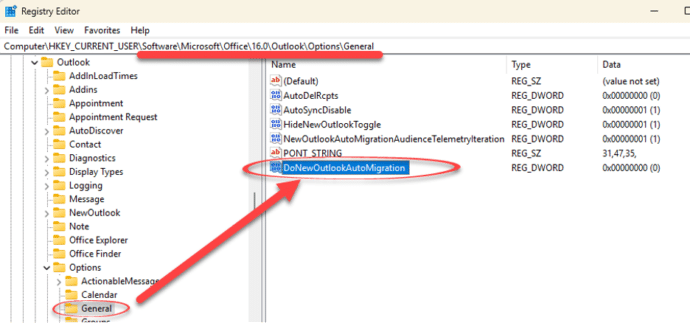
How to prevent Microsoft from pushing a change from classic Outlook for Windows to their new and incomplete Outlook (new). Microsoft is pushing customers to use Outlook (new) even though the software doesn’t have basic features like proper offline support or interactions between mailboxes. New Outlook also has a serious privacy breach for anyone using […]









