
Find & Copy Thanksgiving Emojis
Looking for the perfect holiday emoji for your document, slide or email? This quick-and-easy list from Office Watch offers a searchable collection of Thanksgiving-themed symbols that work across Windows, macOS, iPhone and Android. These emoji are supported (with different looks) on Windows, iPhone, iPad and Android devices. Unicode value (hex) The Unicode value column lets […]

How to Use School-Bus Yellow in Word, PowerPoint & Microsoft Office”
If you’ve ever wondered how to replicate the distinctive “school bus yellow” shade in your documents or slides, you’ll find the answer here. It’s the standard hue for North American school buses, chosen for visibility and impact. You can apply this same shade in Microsoft Word, Microsoft PowerPoint or any other Microsoft Office document simply […]
Keep Vintage Microsoft Office Alive: Zero‑Day Patches to the Rescue
Your trusty Office 2016 or 2019 has lost official Microsoft support. There’s a smart, affordable way to keep your ‘vintage’ Office software secure and running smoothly after October 2025. Zero-day micropatching can protect you from new security threats, extend the life of your software and help you avoid costly upgrades. The sun has finally set […]
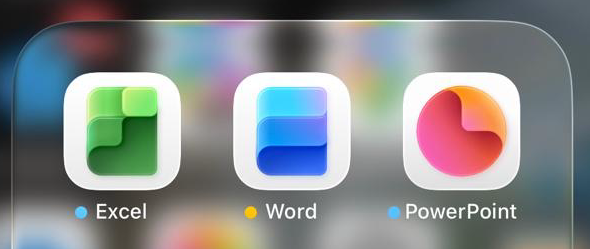
Microsoft Office Icons Lose Their Letters — Users Push Back on Confusing New Design
Microsoft is testing new Office icons for Word, Excel, and PowerPoint that drop their signature “W,” “E,” and “P” letters. The minimalist redesign, currently seen in iPhone preview apps, aims for simplicity but sacrifices instant visual recognition. Without letters, the icons blend into a sea of app symbols, making it harder to find the right […]
Microsoft 365 Copilot Expands for Personal & Family Plans — But Limits Remain
Microsoft is extending more Copilot features to Microsoft 365 Personal and Family subscribers, offering expanded AI tools across Word, Excel, Outlook, and more. While users now gain access to enhanced drafting, summarizing, image generation, and voice features, the long-standing cap of 60 AI credits per month still applies. Compared to the unlimited use in the […]

Microsoft 365 Premium: Copilot AI, new Features & Pricing Explained
Microsoft 365 Premium is the newest consumer plan that bundles the popular Family subscription with Copilot Pro at a much lower cost. For $199 a year, subscribers get six accounts with full Microsoft Office apps, 1TB OneDrive storage each, and premium Copilot AI tools for the plan owner—including research, data analysis, and workflow automation. Our […]

Beware “Evil Kerning”: How Hackers Trick You with Fake Email Addresses
Cybercriminals are exploiting a subtle typography trick called evil kerning to disguise fake domains as trusted ones like Microsoft.com or Gmail.com. By tightening letter spacing, “rn” can appear as “m,” making scam addresses like rnicrosoft.com or grnail.com nearly indistinguishable from the real thing. Here’s how the scam works, why it’s so dangerous, and what you […]
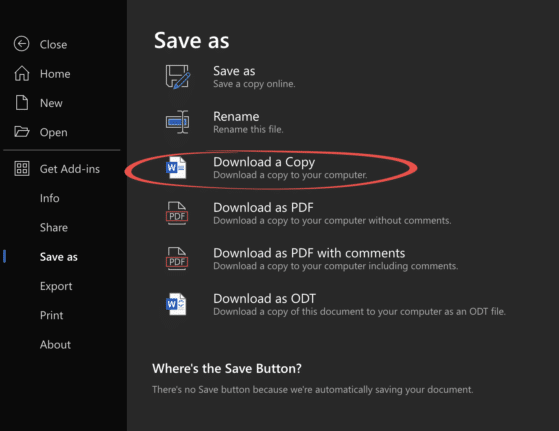
Edit Locally Saved Documents with Office Online – Free and Easy
You don’t need Microsoft 365 or desktop Office to edit your Word, Excel, or PowerPoint files. With Office Online, anyone can upload documents from their computer, make changes directly in a browser, and save the updated file back to their hard drive—all for free. This simple method works across Windows, Mac, and even Linux, making […]
Microsoft Redefines “Red” for Better Accessibility in Word, PowerPoint, and Outlook
Microsoft has quietly adjusted its classic Office “red,” shifting to a slightly softer. While the change may seem minor, it means improved readability and compliance with accessibility standards. But there’s a downside too in Word, PowerPoint, Outlook, and OneNote on both Windows and Mac, ensuring users get a color that looks the same but works […]
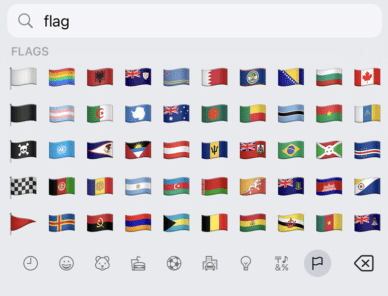
Get flag emoji in Microsoft Office with Windows workaround
Why you can’t insert national flag emoji (among many) in Microsoft Office and Windows but can in Office for Mac, macOS, iPhone and iPad. We’ll explain the workaround necessary to insert national flags in Windows and Office for Windows. Apple devices (macOS, iPhone and iPad) show flag emoji properly like this: But a Windows user […]

Make your own 3D models from a photo
Transform your photos into interactive 3D models in seconds with Copilot 3D, Microsoft’s experimental tool makes it easy to generate high-quality 3D models from simple images. Discover how this experimental technology can let you change the view of a person or object. Take a photo of an object with a plain background and the smarties […]
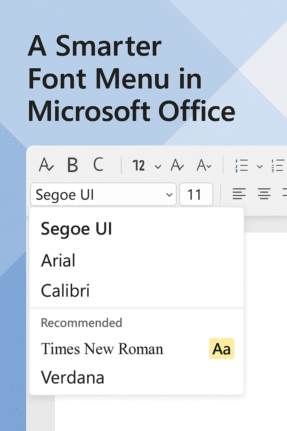
Check out the better font menu in Microsoft Office
Picking a font in Microsoft Word or PowerPoint can be confusing, especially with the existing long, long menus. Now, Microsoft 365 offers a new, easier font picker in two web apps. The new font menu has better search and simple organization, finding the right style for your document or presentation is faster and clearer than […]
Explore Cloud Fonts: A Fast, Free Design Boost in Office 2024 and Microsoft 365
Cloud fonts—your next creative shortcut—are now seamlessly integrated into Office 2024/2021 and Microsoft 365. These lightweight fonts download instantly when needed, bypassing the hassle of system installations and making them ready for use across your Word, PowerPoint, Excel, Outlook (and more) apps in mere moments. Whether on Windows or Mac, simply pick the font from the dropdown, […]

Make a Word table with picture background
How did we make a Word table with a picture background for a recent article – asks an Office Watch friend? She meant this table of Zoom shortcuts for toggling audio and video . There’s a similar table for Teams shortcuts. The quick answer is … we cheated! Word can’t have a table with a […]

Simple ‘one click’ force an update to Microsoft Office
A simple way to update Microsoft Office 365 for Windows with one click instead of digging into the menus to do it. We’ll show you the simple command line with options that make it possible. Normally, the Windows versions of Microsoft Office 365, Office2024, Office 2021 and Office 2019 all update automatically and you don’t […]

Password-Protecting Your PowerPoint Decks: What You Need to Know
To prevent somebody ripping off your prized presentation or deck, you should password-protect your presentation, making it accessible only to people you trust. PowerPoint includes a built‑in password‑protection feature that ensures only authorized users can open and modify your presentation. Why password lock a PowerPoint presentation? To keep the deck safe from prying eyes either […]









