Christmas Cheer with Office, 2nd edition available now
Office Watch has just released a new edition of the popular ebook Christmas Cheer with Office.Office Watch has just released a new edition of the popular ebook Christmas Cheer with Office. We’ll show you how to use it to create great Xmas cards, letters, emails and gift cards for home or office just using Microsoft […]
A humble submission to their Lordships
Even after two years, the Lords and Members of Parliament in the UK can’t easily open Office 2007 documents. We explain the simple options available to the honorable members. Silicon.com is reporting that the UK’s Members of Parliament and the House of Lords are having trouble opening documents that are delivered in the Office 2007 […]
Reorganising monthly information in Word
It’s a simple question about ordering monthly data in Word – there’s many answers which give a glimpse into what you can do with Office. ” I want to have a monthly log of items, each month separated by a page or section break, but be able to “toggle” the pages to have the most […]
Of Rand()om text, old text and Lorem ipsum
New wrinkles on an old Microsoft Office =rand() ‘random’ or filler text trick Old Word hands know there’s a quick way to enter text into a document as a placeholder for testing or to help formatting while you’re waiting for the real content to arrive. Type =rand() and some text will appear. There are NO […]
New Office 2007 help files
Microsoft has released a series of updated help files for Office 2007 programs. Microsoft has released a series of updated help files for Office 2007 programs. Each program has a separate download. In most cases the download includes updates for both the main user help file and the developers help file. There are no details […]
MS Office coming to the Apple iPhone
Soon Apple iPhone and iTouch users will be able to edit MS Office documents on a tiny but crisp screen. When Apple released the latest iPhone with direct support for Microsoft Exchange Server, it left the question of access to other parts of the Office suite. DataViz has announced that their Documents To Go product […]
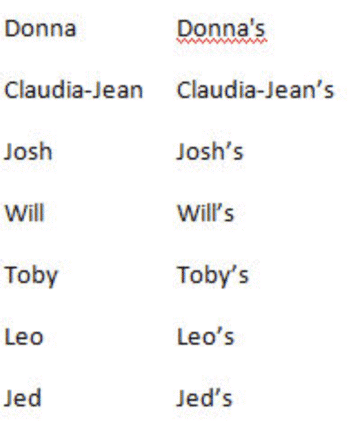
Word’s problem with a possessive Donna
A strange spelling anomaly appeared in Word 2003 and Word 2007 — all to do with a possessive Donna. ” At some point “recently” (like within the past year?) the last name Donna, when you add a possessive, Office 2007 spell checker thinks it is spelled wrong. Try it with Donna’s book. How did Microsoft […]
The Cheese Shop and Microsoft Word
More comparisons between the legendary comedy team and Microsoft Office. I suppose it was inevitable .. after mentioning Monty Python and the MS Word dictionary last week (admittedly tongue-in-cheek) someone has asked about more comparisons between the legendary comedy team and Microsoft Office. “Great point about Monty – if mere politicians can get special treatment […]

Palin isn’t in the Word dictionary
Why isn’t Sarah Palin in the MS Word dictionary and the suggested spellings offensive to some people? We explain why Microsoft is NOT to blame, what’s happening and how to fix it. You can tell election fever is getting too hot when poor old Microsoft Office gets dragged into arguments between Republicans vs. Democrats. Earlier in […]
MS Word vs. The New York Times
How does Word cope with a grammar quiz in The New York Times? The New York Times has a grammar quiz today (free registration required for some of the NYT web site). ” When we stumble over sound-alike words, readers accuse us of turning our editing chores over to a computer program (and not a […]
How to save a PDF from Office
There are plenty of ways to make an Adobe Acrobat PDF files from Microsoft Office programs. Here’s a quick guide to some of the options including free downloads. There are plenty of ways to make an Adobe Acrobat PDF files from Microsoft Office programs. PDF files retain most of the look in your original document […]
August updates for Office
‘Remote Code Execution’ is the phrase for August 08 updates for a wide range of Office products. August 2008 brings two security updates for Access plus Word, Excel, Powerpoint, Publisher and Office. It’s really a case of ‘once more around the roundabout’ with most of the patches fixing yet more ‘remote code execution’ security lapses. […]

Make the Office 2007 ribbon go away
The Office 2007 can disappear to make more screen room available for your document – not only that but it does so intelligently. The Office 2007 can disappear to make more screen room available for your document – not only that but it does so intelligently. The ribbon can be minimised from the pull-down menu […]

Quick Access toolbar – keyboard shortcuts
The Quick Access Toolbar (QAT) in Office 2007 programs have their own shortcut keys using the number keys. The Quick Access Toolbar (QAT) in Office 2007 programs have their own shortcut keys using the number keys. Alt + 1 for the first icon on the QAT, Alt + 2 for the second and so on. […]
Automatically open the last Word document you edited
If you frequently find yourself wanting to edit the same document you were using in your last Word session, you can create a shortcut which does just this. If you frequently find yourself wanting to edit the same document you were using in your last Word session, you can create a shortcut which does just […]
Delete an open Word document
Here’s how to delete the Microsoft Word document you’re currently editing. Here’s a rather more complex macro you might find useful. This one lets you delete the document you’re currently editing. Word normally won’t let you do this: you must first close the document, then delete it. That’s a sensible safeguard, but sometimes it gets […]









