Here’s some Explorer-type interfaces for finding records in Access tables. Q: Tom Gerry asks: “Is there any way to create an Explorer style cascading folders user interface to find records in an Access Table?” A: The closest to this would be a TreeView control used as a record selector. I
Option Explicit – to use or not to use? Q: Matt Perelstein writes: “I was wondering what you thought about using Option Explicit? It used to be a default, included with each module, but I noticed that in Access 2003, it’s not any more. I’ve used it religiously for years,
How to customize menus/toolbars so the full menu always shows. Q: Bob R. writes “I just got a new computer with Office 2003 pre-installed, and when I open a menu in Access (or any other Office app, for that matter), I just see a few commands, and I have to
The meaning of the word “Me” in VBA code. Q: Stuart E. Wugalter asks what is the meaning of the word “Me” in VBA code? A: Me is an Access keyword that refers to the form (or report) from which the code is running. There is also a Parent keyword
How to use conditional formatting to change the color of the highlighted record in a tabular form. Q:Ashjan Al Mahmeed wants to know how to change the color of the highlighted record in a tabular form.A:This can be done with conditional formatting (a feature added to Access in Office 2000).
A reader’s having some problems after installing Access 2000 over Access 97. Q:Bob Timms wrote to say he was having problems after installing Access 2000 over Access 97. A:If you don’t need to use Access 97 any more, it is advisable to first uninstall it, then install Access 2000, but
How to synchronize Access and Outlook – a more advanced lesson. Q: Jim Brooking writes that he is trying to use my Code Sample #49 for synchronizing Access and Outlook contacts, but it doesn’t do all that he wants, in particular two-way synchronizing. A: My Code Sample #49 dates from
How to insert a field in a Word document that calculates dates. Q: George Forsythe writes: “I want to insert a field in a Word document that calculates Tomorrow’s date. It would be even better if I could make it Next Weekday’s date. There seems to be no intuitively obvious
Access Archon #164 The final (and most complex) procedure is the cmdWordLetters Click event procedure, which creates a new Word document from a hard-coded template for each selected contact; when it is done, the documents are open for inspection. Private Sub cmdWordLetters_Click() On Error GoTo ErrorHandler Dim
A reader suggests an alternative method to referencing a subform control. Q: Bob Massey writes to comment on my answer to Noni Nabong’s question in AW 9.03, where I gave the syntax for referencing a subform control. He suggests an alternate method, as follows: I have mostly (99% of the
Access Archon #152 The Sample Forms The sample database has two forms, frmGetFromDBProps and frmSaveToDBProps. frmGetFromDBProps has an Open event procedure that first clears and then refills a table with the current database properties, and requeries the cboSelectProperty combo box. The txtPropertyValue field displays the property value from the
Q: Martin Wichmand writes: I’m trying to make some conditional formatting with VBA, using the following line of code to pop up a message box if the date in the control is today’s date or later: If IsDate(Me![cboOpfoelgning].Value) >= Dato() Then But I just get an error. A: The
How to make only selected fields display in a form or report. Q: Martin writes: I’m working on a function that should not display the field if it is not picked, but my code (below) does not work: Private Sub picEpl() Dim picEpl If Me![picEpl.Visible] = 0 Then picEpl.Visible
DAO or ADO – what’s the best to use when working with Access? Q: Scott Berry writes: “When should I use ADO and when should I use DAO? I have always used DAO since Access 97, but a lot of guys at work use ADO because it is the ‘new
How to print a report to a specific printer using the Printer Object. Access Archon #131 Introduction WAW reader Tim H. writes: “Unless my mind is starting to go, I remember being able to select a specific printer for a report in past versions of Access. The report was
How to email attachments using the redemption library. Q: Mark Riddick writes: “Before OMG became an issue I used to email snapshots of Access reports using docmd.sendobject etc etc. How do I achieve the same thing using Redemption? The database in question is Access 2000.” A: OMG (the annoying Object
Here’s a function to determine whether a database exists on a network drive. Q: Glenn Faber writes that he needs a function that determines whether a database exists, on a network drive. If it exists (i.e., the network drive is available), a number of instructions will be run; otherwise, they
How to add new color constants. Q: James T. writes: “I need to use certain colors for the back color of controls (I am changing the color from code on a report’s Detail section Print event procedure). The VB color constants enum only has a few colors (vbRed, vbBlue, etc.).
How to create a query that returns the number of visitors (not the number of visits). Q:Adam Nims wants to create a query that returns the number of patients who have visited (not the number of visits). Each patient should be counted only once, regardless of the number of visits.
How to print reports from a printer that’s not the default. Q:Bronwyn Pugh wrote to ask how to print certain reports to a color laser printer, when the default printer is (and should be) another printer. A: I have two laser printers (color and b&w), so I have the same
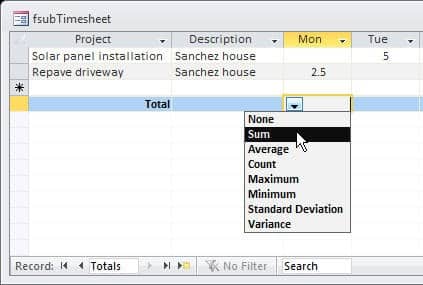
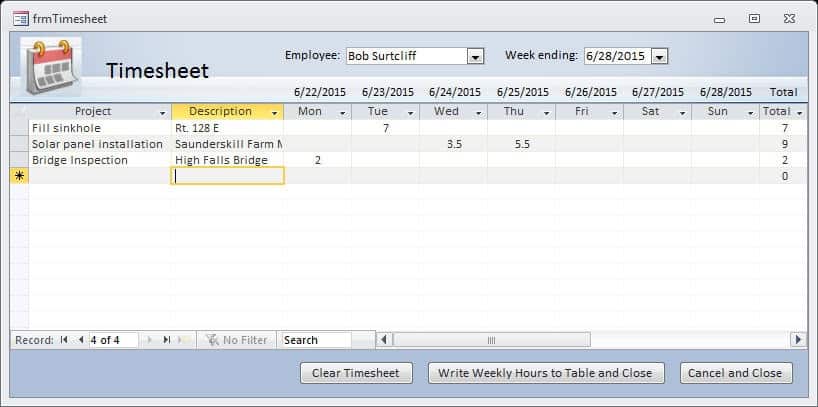
How to create an Excel timesheet, and export data from an Access timesheet. Q: Maurice writes that he needs to export Access timesheet data to an Excel worksheet for distribution, since some users don’t have Access, so he can’t just create an Access report. Is there a way to do
How to do calculations on a form and store the results. Q: Rob Stoker writes: I have a table called “tblPartHistory” where I store the quantity of parts used in the field “quantity”. When I enter the quantity used into the form I want it to subtract the amount used
How to edit Value Lists in Access 2007. Access Archon #169 In Access versions through 2003, if you selected Value List as the row source type for a listbox or combo box, you had to type in the list values as a semicolon-separated list, which is a tedious chore for
How to show multiple lines of information about listbox items. Access Archon #164 Introduction Listboxes are a convenient way to select one or more items for action, such as creating Word letters or printing a filtered Access report. But sometimes you need to see more than a single line