GPT 5.6 Arrives in Microsoft 365 Copilot, But Microsoft Hides What You Get
Microsoft has quietly added OpenAI’s new GPT 5.6 model to Microsoft 365 Copilot on the very same day it reached ChatGPT, a surprisingly fast turnaround. The catch is that Microsoft renames the model, so instead of the clear Sol, Terra and Luna labels that OpenAI uses, Copilot users only see vague choices like “Quick Response” and “Think Deeper.” Here’s what GPT 5.6 actually changes for your documents, slides and spreadsheets, and how to work out which version you are really getting.
GPT 5.6 is available now across ChatGPT, Codex, and the OpenAI API as well as to Microsoft’s Copilot customers.
There’s isn’t one GPT 5.6 model, there are three which OpenAI describe as:
- Sol – the flagship
- Terra – a mid range option
- Luna – the fast, cheap one
According to OpenAI, you pick by intelligence, speed, or cost. Sol for hard work, Luna when you want fast and cheap, Terra in between.
OpenAI claims that GPT 5.6 is mostly about efficiency, doing the same work with fewer resources (AI tokens). In other words, lower cost and faster answers. On a coding benchmark, Sol scored 80, ahead of Anthropic’s Fable 5, while using less than half the output tokens, taking less than half the time, and costing about a third less.
While Copilot users don’t have a direct AI token cost, there’s a cost to Microsoft in their partnership with OpenAI. The improved efficiencies would partly explain why Microsoft has rolled out the new models so quickly.
They appear in ChatGPT like this:
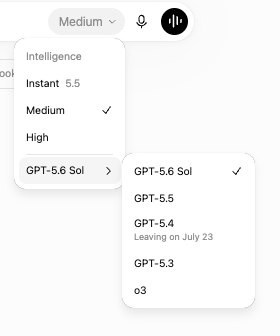
Different names for the same model
Microsoft doesn’t use the same labels as ChatGPT. That would make things too easy for their customers. Instead, there are two choices, in this example from Word.
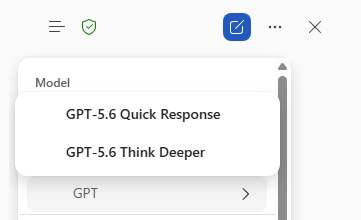
Microsoft hasn’t said how their labels match with the GPT names – our best guess is:
GPT-5.6 Quick Response – could be Luna (quick) or Terra (mid-range) model.
GPT-5.6 Think Deeper – hopefully it’s the high-end Sol model.
But there’s no way to know for sure unless Microsoft chooses to explain itself to paying customers.
In Excel and PowerPoint, the model selector only offers “GPT-5.6” – but which one?
What’s different or better in GPT 5.6?
For Office users, GPT 5.6 creates more visually refined documents and spreadsheets, follows complex reference formats more faithfully, handles equations and financial models with greater precision, and makes better use of typography, spacing, and layout.
One early tester called Sol the first model that consistently generates presentation decks ready for real work.
If you are a regular Copilot user, the practical wins are better looking documents and slides, faster responses, and a cleaner choice between a smart model (Sol / Think Deeper) and a cheap fast one (Luna / Quick Response).
Which GPT to choose from?
By all means choose GPT 5.6 in the Microsoft 365 apps but it would be nice to know exactly which 5.6 variant Microsoft is using.
Microsoft quietly swaps the AI inside Excel and Outlook
Microsoft’s MAI Playground: Test Microsoft’s Own AI Models Free
PowerPoint AI Image Models in Copilot: Which One to Choose
Microsoft 365 Copilot App vs Copilot App: What’s the Difference?
Microsoft 365 Business Price Increase: Who Pays More in 2026
Outlook Immersive Search: Ask Questions Instead of Typing Keywords