Office 2007 and later to Office 365 not only has keyboard shortcuts but in many ways they are better than previous versions of Microsoft Office. For the most part the shortcuts used in Office XP and Office 2003 still work in Office 2007 through 365 also – despite the very
How to type Ghana Cedi currency character in Windows or Office, especially Word. After our article about inserting Numero and other symbols into Office – trust an Office Watch reader to find a character not available in a supplied Windows / Office font: ” The currency in Ghana is the
How to type the ‘Numero’ symbol and other special characters – there’s many ways to do it in Word and Office. It all started with a single, seemingly simple, question from a reader. As often happens, the question opens up a whole range of options in Office Entering the Numero sign
How to get a ‘Chalkboard’ or ‘Whiteboard’ effect in Microsoft Word. Recently we talked about Text Boxes in Word and how to get various looks for sidebars and columns. How about copying the ‘chalkboard’ or ‘Whiteboard’ effect for a different style of text box not offered by Microsoft in their
How to sort a list using a hidden or unseen column in a Microsoft Word table. Sometimes you want to sort a list in a way that isn’t apparent to the reader. To continue our Apollo theme, here’s a list of the twelve men who walked on the moon with
You can hide a table column in Word, all it takes is a little trickery and ignoring Microsoft’s advice! Sometimes you want to hide a table column in a Word document but according to Microsoft you can’t do it. Here’s how to do it anyway. It’s true that there’s no
We’ve all seen the standard Find/Replace in Microsoft Word, either the ‘new’ pane or the older dialog box. Like so much else in Word, there’s a lot more available than the obvious features. Here’s a look at some of tricks. Press Ctrl + F to start a Find. In recent
Microsoft Word’s Replace does a lot more than just replacing one bit of text for another. It can quickly change formatting, enforce a style, paste from clipboard and use special characters. You’re probably familiar with the basics. Press Ctrl + H to open the Replace dialog. Type in the text
Microsoft has been getting serious about drawing features in Office so we thought it was time to look at what’s available and possible across all the Office applications. Word, Excel, PowerPoint and some nice drawing stuff in OneNote Once upon a time, drawing onto a Word document or Excel worksheet
A reader asks about sabotaging a random number generator. Steven H writes … The article on randomness in Excel was quite interesting, and the link to random.org was neat. Two thoughts come to mind almost immediately though: If you have an application where you absolutely need true random numbers, it
Re-creating the “Don’t be a Spock” sign in Word wasn’t hard especially since the original sign seen at the laboratory was probably made in Microsoft Word. Here are some comments on the design. The standard Arial font was used throughout. The two images and captions are in a 2 x
You’ve received a document, but when you try to open it, the file stubbornly won’t appear! We explain how to fix it. Our editor-in-chief saw that problem in an Internet cafe‚ in Ketchikan, Alaska and was surprised when neither the manager of the store nor the cruise computer ‘expert’ knew the
How to use AutoCorrect for more than a word or single character. It can speed up typing of large blocks of text or expanding an acronym into the full name. Paul G writes: “Autocorrect is fantastic for the numerous standard letters, or specific instructions for various computer actions (downloads, etc).
Entering blocks of text in Excel is quite easy. What’s not obvious are all the options to make the text easier to enter and look better. Just typing in a cell will enter text. By default it will extend into any unfilled cells. If there’s something ‘in the way’ the
Benford’s Law is an amazing tool that is simple to use in Excel. Benford’s Law is one of those mathematical laws that seems to defy common sense but works for most naturally occurring number sets. It says that in most groups of naturally occurring numbers, the leading digit 1 will
How to convert metric to imperial and other measure conversions in Excel. Converting measurements from one system to another can be done by Excel using the CONVERT function … here’s how it works and then we’ll tell you what CONVERT can’t do or should do better. As usual, we decided
A quick way to type a ü tick or check mark character in Word. Another great Autocorrect suggestion from Morris B. ” … the one that I have found the most useful is to replace ‘./’ with a tick (wingdings 252 – or wingdings 254) “ Using the fullstop/period is
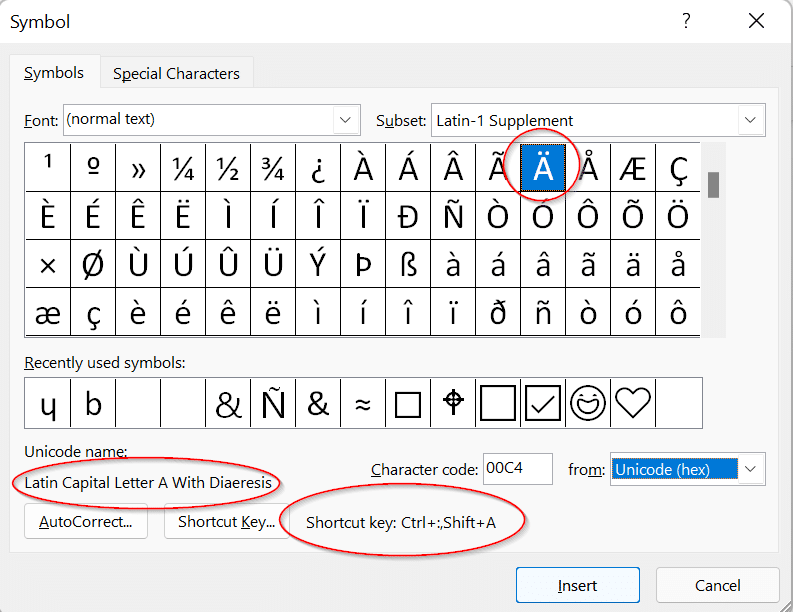
One of the eternal questions to Office Watch is about adding characters to an Office document. Symbols and characters not on the keyboard. The most common requests are for adding currency symbols like Pound £ Euro € or Yen/Renminbi ¥ but can also include the @ symbol which can, even
How to make an Excel chart that changes as you add more cells or rows is really simple these days. Forget all the old stuff about named ranges or changing the Chart data. Setup your Excel list correctly and any linked charts will update automaticall. In a recent article we
The secret to a timeline chart in Excel is the data. Emily writes asking “How can I make an Excel chart with dates on the X axis with a proper time scale – even if the dates aren’t regular? “ We could not understand Emily’s question until we asked for
Change the look of Microsoft Word footnotes and endnotes. You can change the look of footnotes and endnotes using their linked styles: Footnote Reference Footnote Text Endnote Reference Endnote Text The two ‘… Reference’ styles create the look of the numbers, usually just superscript positioning of the default paragraph font.
The Notes Pane is the key to some useful Footnote and Endnote options Now that Print Layout is the main editing view in Microsoft Word, the Notes pane has been somewhat forgotten but it’s the home of details in the Footnotes and Endnotes. Get to the Notes Pane Switch to
Getting started with Word’s footnotes and endnotes. Footnotes is one of those Word features that’s been around for a long time and so it often ignored in all the hoopla about new features. In this article we’ll have a close look at Footnotes and Endnotes. In Word there are Footnotes
Businesses are reopening, which is great. Here’s some suggestions for big signs to let customers know you’re open, with some Word tips to make the letters as big as possible. What’s needed is a BIG sign that catches the eye from a distance or when passing in a bus. Getting