OneNote’s overdue updates; Paste Text and Merge Cells
Microsoft has finally rolled out two highly requested updates for OneNote users on Windows, macOS, and iPad: Merging table cells and a paste text shortcut.
Merge Table Cells
No more resorting to convoluted workarounds or dragging your content into Excel. Now, select two or more adjacent cells in a OneNote table can be merged, just like you’ve been able to do in Excel and Word seemingly forever.
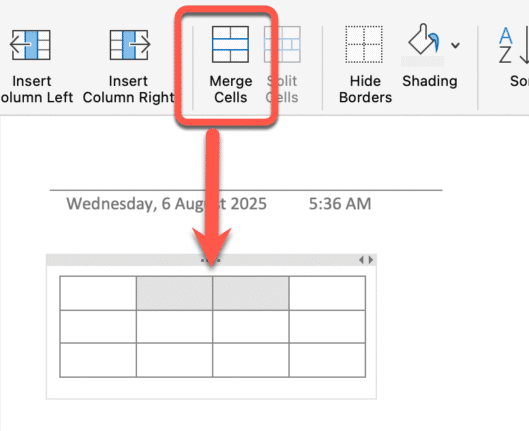
Select some cells, right‑click and choose “Merge Cells”, or use the Table tab on the ribbon.
Great for headings that span multiple columns.
Who gets it?
Merging cells is only available in the latest OneNote for Windows, Mac and iPad. Web, iPhone and Android apps can only display merged cells, at least for now.
Rolling out to Insiders first:
- Windows: 16.0.19030.10000 or later
- Mac: 16.100.715.0 or later
- iPad: 16.100.715.0 or later
Paste Text Only
Also in the “About damn time” category is a simple “Paste as Text” shortcut option
Use Ctrl + Shift + V on Windows or Cmd + Shift + V on Mac to paste plain text only, stripping formatting on the spot.
Also available via
Right-click menu: Choose Paste Text Only
Toolbar: Go to Home | Paste | Paste Options | Keep Text Only
This puts OneNote on par with other Office apps with the same shortcut.
Who gets it?
OneNote for Windows, Mac, and Online
- Windows: 16.0.19101.10000 or later
- Mac: 16.100.719.0 or later