Merriam-Webster new words vs Microsoft Word
Merriam-Webster has added 1,400 new words and definitions to its dictionary, including looksmaxxing, crashout and Rickroll. We typed the headline internet slang into Microsoft Word to see which words get the red squiggly underline. Word already knows some surprisingly fresh slang but still flags a prank that’s been around since 2007. If you use these words in documents, emails or slides, you don’t have to wait for Microsoft: add them to your custom dictionary in seconds.
Merriam-Webster have released a list of new words they’ve added to the dictionary. Office Watch is always interested to compare these lists with the Microsoft Office / Word dictionary to see which words have been included in Microsoft’s spell checker.
There are a few surprises. ‘Looksmaxxing’ only went mainstream on TikTok in the last couple of years.but has already been added to the Microsoft Office dictionary.
On the other hand, ‘crashout’ and especially ‘rickroll’ have been around for some time but still not enough for Microsoft to notice.
Same Results in US, UK and Australian English
Word’s US, UK and Australian English dictionaries give identical results, with only five of the new words missing; copium, crashout, promposal, rickroll and scaries.
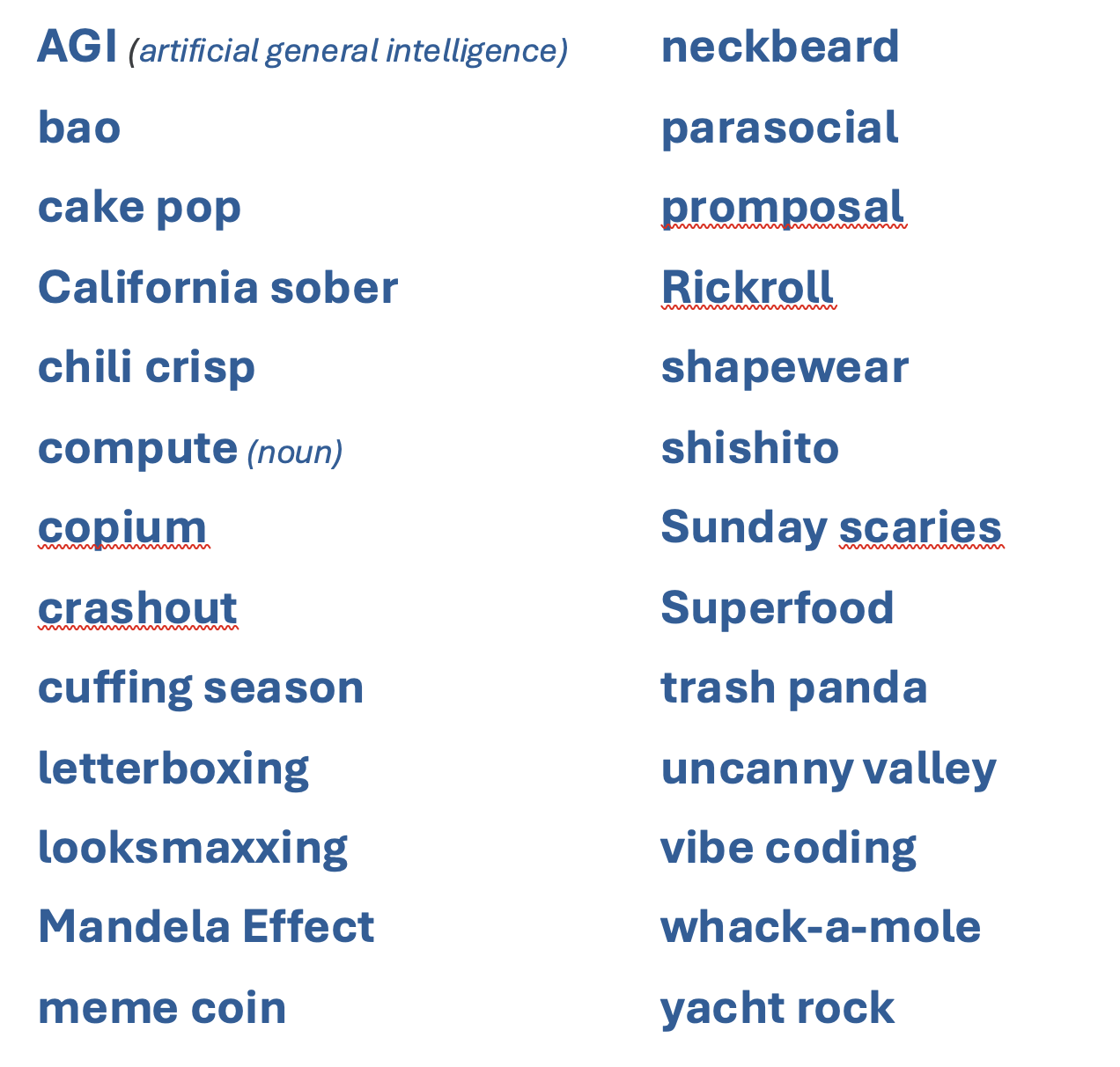
Many of the ‘new words’ are two-word phrases, and one is an acronym.
How to Stop Word Flagging New Words
Right click the red underlined word and choose Add to Dictionary. Adding a word to a custom dictionary in one Office program makes that word available for spelling checks in other Office programs. Discover more in Word’s spelling corrections
To add several words at once, go to File | Options | Proofing | Custom Dictionaries, select Custom.dic or RoamingCustom.dic, then click Edit Word List.
Capitals matter.
Add a word in lower case (rickroll) and Word accepts both rickroll and Rickroll. Add it with a capital and Word flags the lower case version.
Single words only
Custom dictionaries only accept single words, so for phrases like “vibe coding,” add just the word Word doesn’t recognize.
Exclude a word
Want the opposite? Make a word appear with a red underline even though it’s in Microsoft’s dictionary?
The Exclusion Dictionary makes Word flag a word it would otherwise accept, handy if “looksmaxxing” has no place in your company reports.
Who Decides Which Words Get Into Word’s Dictionary?
Microsoft decides, without explanation, when words enter its proofing tools, and it publishes neither a source list nor a useful change log.
The Office main spelling dictionaries are proprietary word lists supplied with the proofing tools for the selected language and regional variety, such as English (United States), English (United Kingdom), or English (Australia).
In the distant past, Microsoft licensed a third-party dictionary. Microsoft once licensed a third party dictionary but has since brought the work in house, presumably to cut costs.
Microsoft Editor is different from the technology used in the spell-checker and appears to use different dictionary sources. Copilot AI is also separate from the core Office dictionary. That’s why you can get different spelling and grammar results from Word, Editor and Copilot for the same text.
More on Word’s Dictionary and Spell Checker
This isn’t the first time Word has stumbled over new vocabulary. See how it handled the Oxford English Dictionary’s latest additions in Does Microsoft Word understand new English words?, and check 2023 Spelling Bee champs vs Microsoft Word for the year Word recognized just 9 of 29 words.
You don’t have to wait for Microsoft to catch up. Adding your name and other personal words to Microsoft Word shows the quick fix plus the capital letter trap, while How to remove words from the Word dictionary does the reverse and makes Word flag words you’d rather not see in your documents.
If you write for readers in more than one country, the dictionary you choose matters more than you’d think. Why Word doesn’t always show US and UK spelling correctly? explains why British settings let American spellings slip through, and Three ways to switch language in Word and one way to turn it off makes sure Word is checking the English you actually want.
Spelling is only half the story. Stop Microsoft Word’s Grammar Checker From Driving You Crazy shows how to silence the blue underlines you disagree with, and Microsoft Kills Word’s Similarity Checker on October 3, 2026 covers what’s disappearing from the Editor pane in a few weeks.