Outlook signatures and roaming troubles
Signatures in Outlook have changed for Outlook 365, Outlook 2021 and Outlook 2019 but they have troubles, at least for Microsoft managed mailboxes (Microsoft 365 and Outlook.com).
In January 2020, Microsoft promised to make email Signatures ‘roam’ meaning they would synchronise and appear on each version of Outlook using the same mailbox. That was originally going to mean the same signature options will ‘roam’ to appear in all Outlook software (Windows, Mac, Mobile and Web).
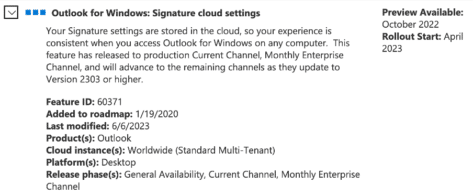
Since then, there’s been delays and a rollback from the original promise. Since April 2023, roaming Signatures is limited to recent Outlook for Windows only (not Mac, web or Mobile) and only Microsoft mailboxes (Microsoft 365 and Outlook.com).
We’ve written about how roaming signatures are supposed to work, see Roaming email signatures in Outlook 365, 2021, 2019
Don’t be fooled by a Microsoft statement like “Email signatures in Outlook for Windows now roam across devices.”. That does NOT mean all mailboxes, let alone all Outlook for Windows.
This pop-up window in Outlook doesn’t even begin to explain the limitations of roaming signatures. Signatures are NOT “available on all of your devices” and only apply to some mailboxes.

Or at least that’s what’s supposed to happen. Based on complaints from readers and our own tests, Outlook Signature roaming is ‘flaky’ to put it mildly … ‘broken’ is a better word.
What about (new) Outlook for Windows?
The upcoming (new) Outlook for Windows does support roaming signatures.
Outlook 365 (new) for Mac
Forget it. Even in the latest and ‘new’ Outlook 365 there’s no Signature roaming. All Signatures are stored on the Mac local computer.
There’s no good reason for this omission. If Microsoft can retrofit Outlook 2021 and Outlook 2019 for Windows with roaming signatures, they could do it for the newly rebuilt Outlook for Mac as well.
It seems Microsoft ‘forgot’ to put the feature in the Mac software as one of their standard tactics to encourage people to use Windows instead.
Who really gets Outlook roaming signatures?
Officially, roaming signatures are available for Microsoft hosted mailboxes including Outlook.com accounts.
In practice, it seems to be a matter of luck. In our tests, one Microsoft 365 Business mailbox stubbornly refused to roam signatures. No matter what we did, the signatures remained on that Outlook for Windows only.
We had more luck with a free Outlook.com mailbox. The difference? Only the Microsoft deities may know.
And that’s before we consider the reports from Office Watch readers who lose their roaming signatures and must recreate them from recent Sent Items.
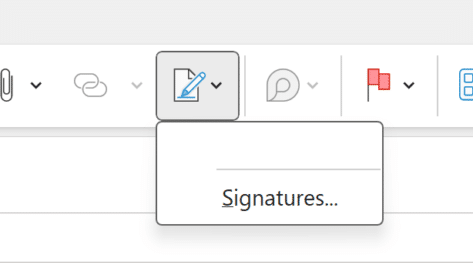
Some of those troubles might be confusion about a signature saved to another mailbox but the many reports and our own experience suggest there are bugs in the roaming feature.
See How to recover lost roaming signatures in Outlook
Where are roaming signatures saved?
Roaming Signatures are saved in the mailbox store, along with all the emails, appointments, contacts etc.
They are NOT saved on each computer in a separate folder. That only applies to non-roaming signatures.
Sad Editorial Note
We started writing this article about how Outlook Signature roaming. Instead of relying on Microsoft’s promises, as usual, we test the software for ourselves.
After testing, we’ve ended up writing about Signature roaming does NOT work, even in supposedly ideal circumstances.
This often happens at Office Watch, we start with a positive view of a Microsoft Office features but that goes sour with a little testing and digging.
Roaming email signatures in Outlook 365, 2021, 2019
Outlook Signatures for Outlook 2016 and earlier
Signatures for all occasions in Outlook
Export / Import your Outlook Signatures