Grok AI in Microsoft 365: What Copilot Users Need to Know Before Turning It On
Microsoft has added Grok AI from SpaceXAI as a model option in Copilot for Word, Excel and PowerPoint. Before you turn it on, there are privacy trade-offs and restrictions you need to understand. Choosing Grok means your data leaves Microsoft’s servers, the feature is blocked in Europe and the UK, and your admin has to opt in. Here is what the change means, who actually gets access, and how to decide whether it is worth enabling.
The announcement appeared on the Microsoft Copilot blog on September 12, 2026, adding Grok models from SpaceXAI to Copilot in Word, Excel and PowerPoint through the Microsoft Frontier Program.
Satya Nadella marked the occasion on X with “More model choice coming to Copilot. Welcome Grok!“
Three things matter far more than the headline. Choosing Grok/SpaceXAI means your data is sent to their servers with all the privacy concerns that raises. Grok is not available to Frontier customers in the European Union, the European Free Trade Association or the United Kingdom during the preview. And access is managed through a dedicated admin setting that is disabled by default.
Is it Grok or SpaceXAI?
Grok is the name of the AI service. SpaceXAI is the company name Microsoft uses for the provider in its Copilot and admin documentation.
SpaceX acquired xAI in an all-stock deal announced in February 2026, and the SpaceXAI corporate branding followed in July 2026. Grok kept its name, as did the apps, the SuperGrok subscription and the developer API.
The name “Grok” is shamelessly taken from Robert A. Heinlein’s book “Stranger in a Strange Land”.
Why choose Grok / SpaceXAI?
Microsoft’s announcement and the breathlessly enthusiastic posts elsewhere do not explain why someone would choose this new AI option over the models already available.
There is also little emphasis on the privacy concerns raised when customer data is sent beyond Microsoft-managed systems to a third party.
One important item Microsoft does not mention: we do not know which version of Grok is being used with Copilot. Grok 4.6 is widely listed as the latest released frontier model, but Microsoft’s Office preview announcement does not identify the version.
Grok is unusually good at ordinary office work
This is the strongest argument, and it is not the one Microsoft leads with. Grok has been positioned for agentic tasks and knowledge work, including document, spreadsheet and presentation work. That maps neatly onto what people actually do in Word, Excel and PowerPoint.
Grok knows what happened recently
Grok can use X search and web search in some xAI experiences, which can make it useful for market sentiment, trending topics and recent events. That does not necessarily mean every Copilot use of Grok has the same live-data access.
More Copilot competition
Even if you never use Grok, it’s good to have competition between AI providers generally and under the Copilot banner. Adding Grok means OpenAI, Anthropic and Microsoft itself have to keep up their AI game.
It means you can match the model to the job without switching AI platforms: one model for contract analysis, another for fast content generation, same interface underneath.
Copilot is quietly turning into a switchboard rather than a product built on one company’s AI. That is good for Microsoft’s negotiating position and mostly neutral for you, right up until the moment you need to explain to a client which company processed their contract or customer info.
Grok is cheaper
It probably does not matter directly to Copilot customers who pay a flat subscription fee, but lower model operating costs may have factored into Microsoft’s decision to add Grok.
Grok 4.6 is listed at about $2 per million input tokens and $6 per million output tokens for standard API use under 200K prompt tokens, with higher pricing for longer prompts. That is cheaper than some frontier-model pricing, though comparisons vary by provider, route, cache use and workload.
Grok’s downsides
We’ve already mentioned the privacy issue. If you live by data residency or privacy rules, the fine print on where your data flows matters a great deal.
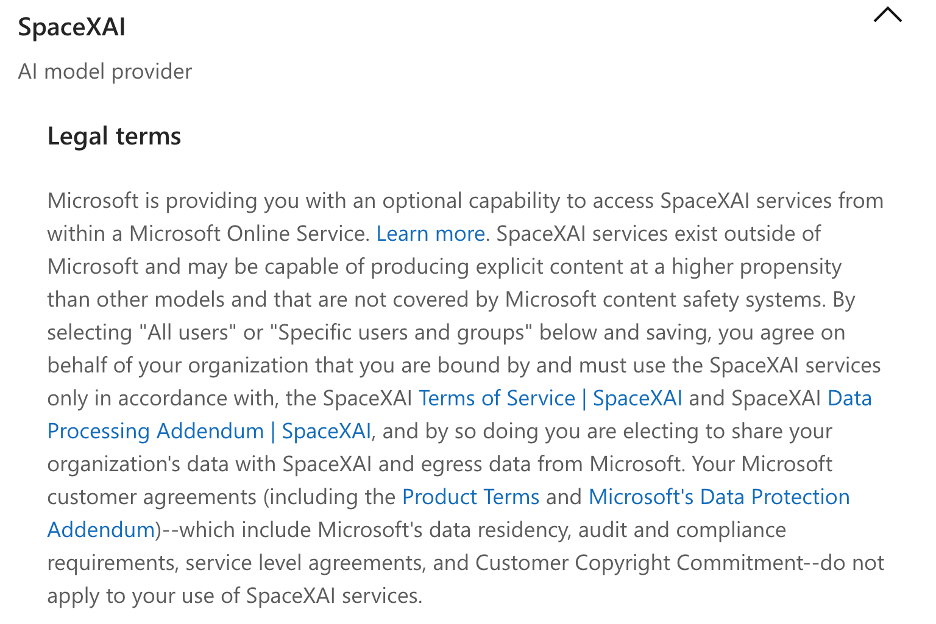
Microsoft documentation says SpaceXAI models are hosted outside Microsoft and that, when an organization chooses to use them, data is processed outside Microsoft-managed environments and audit controls.
Microsoft says its customer agreements, Product Terms, Data Processing Addendum, data residency commitments, audit and compliance requirements, service-level agreements and Customer Copyright Commitment do not apply to the use of SpaceXAI services; instead, xAI’s enterprise terms and data processing addendum apply.
For large documents or long-running tasks, the practical limits depend on the specific Grok model and where it is hosted. Public Grok 4.6 API listings show a large context window, but Microsoft has not said whether that exact model or those exact limits apply inside Copilot.
Grok is not as good for coding or terminal work as ChatGPT or Claude.
Some tests suggest that Grok’s text output is not as good as its rivals’, appearing less polished or persuasive in some cases.
Who actually gets Grok/SpaceXAI
In plain English, it is a limited test. If you are a Microsoft 365 Personal or Family subscriber, there is nothing available yet.
Inside organizations, it is available only if users have a Microsoft Copilot license, the organization is enrolled in the Frontier Program, and an admin specifically enables SpaceXAI access.
Frontier is Microsoft’s early access program for AI features that have not reached general availability. It is managed at the tenant level, requires a Microsoft Copilot license, and your IT admin controls which users see which features. Microsoft describes this as a focused release to gather feedback on how customers use the model in common productivity work.
How to turn on Grok AI in Microsoft 365
Microsoft 365 organization admins have to enable Copilot Frontier for selected or all users.
Then go to Copilot settings, choose View all, and select “AI providers for other large language models”.
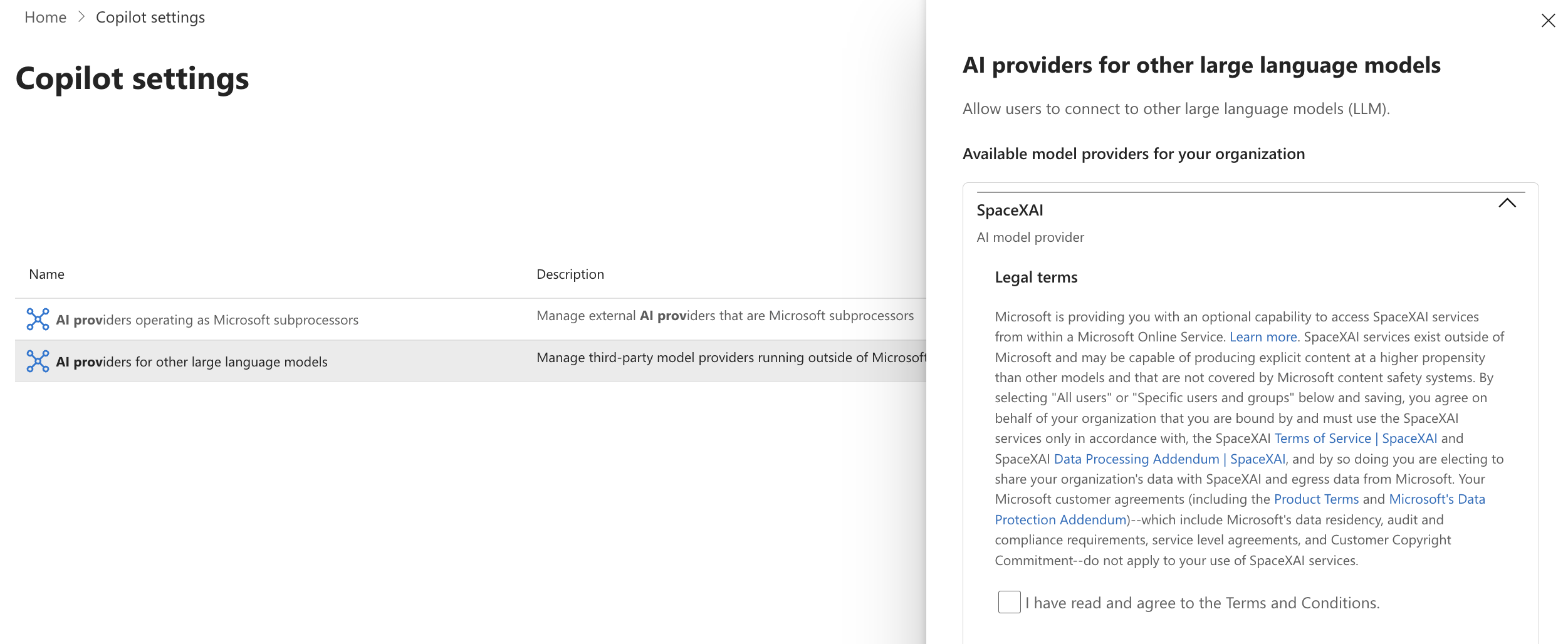
Enable SpaceXAI by accepting the Terms and Conditions.
Even then, this is a gradual rollout, so Grok/SpaceXAI might not appear in Microsoft 365 apps right away.
Off by default, and that is a kill switch worth knowing about
The more revealing detail is buried in the announcement. SpaceXAI has been added to Microsoft’s Online Services Subprocessor List. That is the legal register of outside companies allowed to handle Microsoft customer data. Adding a company to it is not a formality. It is Microsoft telling you, in writing, that your documents and prompts can be processed by someone else.
Here are the legal terms that admins have to accept before SpaceXAI is available.
Europe and the UK are locked out, and that tells you something
The EU, EFTA and UK exclusion is the loudest signal in the whole post. Microsoft does not give a reason for the restriction, but data handling, privacy and regional compliance are obvious questions for admins to ask.
If you are in Spain, Germany, Switzerland, or Britain, you cannot turn this on even if you want to. Microsoft says only that it will evaluate feedback and product fit before broadening availability, with no date attached.
Which Grok? Microsoft is not saying
The blog post refers to “Grok models” without naming a version. That is unhelpful, because the versions differ a lot. Grok 4.6 is widely listed as an August 2026 release, but Microsoft has not confirmed whether Copilot is using Grok 4.6, Grok 4.1 Fast, or another variant in this Office preview.
That uncertainty is worth remembering when Copilot offers you a model picker.
What this means for you
- If you are in the EU or UK: nothing changes. You cannot access it during the preview.
- If you are outside those regions and on Frontier: talk to your admin before assuming it is available. It is off until someone turns it on.
- If you just want a different model for everyday Office work: the practical gain is small. For drafting a paragraph or writing an Excel formula, the leading models perform similarly. Model choice matters at the edges, not in the middle.
- If you handle regulated or client confidential material: treat the subprocessor listing as the deciding fact, not the marketing language about trusted Copilot experiences.
You can already get Grok in Office
Separate from the Copilot announcement, SpaceXAI already offers its own Grok apps for Microsoft 365 through Microsoft Marketplace. Marketplace listings describe support for Word, Excel and PowerPoint, with availability tied to paid X or SuperGrok access.
More on Copilot AI in Microsoft 365
If you are weighing whether Grok is worth enabling, it helps to understand what Copilot already does in each app. Our walkthroughs cover Microsoft Copilot for Word: what it can do and what it costs, Microsoft Copilot for Excel: what it does and how to use it, and Microsoft Copilot for PowerPoint explained.
The privacy trade-offs raised by Grok apply to Copilot more broadly. If you have not reviewed the baseline, start with Privacy and security concerns with Microsoft Copilot.
For a broader look at whether Copilot is worth the subscription in the first place, see What is Microsoft 365 Copilot and is it worth paying for? and Microsoft 365 Copilot pricing and licensing explained.
Admins who need to manage the Grok rollout alongside other Copilot features will find How to manage Microsoft 365 Copilot as an admin useful for tenant-level controls and policy settings.