Canada Time Zone Change 2026: How to Fix Windows, Mac and Outlook
Canada’s 2026 time zone change has arrived and it’s breaking calendars. On November 1, most of British Columbia, Alberta, Manitoba, the Northwest Territories and northwestern Ontario stopped changing clocks, while the rest of North America fell back an hour. If you use Windows, Mac or Outlook, your clock, calendar or both may now be wrong. Here’s what you need to check and how to fix it.
If a time zone region changes its daylight saving rules, modern software can cope automatically. But this is different because there are new time zones created and Outlook can’t know automatically if a meeting or repeating event belongs in one of the new zones.
It’s something that needs checking for any of our Canadian friends living in the affected areas and anyone who has scheduled online meetings with someone in those areas.
Microsoft is very late in addressing this issue, which only adds to customer woes. Their first statement was on October 26, just a week before customers were affected. That’s despite the permanent daylight saving laws being approved between 2 and 8 months ago (depending on the province).
What some Canadians need to do
- You live or work in an affected area: check your Windows time zone, your Outlook calendar time zone, and every meeting you organized for November 1 or later. Meetings booked before the change are the main culprits.
- You meet with people there: the time gap between you has changed until March 2027. If a meeting looks wrong, confirm the time with the organizer rather than guessing.
- You use a Mac or iPhone: update and restart. Outlook for Mac is the weak link, so make calendar fixes in Outlook on the web.
What areas have changed time zones
Four provinces and territories, plus parts of two more, now keep the same time all year, aka “permanent daylight saving”. The March 8 spring forward was British Columbia’s final clock change.
| Area | Hours behind UTC, all year | Windows time zone | Mac or iPhone city |
| Most of British Columbia | 7 | Pacific Time (British Columbia) | Vancouver |
| Alberta, Yellowknife, Inuvik, and southeastern BC communities that follow Alberta (East Kootenay) | 6 | Mountain Time (Alberta) | Edmonton or Calgary |
| Manitoba and northwestern Ontario (Kenora) | 5 | Manitoba | Winnipeg |
Windows: install the update, then pick the new time zone
Microsoft added three new time zones to Windows:
Pacific Time (British Columbia), UTC -7
Mountain Time (Alberta), UTC -6
Manitoba, UTC -5
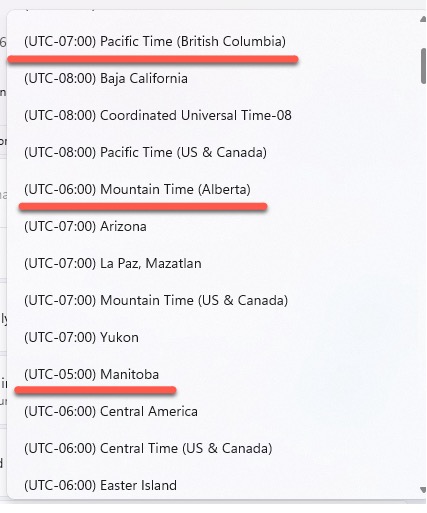
Before the October 2026 update, none of these places had a time zone of their own in Windows. They shared the matching US zones, which observe daylight saving and the same change dates each year.
To check your PC:
- Go to Settings | Windows Update, install everything and restart.
- Go to Settings | Time & language | Date & time.
- If automatic time zone is on and location services work, Windows should pick the new zone by itself. Otherwise choose it by hand.
- Make sure you’re not still on Pacific Time (US & Canada) or one of the US/Canada shared time zones e.g. Mountain Time (US & Canada) in Alberta and Central Time (US & Canada) in Manitoba.
Set your Outlook calendar’s time zone
New Outlook, Outlook on the web, Outlook.com: open Settings, then Calendar, then View. Under Time zones, use the “Display my calendar in time zone” list to pick the new zone, then Save.
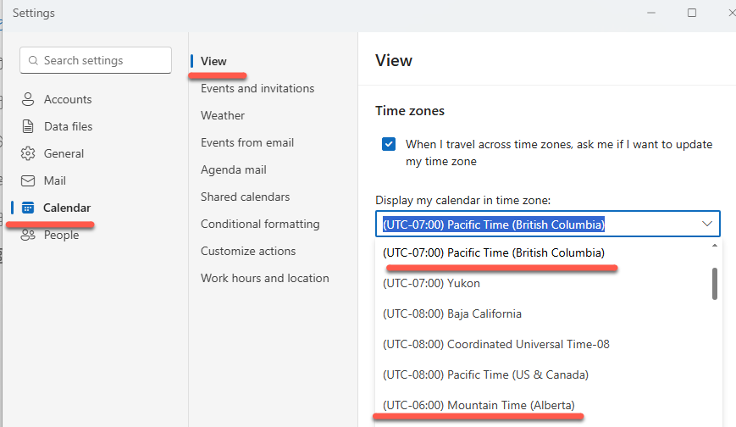
Classic Outlook for Windows: it takes its time zone from Windows, so once Windows is right there’s nothing separate to set. You can check it under File, Options, Calendar, Time zones. For more on adding a time zone to Outlook, see our detailed guide.
Outlook: the real headache
Fixing Windows fixes the clock. It does not fix your calendar. Microsoft confirms that existing events don’t move to the new time zone on their own, and recurring meetings need extra checking.
In other words, there’s no way for Outlook to know that a calendar item specifically set for, say, “Mountain Time (US & Canada)” should now be “Mountain Time (Alberta)”.
Recurring meetings
Changing a series’ time zone wipes its exceptions. Any single occurrence you moved to a different time gets reset, so you have to recreate those changes afterward. Make a list before you touch the series.
A recurring meeting with no end date can’t have its time zone changed until you give it an end date.
Organizers update every future meeting
Only the organizer can fix a meeting that has attendees. If you were invited, leave the meeting alone, don’t nudge the start time by an hour to compensate, and ask the organizer to update it.
For organizers, in new Outlook or Outlook on the web:
- Open the meeting. For a recurring meeting, choose Edit Series.
- Click the time block to show the start and end settings, then click the globe icon for the time zone.
- Choose the new zone and check the start time is still what you intended.
- Save or Send. Attendees get an updated invitation.
We’d do this in Outlook on the web (outlook.office.com) if you have it.
Outlook bugs to dodge
Your free/busy can disappear. Setting your meeting hours time zone to the new zone can hide your availability in Outlook on the web, new Outlook and Teams. If Outlook on the web offers to update your meeting hours time zone, click No. Microsoft says free/busy and Work Hours problems are still under investigation.
You can hit your sending limit. Every meeting update goes to each attendee and counts against your mailbox’s sending quota, so people fixing big meetings have had their mailboxes temporarily blocked. Spread large updates over a few days, or ask IT first.
Rooms can decline. An updated meeting may be declined by a room if it now overlaps another booking, so check the room’s reply.
For IT admins
The Exchange Online cleanup cmdlet was originally targeted for October 28 and is now due by November 4, covering only meetings that don’t repeat. There is no date yet for recurring meeting fixes. If you need help, open a support case with “#CanadaTimeZone” in the title.
Admins are not happy: many have criticized Microsoft for shipping the Windows updates only in the middle of October, leaving little time to test. Fair criticism.
Mac and iPhone
macOS
Apple doesn’t add new zone names. It updated the rules behind the city names, so the setting looks the same but now reflects the new offset.
- System Settings | General | Software Update, install everything and restart.
- In System Settings | General | Date & Time, turn on automatic date and time, and automatic time zone using your current location.
- Or pick a city by hand: Vancouver for most of BC; Edmonton or Calgary for Alberta, BC’s East Kootenay and the NWT; Winnipeg for Manitoba and Kenora.
- If an Alberta Mac still shows the wrong time, Regina is said to work as a temporary choice.
Ignore odd labels; check the actual time. Some devices label BC’s new time MST, some call Alberta’s time CST, and one iPhone in BC switched its city to Creston, which has the right offset despite the strange name.
Outlook for Mac: don’t trust it for calendar fixes yet
Microsoft is still checking how Outlook for Mac, iOS and Android handle the new zones. Users report new Outlook for Mac and Outlook for iOS showing Alberta appointments an hour late while Outlook on the web shows them correctly. Outlook for Mac also gained a new British Columbia option marked as UTC minus 8; don’t select it.
Install the latest version via Help | Check for Updates, then do all meeting fixes in Outlook on the web.
iPhone and iPad
Go to Settings | General | Date & Time and leave Set Automatically on. If you see a note about updated time zone definitions, restart.
Other Microsoft 365 apps that need a stopgap
Several Microsoft 365 apps don’t offer the new zones yet, so Microsoft’s advice is to borrow a zone with the same offset.
| App | Problem | Stopgap until fixed |
| Teams Events | New zones may be missing | Saskatchewan for Alberta, Yukon for BC, Eastern Time for Manitoba |
| Power Automate | Schedules on US zones are an hour adrift | Saskatchewan for Alberta; Yukon for BC (Arizona for recurrence triggers); Bogota for Manitoba |
| Power BI and Fabric | New zones not available yet | Arizona for BC; Saskatchewan for Alberta; Bogota, Lima, Quito for Manitoba |
| SharePoint Online | Sites set to Pacific Time (US & Canada) show times an hour behind BC | Change each site’s regional settings |
| SharePoint on premises | New zones missing | Update due November 10 |
| Teams Rooms on Windows | Room display can show time an hour behind Windows | Update Edge and WebView2, then check the display |
Possible sequel in Quebec
Quebec’s premier said on October 28 that this was very likely the last time Quebecers turn clocks back, though no bill has been tabled. Ontario’s 2020 law for permanent daylight time only kicks in if Quebec and New York State do the same.
If Quebec moves, expect another round of Windows updates and calendar cleanup. Hopefully Microsoft won’t leave their work until the last minute.
Official Sources
- Microsoft: Canada 2026 time zone changes, guidance for Microsoft products (KB5134344)
- Microsoft: Outlook time zone changes for British Columbia, Alberta and Manitoba
Outlook and Time Zones
Time zones in Outlook have always been fiddly. Adding a time zone to Outlook walks through the full setup, and Outlook Time Zone for London and UK explains why picking the right zone label matters more than you’d think.
If you’re now cleaning up meetings that shifted, Repeating or recurring Outlook Appointments covers the rules for editing a series without breaking individual exceptions, and Outlook repeating appointments tricks has shortcuts for the trickier patterns.
Need to hand a broken recurring meeting to someone else to fix? Outlook Change Organizer: Hand Off Meetings Without Canceling lets you transfer ownership of a meeting or series without canceling and rebooking.
Cross-border calendar events are a common headache. Add Outlook appointment in another time zone shows how to book a meeting in one zone and have it display correctly in yours,