The latest update to Windows 10 is out now and so is our companion book Windows 10 November 2019 for Microsoft Office users. Somewhat chastened by past troubles, the November 2019 update is being deployed in a much more cautious way. Microsoft is giving customers a choice about when to
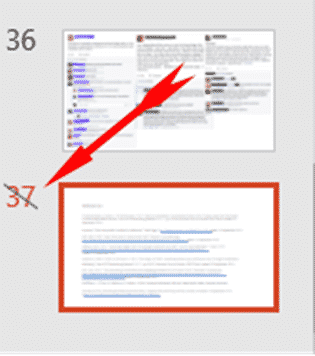
If you have a slide that you want to keep in your PowerPoint deck but don’t want to show them in a presentation, you can hide those slides. Go to the strip of slide thumbnails down the side of your project and select the slide you want to hide. You
OneNote for Windows has a better future after some reverse-course announcements from Microsoft. OneNote desktop program gets extended life and a promotion. The desktop and app versions merging into a single codebase. We’ll also explain the strange case of two OneNote for Windows. The announcements amount to a 180° reversal
The first sign that OneNote 2016 is back from a slow death is the announcement of the first new feature in well over a year. OneNote 2016 is getting a Dark Mode just like the Mac and Apple apps. OneNote dark mode will be an option in OneNote 2016 for
Buying and using a computer keyboard from Microsoft is very annoying, based on what we’ve heard from Office Watch readers. Choosing a Microsoft keyboard is harder than necessary and finding help, even harder. Microsoft’s keyboard range is especially bad for not properly explaining all the features of the products, apparently
In Wales, all teachers and their students can get Office 365 free, instead of about ₤60, thanks to an initiative of the Welsh government. It’s worth checking what access to the full Office suite your school, college or university kids might have. The Welsh government has arranged this as part
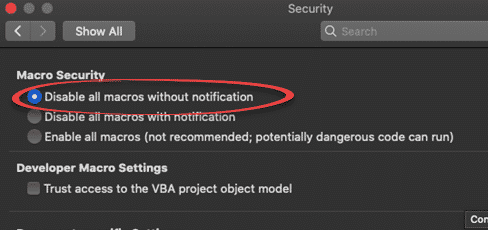
A security vulnerability has been discovered in Excel for Mac. It’s been there for many years and affects Office 365, Office 2019, Office 2016 and Office 2011 for Mac. We have details and suggest a protection you can do yourself. It’s another problem with legacy support for an older Microsoft
Outlook for Mac also has Profiles to manage multiple setups on the one machine. Though they are managed very differently to Outlook for Windows, the basics are the same on both. To add a bit of confusion, profiles where called ‘identities’ up to Outlook 2011. Outlook 2016 and later for
It was inevitable that phone scammers should try fooling Office 365 users into giving up their login details. Update: after this scam was publicized, the phishing email turned up in our Office 365 mailbox! Microsoft’s mail filtering let their customers down. Microsoft’s lapse let us show you a real example
The Microsoft Bluetooth Keyboard is one of two new models with dedicated Office key and Emoji key. What’s this new keyboard like … aside from those innovations? We bought a Microsoft Bluetooth Keyboard with our own money and gave it a long hard look. Source: Microsoft Note: this is the
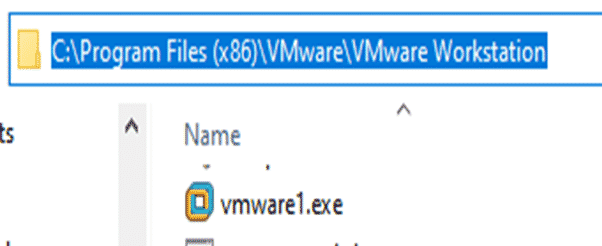
A nasty surprise for VMWare Workstation users after a recent Windows 10. Happily there’s an absurdly simple workaround and now a free update too! VMWare Workstation is popular virtual machine software. Among it’s many uses is running different versions or states of Microsoft Office on the one physical computer. Microsoft
While we were looking for Publisher 2019 on Amazon, we found more obviously illegal sales of Microsoft Office products. We’ve mentioned this before. Blatantly illegal Office licences sold on Amazon by third-parties. Why is this MS Office is illegal? Office 2019 Professional Plus is not sold retail. It’s only sold
There is a stand-alone perpetual licence Publisher 2019. It’s hiding and Microsoft definitely doesn’t want people to find it, but it’s there. We’ll explain where to find Publisher 2019 among all the subscription options Microsoft would like you to buy. Publisher 2019 is the latest single purchase version of Publisher
There are three little ‘gotchas’ with the Rewrite feature in Word 365 for Windows. One is unprecedented in the history of Microsoft Office. The ‘public’ feature isn’t available to everyone. Rewrite is the new cloud service that suggests alternatives to phrases in a document. The way it’s been released
Two new Microsoft keyboards have an Emoji key. Office-Watch.com has now tried one of these keyboards to see how the new key really works and hardware details. There are various layouts available including US layout. We bought a UK layout keyboard with the Alt Gr key. Firstly, it’s not an
Two new Microsoft keyboards have a dedicated Office key. Office-Watch.com has tested one of these keyboards to see how the new Office key really works. We have a full list of Office key shortcuts plus how it works inside Word, Excel and PowerPoint and geeky hardware info. Hard information about
Microsoft Word can now suggest alternative wordings for phrases and sentences in a feature called Rewrite. It’s ‘synonyms for phrases’ not just single words. Rewrite is promoted as ‘Say it another way’. If you want a different wording for an overworked phrase, Rewrite could help. Speaking of overworked phrases, here’s
Outlook for Windows is getting a new Search bar which combines many existing search and other options right on top of the title bar. It’s now available to Office 365 Insiders and will gradually roll out to other Office 365 . Outlook Search is hard to miss, it’s right on
The Microsoft Whiteboard app can now import pages from Word documents or selected slides from a PowerPoint deck. The new feature is better than it’s promoted because you can select pages/slides not just entire documents or decks. Start from the Insert menu where there are now options for Word document
Microsoft’s new Surface Buds are earbuds with links to Microsoft Office for voice control and transcription. The new product is a rival to the Apple Airpods and many other similar cordless earphones. What’s different is the touch surface with allow more integration with Windows and especially Office. Source: Microsoft It’s
A new Windows 10 bug patch has some fixes for Microsoft Outlook. Microsoft’s documentation is typically brief, so we’ll fill in some details. The time zone changes are too late to help some customers … why? KB4520062 has many Windows 10 fixes but a few affect some Outlook users and
Why does Microsoft demand a credit/debit card for Office 365 plans when you’ve bought your annual plans elsewhere, and probably cheaper? As Office Watch readers know, you don’t have to buy Office 365 Home or Personal direct from Microsoft. Microsoft is the worst place to buy or renew Microsoft Office
A few days ago we told you about a very good deal at Argos in the UK, half-price Office 365 Home. One couple has taken advantage of our tip, and other suggestions from Office-Watch, to get two years of Office 365 for the price of one. One of our readers
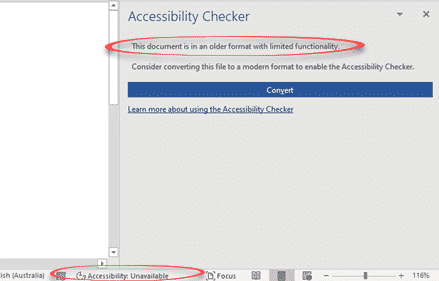
Soon, Office 365 will warn you when the document, worksheet or presentation uses a document format that doesn’t support modern accessibility features. Accessibility features like alt text in images, color contrast, heading consistency, table structures are only available with the modern Office document formats ( .docx .xlsx .pptx etc). Office