Microsoft can’t help itself from releasing a product or feature before it’s ready. They’ve done it again with a premature public release of Excel 365’s Stock and Geography data types. Excel 365’s Linked Data Types feature promises to be a great innovation. At long last there’s a simple way to
Dig a little into PowerPoint for some slide printing choices. They apply to printing slides only, slides with notes, outline or handouts. See also: Print part of a Word document Print selected pages or sections of a Word document in any order Print selection and other choices in Excel The choices
This is a good time to renew Office 365 Home with prices about as low as we’ve ever seen them. It’s possible to save $40 or 40%. There are also some good deals on Office 2019 packages. The official and automatic renewal price for Office 365 Home in the USA
It’s not specified in this press release but the announcement means a change in the financial data source for Excel 365’s Stock data type. ” 16 October 2018 Collaboration brings financial data to the masses with simple, direct access to trusted financial data within Microsoft Excel, MSN Money and Bing.
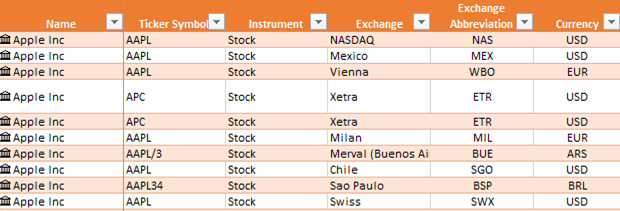
We like Excel 365’s new Stock data type but it’s far from perfect. It’s vital that you make sure you’re tracking the correct stock and exchange by checking the ticker code. Microsoft has been having a difficult time ‘data wrangling’. They rely on outside contractors to supply the price and
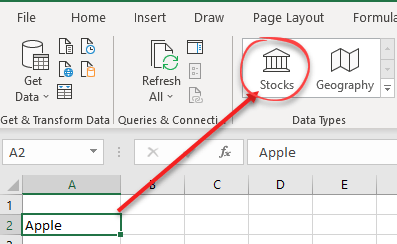
Give Stock or Geography linked data types a try in Excel 365 for Windows. It really is a great innovation and will be better once Microsoft sorts out the data issues. Getting started At its simplest, type in the name of a company and click on Data | Data Types
Excel 365’s new Stock data type has the potential to be really great. Here’s how to report problems to Microsoft so they can fix them. Real people read the bug reports, especially for a new and developing feature like Linked Data Types. The bug reports help Microsoft staff identify problems
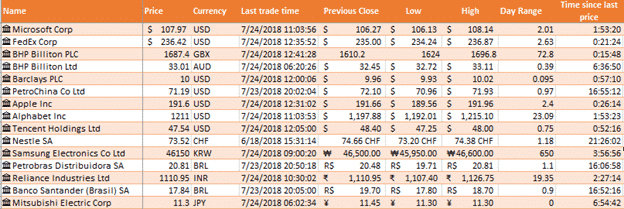
A truly interesting new Excel feature is now going public. Stock and Geography are the first two Linked Data Types (LDT) that bring stock prices and geographic info direct into Excel 365. Stock data type gives you information on stocks and indexes from over 60 global stock exchanges. No messing
Microsoft has released four security patches that all Outlook for Windows need to protect from newly discovered bugs. The patches apply to Outlook 365, 2019, 2016, 2013 and 2010 for Windows and are available today. The four Outlook security bugs are related. They involved a hacked .RWZ file that could
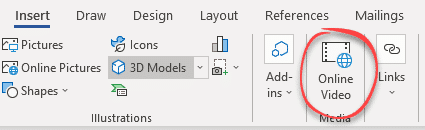
A previously theoretical way to misuse Office documents to infect your computer is now ‘in the wild’ and Microsoft isn’t interested in stopping it. Last week we told you about a new way for Office documents to get malware onto your computer. Cymulate discovered that the Online Video feature could
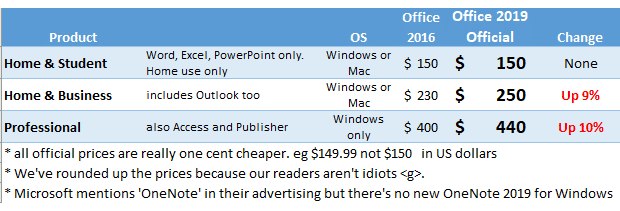
Microsoft has raised the prices of Office 2019, but there are still ways to beat the price rise. As widely expected, Microsoft upped the retail price of Office 2019. The official price increases are up to 10%. Office 2019 Home & Student remains at the same price, $149.99, keeping the
The latest ‘Insiders Fast Track’ Outlook for Windows has an interesting but somewhat incomplete new feature for managing appointments called ‘End appointments early’. It’s an overall setting at File | Options | Calendar | End appointments and meetings early. There are ‘end early’ choices for meetings: Less than one hour
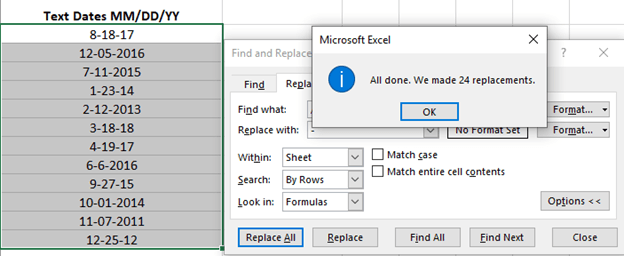
A little side-trick for converting text dates to Excel dates is replacing the text separator. Excel lets you replace text within the selected cells only. If the text dates are in the correct order (e.g. m/d/y ) but use the wrong separator for your Windows regional setting (e.g. m-d-y ).
A badly managed switch to Office 365 made it hard for staff and passengers at London’s Victoria Station. An uninstall message for Office 2010 appeared over the important platform display. The Register reports that the platform status displays, not the main board were hard to read because an Office 365
Yet another breakdown of Office 365 servers makes like difficult for customers. Users were unable to login with their Office apps or to Microsoft hosted Exchange Servers. It’s not clear how widespread the problems were. It happened on 31 October 2018 but took twelve hours to repair. That’s a disappointingly
Cymulate is reporting how embedded video in Word or other Office documents are another way for criminals and hackers to infect your computer. It’s yet another example of how Word, Excel or PowerPoint documents can be used to get malware onto computers to steal data, becomes bots or other nasties.
Office 365 enterprise customers will soon receive tips emails from Microsoft directly and without ‘opting in’. Microsoft calls them “helpful product training and tips” but aren’t being greeted with the enthusiasm that the company might be expecting. They’re reported to be starting on 29 November 2018 to all Office 365
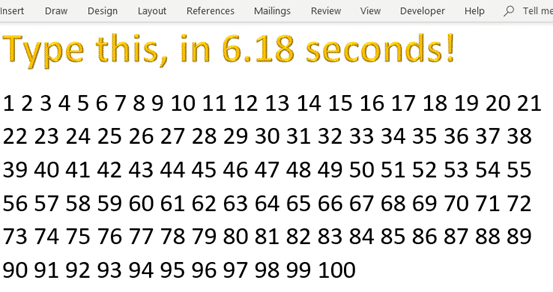
Speed Running, a gamers pastime has come to Microsoft Word. Finding ways to type the numbers 1 to 100 in the fastest time. If you’re unfamiliar with speed running, as we were, it’s playing and recording a pass through a game aiming to complete as fast as possible. Someone came
A new email trick to fool people into clicking a link from Outlook. It’s a ‘warning’ that your mailbox is near it’s size limit. The message was a little sophisticated by pretending to come from the real company that handles the domain. It was sent to an address with a
Changing an Excel formula into the values is amazingly easy. It’s just a copy and special paste. Another way to think of it is deleting the formula but leaving the results in the cells. Select the cells. In this case from our article on converting text cells into Excel dates.
The new iPad Pro’s announced today by Apple come with an extra cost to use Microsoft Office. Office Mobile apps for iPad are usually free for everyone. There are some extras for Office 365 customers but most of the app features are available for all comers. But the new iPad
The Office Home Use Program (HUP) is a cheap way to buy Office 2019 but there are some downsides. Your money might be better used for an Office 365 Home or Personal plan. The Home Use Program product is very limited in both features and how many computers you can
We clear up some of the misunderstandings about the MS Office Home Use Program (HUP), one of the cheapest ways to buy Microsoft Office. In our article Home Use Program or getting Microsoft Office for $15 we explained how many companies can let their staff buy Office 2019 for Windows
The cheapest legal way to get Microsoft Office is the Home Use Program (HUP). It costs just $15 each for Office 2019 Windows or Mac. Like many Microsoft deals, it’s not as good as in the past, but it’s still cheap and worth considering. Many people qualify for the Home