An important Microsoft Office related security bug fix has been bypassed by hackers in an embarrassingly simple way. Back in September 2021, Microsoft released a fix for a security bug which involved accessing a web page within a Word document (docx or rtf). That web page then downloaded and ran
Outlook replies can be a problem of invisible or hard to read text when the incoming email has a color background. We’ll explain the problem and how to fix your reply email. Messages with colored backgrounds might look OK to the sender but are a pain when you try to
If you want to change the background color on an email, Outlook’s option to do that has changed name and location. At least Windows users can change background color, Outlook for Mac users lost this option at few years ago! A color background can be nice in an email but
Looks like many people will be using Zoom, Facetime, Skype or Teams to meet up with family and friends over Christmas. Take a few moments to get ready, look and sound your best for family and friends. All through 2020/2021, Office Watch expanded its coverage to include no-nonsense guides to
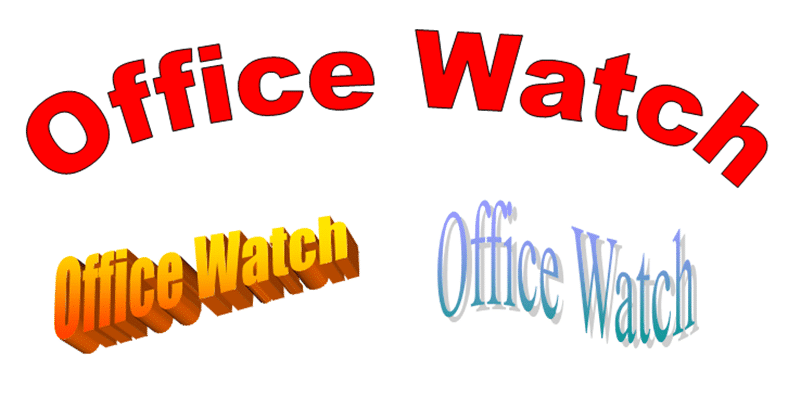
Microsoft loves tinkering with WordArt and in Word 2010 the entire feature was expanded to Text Effects and split into two features on different tabs. Here’s how to find all the old WordArt features plus a lot more. Back in Office 2007 there was one WordArt feature on the Insert
Microsoft’s Clippy, the source of many jokes and frustration is being trademarked, almost 25 years after it was released in Office 97. Why? Hopefully not the first step in a revival of the hated little paperclip? Clippy was the overly persistent helper in Office 97 that kept popping up at
The new look Office 365 (and Office 2021) is coming. For the moment you might have the option to try it or not. Here’s how. Look for the megaphone If a megaphone appears on an Office app title bar, you can try the new look Office for Windows. Click on
We’ve looked at design and typography in 2001: A Space Odyssey and how to use the ‘2001’ look in Microsoft Office. Two readers asked about some curious kerning in our version of the title font.Maybe you’re not interested in the fine detail of the text in a fifty year old
Use Word tables to do formatting tricks, make complex formats easily and solve Word formatting problems. There’s more to Word tables than just showing grids of information like this: Tables have all sorts of little tricks in them and let you do clever things in Word. Here’s a look at
Pantone has announced their “Color of the Year” for 2022 and, as usual, we’ll explain how to use those exact colors in Word, Excel, PowerPoint and Outlook. For 2022, the new color will also be appearing in Microsoft products with a nice PowerPoint template with extra color palettes. The color
The Financial Modelling World Cup or Excel esports Final was held a few days ago and you can watch the whole event. There were eight finalists from the USA, Canada, UK, India and Australia. If you can’t get enough of Excel champs at work, check out the earlier rounds. Last
In January 2022 there are important changes to the volume licence Business and Enterprise plans for Microsoft 365, Office and Windows. Monthly plans will cost 20% more, making annual plans more enticing. Microsoft says “introduces a monthly term option that will enable partners to provide customers with flexibility at a premium price,” However, the option to
Microsoft is increasing the prices on their main Business and Enterprise plans ranging from 9% to 25% effective 1 March 2022 now extended to 14 March 2022. Of course, Microsoft hasn’t stated the price rises in such stark terms. They give the increases as monthly prices (e.g $1 a month)
Microsoft is offering a discount price on Microsoft 365 to people with pirated or illegal Microsoft Office. As usual with Microsoft, there are ‘gotchas’ and unknowns with their special offer. People using illegal or pirated Microsoft Office might be seeing a message like this in their Office apps. The message
The Ink Editor button in Word 365 has gone, replaced with the ‘Action Pen’ on the Draw tab in Word 365. Some of the ink gestures have quietly changed since the original release of the Action Pen. The ‘Action Pen’ is now on right-side of the Draw tab | Drawing
Rename Word styles or give them alternative names/aliases. Sometimes you’ve got no choice but to make an alias because the original style name is fixed. Any style can have an alternative name which appears in the Style Gallery. That’s a useful trick because there’s limited space for the style name
The Word Style Gallery doesn’t have to be left the way Microsoft supplies it. Fix the Gallery to make it work better for you. Microsoft Office often has menus and options aren’t designed for the customer. Instead they are setup for Microsoft’s needs in ‘out of the box’ demonstrations or
Microsoft Word, since 2007, has developed a confusing mish-mash of lists, galleries and dialog boxes to view, select and manage styles. We’ve received a few questions about finding style options so this Office-Watch.com article will try to make sense of all fourteen places. It’s a guided tour to the various
The gradual rollout of the new look Office for Windows (Microsoft 365 and Office 2021) continues. More users, but not all, can now try the revamped Office interface. We’ve had a lot of feedback from Office Watchers about the new look. Some approve, others definitely don’t. Some users are eager
Office 365 for Windows is getting the Mica effect in a coming release for Windows 11 users. What is Mica? How will affect Microsoft Office users? We’ll explain Mica ‘material’ (Microsoft’s pretentious noun), show you what it does and how (little) it matters to Office users. Also how to get
A lesser known Excel file, the .XLL, is being used to spread password stealing malware across the Internet by email and online contact forms. As reported by Bleeping Computer, emails and online forms are getting spammed with links to fake and malicious web sites which entice people to download the
The Office 365 / 2021 for Windows “new look” is mostly about the Quick Access Toolbar with some nasty surprises and confusion, especially for novices. Let’s dig into the detail of the QAT changes, “fix” it to suit you and how the changes aren’t finished yet and not fully thought
Now there’s a new and different way to get paid Teams called Teams Essentials. Teams Essentials is a standalone Teams offering, not bundled into any other Microsoft 365 plan. That’s what makes it different from other ways to get a paid version of Teams. It costs US$48 a year per
Word lets us down when it comes to viewing a document’s styles and how they link together. The only way to see a detailed list of styles is to Print them! In the print pane, choose the drop-down list under Print All Pages and scroll down until you see the