Microsoft 365 – the subscription / annual fee plan for Microsoft Office on Windows, Mac, iPhone, iPad and Android.
Includes Word 365, Excel 365, PowerPoint 365, Outlook 365 and many other ‘365’ programs, apps and services.

Creative Last-Minute Christmas Tricks from Microsoft Designer (Easy Gift Tags & Activities)
Struggling with last-minute Christmas prep? These clever Christmas tricks using Microsoft Designer help you create unforgettable personalized gift tags, fun stickers, and engaging coloring pages in minutes. Perfect for kids and adults alike. Whether you want to add a personal touch for each recipient or keep the little ones entertained, these Designer techniques will save […]

Copilot Chat in Word, Excel & PowerPoint, a Practical Guide for Microsoft 365 Users
Microsoft is now embedding Copilot Chat directly inside Word, Excel, PowerPoint apps, giving users a conversational AI interface right next to the doc, sheet or slide. Ask questions, summarise, rewrite, explore ideas, and get help with your open document or spreadsheet without leaving the app. No need to switch to a separate browser or Copilot […]

Turn Copilot Off in Microsoft 365: How to Guide for Word, Excel, PowerPoint & Outlook
If you’re finding Microsoft 365 Copilot intrusive or just prefer a cleaner Office view, you can turn AI off across your desktop app, including Word, Excel, PowerPoint and Outlook. Users who don’t want Copilot help can disable it on both Windows and Mac. In this guide, we walk through how to switch off Copilot completely […]
AI Credits in Microsoft 365: What They Are and How They Impact Your Copilot Usage
There’s a fixed monthly limit on Copilot AI features across all Microsoft applications. Microsoft uses AI credits in Microsoft 365 Personal and some Family plan users to limiting Copilot AI usage across apps like Word, Excel, PowerPoint and Outlook. They are a key part of the HUGE changes to Microsoft 365 but somewhat overlooked in […]
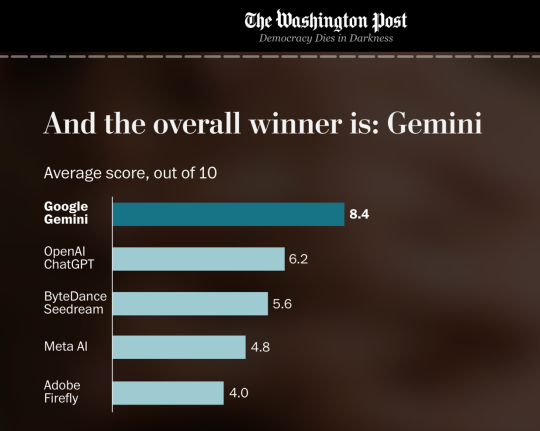
AI Image Maker & Editor Tests, Full Comparison of Leading Tools
The major AI image generation and editing tools are put to the test using real-world prompts to see which can truly deliver the best results. According to an in-depth comparison testing by The Washington Post, Google’s Gemini AI came out on top across all creative tasks — outpacing competitors from OpenAI, ByteDance, Meta and Adobe. […]
Are Microsoft 365 Business Plans Overpriced? Real Price History & Value Explained
As Microsoft continues to raise prices on its Microsoft 365 Business plans, with major bumps tied to AI, security, and management features. Many small and medium businesses are asking: Are these subscriptions truly overpriced for what you get? Let’s look at the price history of the Microsoft 365 Business plans and how they compare with […]

How to Insert the Exclamation Question Mark (⁉) in Word, Excel, PowerPoint & Outlook
Learn how to quickly insert the unique Exclamation Question Mark (⁉) symbol across Microsoft Word, Excel, PowerPoint, and Outlook on both Windows and Mac. Whether you’re adding emphasis and excitement to documents, spreadsheets, slides or emails, this step-by-step guide shows you the fastest methods — including keyboard shortcuts, the Symbol menu, and Character Viewer tips […]

Create Your Own AI Writing Style Prompts, a Step-by-Step Guide
Want to make your AI writing tools truly reflect your voice? Instead of relying on generic presets like “formal” or “casual,” you can create your own writing style prompts tailored to the exact tone, vocabulary, and structure you prefer. This step-by-step guide shows how to feed an AI system several examples of your writing and […]

AI Writing & Rewriting Made Easy: How Anyone Can Get Better Text with Modern AI
Struggling with writer’s block, phrasing, or finding the right tone for your text? Modern AI tools can help anyone rewrite, rephrase, and polish text quickly and effectively. From simple prompts like “Rewrite this in a friendly tone” to advanced style adjustments, here are practical and ways to draft writing before adding the vital human touch. […]

PDF Save As or Print: Best Methods Explained
Learn how to create high-quality PDF files from Microsoft Office documents using the two main methods: Save As/Export and Print to PDF. This guide compares both approaches so you can choose the best one for your needs. Whether you want clickable hyperlinks, bookmarks, backgrounds, or a simple fixed layout PDF from Word, Excel, PowerPoint, Outlook, […]
Master Excel’s SWITCH Function: Simplify Conditional Logic & Replace Nested IFs
Learn how to use Excel’s powerful SWITCH function, the modern alternative to nested IF statements. The SWITCH function evaluates a value against multiple matched outcomes and returns the first corresponding result, plus an optional default if nothing matches. Our guide breaks down the format, best usage patterns and practical examples plus tips for combining SWITCH […]

How to get Pantone’s 2026 color in Word, Excel and PowerPoint
Pantone’s color of the year for 2026 is “Cloud Dancer”. You can use that exact color in Word, Excel, PowerPoint, Outlook and Designer using the right Hex/RGB color code. And we’ll look at the flowery prose that’s become a hallmark of this annual promotion. The color of 2026 is … Cloud Dancer “Cloud Dancer” is […]
New “Modern Comments” Redesign in Microsoft Word
Microsoft has rolled out a refreshed design for comments in Microsoft Word, for now just the web version. It changes how feedback and discussion appear inside documents. The updated interface features revamped icons, buttons and, most importantly, when you select a comment it lights up, while unselected comments fade to muted gray. A small update, […]

Microsoft Mico: Because Apparently Copilot Needs a Blob to Feel “Relatable”
Microsoft has introduced Mico, the new AI avatar designed to make Copilot feel “friendly,” “expressive,” and, according to Microsoft, more human. Because nothing says cutting-edge technology like a floating blob reacting to your voice with the emotional depth of Jello. Mico promises to make conversations with your computer more “natural,” assuming your idea of natural […]
US State Department switches fonts, Times New Roman vs Calibri
In a move reversing a 2023 policy, the U.S. State Department has officially returned to using Times New Roman font for its communications, ending the brief tenure of Calibri. Why choose one font over another? Times New Roman vs Calibri – the pros and cons of each font. The US State Department is switching fonts […]
Microsoft Announces Global Microsoft 365 Price Increases What It Means for You
Microsoft is raising the price of Microsoft 365 across most Business, Enterprise and Non-Profit subscription plans worldwide, a move that affects most business users in 2026. According to Microsoft, the increases reflect the substantial number of new features (especially AI-powered tools and enhanced security) added to Microsoft 365 in recent years. From 1 July 2026, […]









