Microsoft 365 – the subscription / annual fee plan for Microsoft Office on Windows, Mac, iPhone, iPad and Android.
Includes Word 365, Excel 365, PowerPoint 365, Outlook 365 and many other ‘365’ programs, apps and services.

More Microsoft hype to force new Outlook on customers
Rejoice, Outlook users! Microsoft has decided to fix what wasn’t broken, ushering in the “new” Outlook with all the grace of a bull in a china shop. Because who wouldn’t want to trade in their reliable, familiar email experience, Outlook ‘classic’ for a shiny, unfinished product (Outlook ‘new’) dressed up with features you’ve enjoyed for […]
Why doesn’t Find File work in Word?
Microsoft Word’s hidden “Find File” command has been broken for years, and despite repeated reports, the issue remains unfixed in Word 365, 2024, 2021 and 2019 on both Windows 10 and 11. Instead of opening documents as intended, the feature fails entirely—leaving users to wonder why Microsoft has ignored such a long-standing flaw in one […]
Microsoft Word Accepts “Accidently” as Correct — Here’s How to Fix It
Fed up with Microsoft Word’s refusal to fix “accidently”? You’re not imagining things—Word’s spellchecker lets this typo slip through. If you want to finally solve the “accidently” vs “accidentally” debate, you’ve come to the right place. Office Watch reader Steve D. noticed something strange in the Microsoft Word dictionary. According to Word ‘accidently’ is a […]
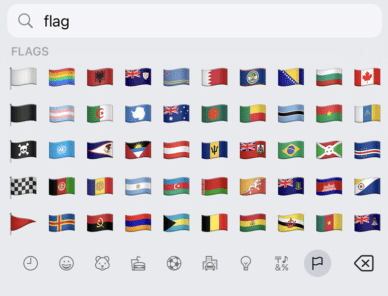
Get flag emoji in Microsoft Office with Windows workaround
Why you can’t insert national flag emoji (among many) in Microsoft Office and Windows but can in Office for Mac, macOS, iPhone and iPad. We’ll explain the workaround necessary to insert national flags in Windows and Office for Windows. Apple devices (macOS, iPhone and iPad) show flag emoji properly like this: But a Windows user […]

If “Microsoft” Calls, Hang Up — It’s a Scam (How to Spot & Stop It)
“Microsoft ” will never cold-call you. If you get an unexpected call about “Windows errors,” “Defender alerts,” or subscription refunds, it’s a tech-support scam. The safest move is simple: hang up, don’t say a word, and never read out codes or grant remote access. We show the warning signs, what to do if you answered, […]
All about Font Embedding in Microsoft Word — make sure your document looks the same across devices
Make sure your Microsoft Word documents look the same everywhere by embedding fonts, just in case the right fonts aren’t installed on recipients’ systems. How to embed fonts in Word on both Windows and Mac plus the options and alternatives for font embedding. Allow anyone opening the document to see what you intend. When you […]
Stop Microsoft Word’s Automatic Formatting Tricks
Take control of automatic formatting in Microsoft Word, the AutoFormat and AutoCorrect features. Whether you’re frustrated by Word turning your asterisks into bullet points or want to customize how your documents handle quotes, lists, and spelling corrections, this guide explores every option available. Discover how to manage, disable, and fine-tune Word’s automatic helpers so you […]

OneNote only lives until October 2025!
A once common and Microsoft recommended OneNote app is on the way out and has only six months to live. Make sure you’re using the right “OneNote for Windows”. You’re forgiven for being confused because this is a problem entirely of Microsoft’s making. There was a time when Microsoft insisted that their Universal Windows Platform […]
Excel worksheet protection is not encryption
Hiding and protecting an Excel worksheet is NOT the same as full encryption. Protected workbooks can be encrypted and not available without the right password. Worksheets protected or hidden with a password are absurdly easy to view whether you have the password or not. Excel has long had the ability to hide a worksheet (tab) […]
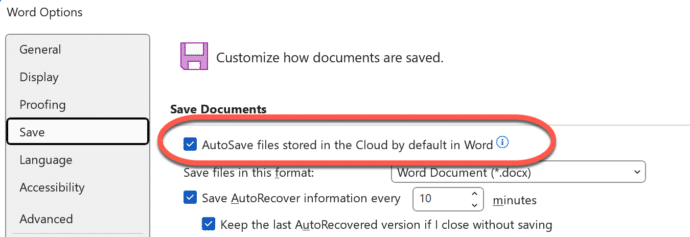
How to stop the Microsoft Word change to cloud folders only
Microsoft’s change to cloud folders only in Microsoft 365 can be stopped in three different ways. Regain full control of your document options, including two options to stop this unloved feature from appearing at all! People are complaining about Microsoft’s change to showing cloud storage only in Microsoft 365, before it’s even happened. There are […]

Microsoft 365 Classic: Watch Out for Hidden Full-Price Auto-Renewals
If you have Microsoft 365 Classic, watch for a sneaky Microsoft trick to make you pay more. They are automatically renewing Classic plans to more expensive Microsoft 365 plans without notice. That’s not just tricky but possibly illegal. We’ll explain how to keep Microsoft 365 Classic or complain if it’s already happened. Microsoft 365 Classic […]
Understand and use Excel’s Standard Error of the mean
Calculating the ‘Standard Error of the mean’ or SEM is simple using Excel’s in-built functions. Understanding ‘Standard Error of the mean’ isn’t hard either. We’ll explain the formula and what it all means. To calculate standard error of the mean get the Standard Deviation of a sample (STDEV.S() or STDEV()) then divide by the square […]

Standard Deviation made easy in Excel
Understanding Standard Deviation isn’t hard, especially with Excel’s help. This quick guide shows the difference between sample and population functions so you can choose the right one and get accurate, informative results every time. Standard Deviation in Excel The standard deviation measures the variation from the average or mean of a sample set of values. A […]

Make your own 3D models from a photo
Transform your photos into interactive 3D models in seconds with Copilot 3D, Microsoft’s experimental tool makes it easy to generate high-quality 3D models from simple images. Discover how this experimental technology can let you change the view of a person or object. Take a photo of an object with a plain background and the smarties […]
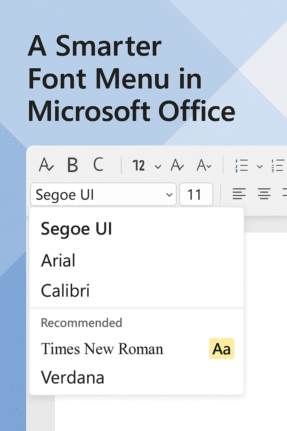
Check out the better font menu in Microsoft Office
Picking a font in Microsoft Word or PowerPoint can be confusing, especially with the existing long, long menus. Now, Microsoft 365 offers a new, easier font picker in two web apps. The new font menu has better search and simple organization, finding the right style for your document or presentation is faster and clearer than […]

Excel 365 has Searchable Drop-Down Lists with AutoComplete
Excel 365 for Windows and now Excel 365 for Mac and Mobile apps have a great improvement to its drop-down list selector. At long last we have AutoComplete or Search for pull-down lists and you don’t have to do anything to make this work. You can type a search into the drop-down list so Excel […]









