Microsoft 365 – the subscription / annual fee plan for Microsoft Office on Windows, Mac, iPhone, iPad and Android.
Includes Word 365, Excel 365, PowerPoint 365, Outlook 365 and many other ‘365’ programs, apps and services.

Two ways to change Excel default fonts
There are two options for changing the default fonts in Excel, either for new blank workbooks or existing spreadsheets. Maybe you prefer another font. Perhaps the old default font until mid-2023, Calibri. Or a spreadsheet specialist font like Goldman Sans. Maybe your organization or client has a preferred font? Go ahead and change the font […]
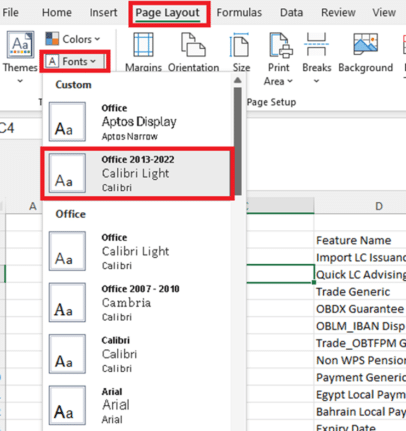
Excel – switch away from Aptos fonts
Here’s the simplest way to switch from Aptos fonts in Excel 365/2021/2019 to either the previous font (Calibri) or some other font. In Excel, Aptos Narrow is the new (mid-2023) default font style with a font size of 11, Black. What if you don’t like the new default font? Aptos fonts haven’t been met with […]

Copilot’s Legal Trap or what you’re giving to Microsoft
Just by using Copilot you’re giving Microsoft free access to anything you do or get from their AI system. It’s a legal trap that everyone needs to keep in mind. We found this buried in the Copilot Terms and Conditions (T&C’s) starting on the Bing web site https://www.bing.com/new/termsofuse (strange place for it to hide). Microsoft’s […]

Essential ways to strengthen your Microsoft account
Most readers of Office Watch will have a Microsoft account but is it as secure as it should be? Two-step authentication is becoming essential for the key Microsoft account. If you have Microsoft 365, OneDrive, Outlook.com, Windows 11/10/8.1/8, Windows Phone or (likely) Skype then you’ll have a Microsoft account. It’s the single login for all […]

How Office improves without customers even noticing
While a lot of Word, Excel and PowerPoint might appear to be the same for decades, there’s a lot of work happening ‘under the hood’ to keep Office working. Gilad Oren at Microsoft has written an interesting piece on how the whole real-time collaboration feature in Microsoft Office has been changed to make it faster […]

Make Images with Google Bard
For yet another way to make AI images, perhaps with a different look, you can now try Google Bard. Bard is Google’s AI helper, now available in ‘most countries’ (Google’s wording) but only in English for the moment. It does all the things we’ve come to expect from a broad AI service, similar to Copilot. […]
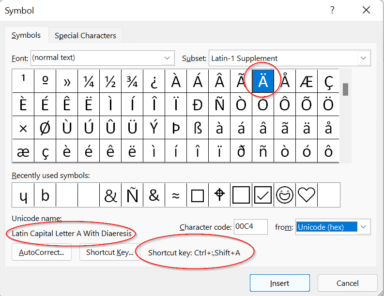
Five ways (and more) to type Accent characters in Word and Outlook
More than five ways to type characters with accent, grave, circumflex, tilde, umlaut, dieresis or cedilla in Microsoft Word and Outlook when they aren’t on the keyboard such as á ã à ä Ç ç ē é ê è ë â ê î ô û and many more. Typing accented letters can be a chore […]

Easily compare a series of values with ChiTest() Excel
Compare one set of numbers with another list of values using ChiTest() in Excel. It compares two sets of numbers and gives a single number to show how different the sets are. ChiTest() or ChiSq.Test() sounds like a complex formula that only expert statisticians can understand – not at all! While the math behind ChiTest() […]
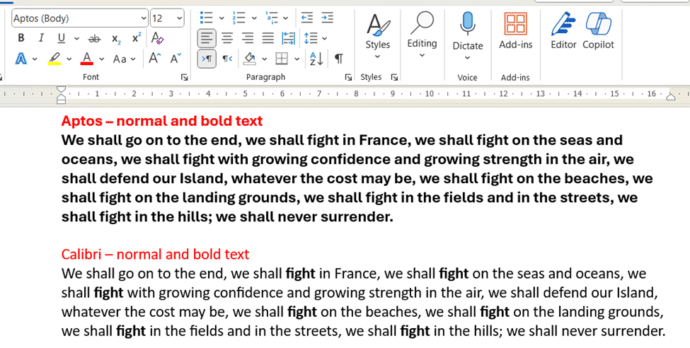
Microsoft Word – switch away from Aptos fonts
There are at least two ways to switch away from the new Aptos fonts in Microsoft Word and back to the old Calibri fonts or something else. Microsoft has forced a change to Aptos as the new default font in Word but that change doesn’t suit everyone. In particular, Aptos doesn’t make much (or any) […]
Outlook.com users face sign-in issues with email clients
A technical issue has been affecting Outlook.com users who try to access their accounts using various email clients, Microsoft announced. The problem started on January 23, 2024 was partly resolved late on 31 January and finally on 2 Feb for some but not all customers. Outlook 2013 and Outlook 2016 users might have some extra […]

Save your WordPad before it’s too late
Wordpad is about to be removed from Windows 11, here’s something you can try to keep this useful Word document app available. Microsoft is ending WordPad the long-standing app that’s installed with Windows which can open, view, edit and print Word documents (.doc .docx) and RTF files. Microsoft isn’t just removing WordPad from new Windows […]

What’s the deal with Microsoft’s Copilot Copyright Commitment
Microsoft loves to boast about their “Copilot Copyright Commitment” but what does it really mean and how much protection do customers really get? There’s a concern that AI generated content might be subject to intellectual property (IP) law suits. Perhaps because an AI image or text is too similar to copyrighted content. The New York […]
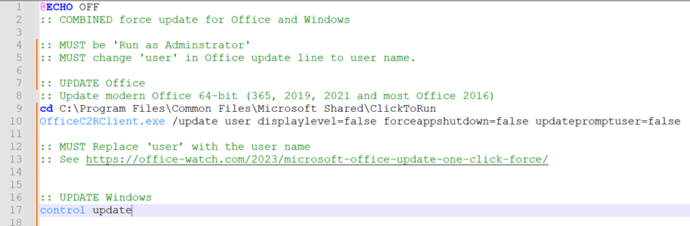
Combined ‘one-click’ update for both Windows and Office
Here’s a combined ‘one-click’ way to force an update to both Windows and Microsoft Office at the same time. Normally Windows and Office both update themselves automatically and in the background so you don’t have to worry about it. But there are times when you need to ensure both are fully updated. To do that […]
Make your own CPU using Excel
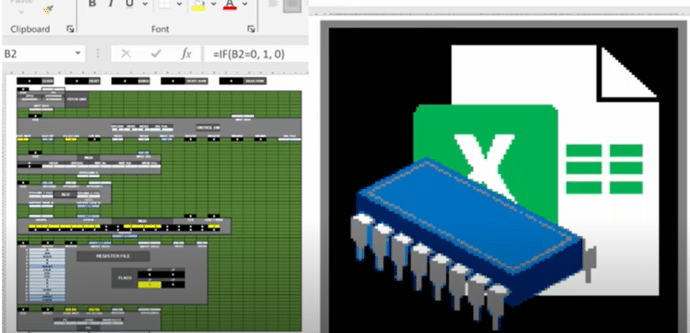
You can do incredible things in Excel but here’s something truly amazing. Someone has made a 16-bit computer chip (CPU) emulation entirely in Excel. We have links to the source code and fascinating video that explains it all. @Inkbox has recreated the basic logic of a CPU to make a mini-computer in Excel with no […]
Microsoft Forms (finally) live updates Excel
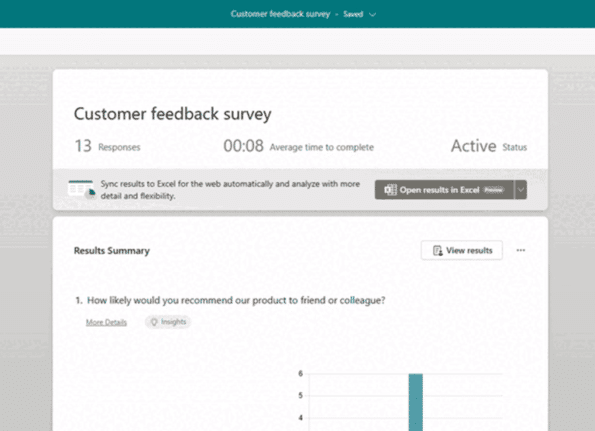
At long last, there’s a way to get Microsoft Forms results synchronized with an Excel workbook. It’s not what Excel users were expecting but it’s a start. Microsoft is calling this a ‘highly anticipated feature’ which is corporate weasel term for a long-standing customer request that’s finally fulfilled (in part). The Forms responses page should […]
Is AutoSave really the ‘greatest feature of all time’?
According to Microsoft, AutoSave is the ‘greatest feature of all time’. That’s ‘over the top’ even for Microsoft and it only highlights the self-serving limitations of the current Autosave feature in Office. “Autosave is the greatest feature of all time and you can use it across your M365 apps. That’s all.” The ‘X’ (formerly Tweet) […]









