Microsoft 365 – the subscription / annual fee plan for Microsoft Office on Windows, Mac, iPhone, iPad and Android.
Includes Word 365, Excel 365, PowerPoint 365, Outlook 365 and many other ‘365’ programs, apps and services.

Telephone receiver 📞 emoji in Word, Excel, PowerPoint and Outlook
Insert the Telephone receiver symbol 📞 into Microsoft Word, Excel, PowerPoint or Outlook. Both in Office for Windows and Office for Mac. Telephone receiver or handset 📞 symbol can be used on a letterhead or sign where a phone number is shown. There’s an emoji in the Unicode standard plus two Microsoft Office Icons. How […]

Find out more about fonts
A clever interactive from The New York Times explains the basics of fonts and how to choose the right font for your documents, slides and sheets. What’s your type? Try these tests to pick the perfect font for you starts with an option to read the whole article in different fonts. One of the fonts […]

A quicker, easier way to AI expand a graphic or photo
Stability.AI now has a quick and easy way to expand or extend an image. Using AI, it can take an existing image to make a larger version. Unlike other options like OpenAI’s Outpainting, ‘Uncrop’ is quite simple to use. Whatever you call it; Uncrop, Outpainting, extending etc, it’s a useful AI feature for reshaping images […]

What you’ll need to use Copilot with Microsoft Office
Microsoft has released some information about what you’ll need to get their AI tools (called Copilot) when they are eventually released. Copilot is Microsoft’s name for their upcoming AI tools integrated into Office apps (Word, Excel, PowerPoint and Outlook) plus other services like Teams. As with all Microsoft’s Copilot announcements, it’s a strange mix. The […]

Designer Erase is a picture edit opportunity for all Office users
Microsoft Designer now has an image editing tool that’s been missing from Microsoft Office. Erase in Designer lets you edit images in an important way that’s not possible in Word, Excel, PowerPoint or Outlook for Windows or Mac. Picture editing in Office has a lot of features but they mostly effect the whole image, there’s […]

Designer gets a clever Erase feature
Microsoft Designer now has a nice Erase tool to remove unwanted parts of an image. Finding Erase is a little tricky, we’ll show you where it’s hiding and how to get the most from Erase. Erase lets you remove parts of an image. It’s not on the main image toolbar (with Replace, Remove Background etc.) […]

Outlook bug workaround for hang or slow startup
Microsoft is offering some workarounds for a bug in Outlook for Windows which leaves it hanging on the opening screen and very slowly opening properly. According to Microsoft the bug is in the Outlook software part of Microsoft 365 for Windows. We suspect a similar problem might also be in Outlook 2021 for Windows since […]

Updated – Windows 11 for Microsoft Office users
We’re delighted to announce that our popular ebook Windows 11 (June 2023) for Microsoft Office users has been updated to accompany the latest mid-2023 “Moment 3” changes to Windows 11 itself. New Chapters Two new chapters have been added to the 1,000 page book plus other changes to reflect the updates to Windows 11. Moment […]

Like👍button now in Word Comments
Comments in Word documents can now have a quick response from others just by clicking a ‘Like’👍button. Why just one button when other Microsoft apps have more? Instead of writing a short reply adding to a Word comment thread, you can now just click a Like👍button on an existing comment or reply. Each comment/reply has […]
‘Suggestions’ appear to sell Microsoft OneDrive
Microsoft continues to push Office users to store their documents on OneDrive with new promotional messages appearing inside Word, Excel and PowerPoint. Messages like these are appearing for Microsoft 365 customers who are saving documents on their computer, not OneDrive. “MAKE THE MOST OF MICROSOFT 365 Take advantage of OneDrive storage” “SHARE THIS DOCUMENT Work […]

Can you use Microsoft Office with Tiny Windows?
Tiny Windows are stripped down versions of Windows 11 and Windows 10, ideal for older computers or virtual machines. We tested Microsoft Office on both ‘tiny11’ and ‘tiny10’ to see if the Office apps can run in memory far below the official limits. Tiny Windows are stripped down versions of Windows 11 (tiny11) and Windows […]

Lovely Wallpapers from Microsoft – old and new
Tucked away in a little known part of Microsoft’s web sites is a lovely collection of wallpapers (or PowerPoint backgrounds) with new and old, nostalgic designs. Including a 4k rendering of the famous Windows XP wallpaper . Go to https://wallpapers.microsoft.design/ to see all the wallpapers. At first some in full-page versions but scrolling past that […]

Search improvements in Word, Excel and PowerPoint
Microsoft is again changing the way Search works in Microsoft 365 and also (surprise!) Office 2021 to expand the results beyond the document or Office features. Now you can search for definitions, media and even web results from the top bar of Word, Excel and PowerPoint. The most recent announcement is about Office 365/2021 for […]
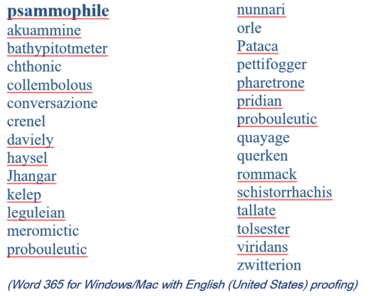
2023 Spelling Bee champs vs Microsoft Word
Our annual look at the words that challenged the Scripps Spelling Bee champs to see how many are recognized by the spell check in Microsoft Word. 2023 wasn’t a good year for Word with a disappointing score that would shame some 14 year olds. Here’s a selection of the last round words from the 2023 […]

Word, Excel and PowerPoint work in Apple’s VR headset
Microsoft is already boasting that Word, Excel, PowerPoint and Teams will work with the new Apple Vision Pro headset. Here’s a quick look at the new tech and a few features that caught our eye. Apple Vision Pro is the much anticipated virtual-reality headset due out in early 2024 for about US$3,500 (no, that’s not […]
Microsoft outages hurt lots of paying 365 customers
Microsoft Outlook and Teams had a horror Monday (and now into Tuesday) with cloud service outages affecting many paying and unhappy customers. The peak trouble was around 11am (US Eastern time) Monday 5th June. UPDATE: As we type this, there’s a new Exchange Online (Microsoft 365 hosting) outage. According to Microsoft “Users may be intermittently […]









