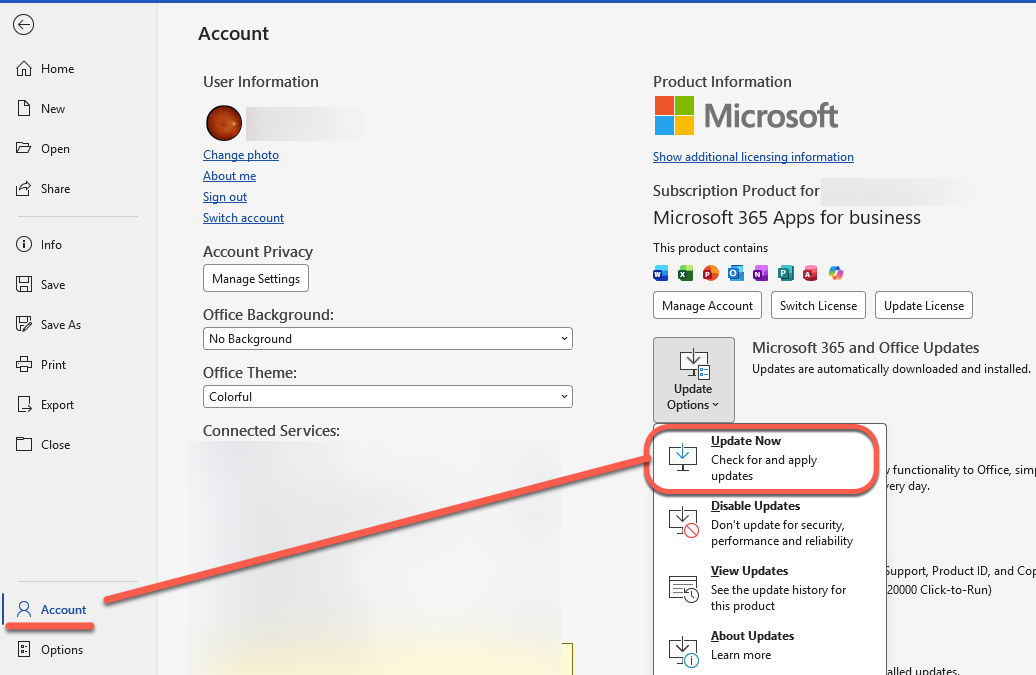
Microsoft 365 – the subscription / annual fee plan for Microsoft Office on Windows, Mac, iPhone, iPad and Android.
Includes Word 365, Excel 365, PowerPoint 365, Outlook 365 and many other ‘365’ programs, apps and services.

Microsoft outages hurt lots of paying 365 customers
Microsoft Outlook and Teams had a horror Monday (and now into Tuesday) with cloud service outages affecting many paying and unhappy customers. The peak trouble was around 11am (US Eastern time) Monday 5th June. UPDATE: As we type this, there’s a new Exchange Online (Microsoft 365 hosting) outage. According to Microsoft “Users may be intermittently […]

Excel formula: get percentage discount
Use Excel to figure out the percentage discount or increase, for example the difference between the original and sale prices. We’ll show you the Excel formula and some practical tricks beyond the official answer. Percentage discount formula The basic formula is: (Original – Sale) – to figure out the difference between old and new amount […]
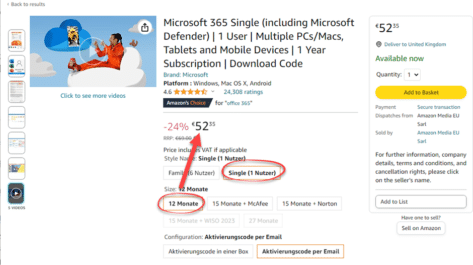
Get 25% off on Microsoft 365 Single/Personal from Amazon in Europe
Amazon’s European sites are offering good deals on Microsoft 365 Personal (in Deutsch “Microsoft 365 Single”) The best deal is around €4.35 a month. We’ll look at each offer, figure out which is best and how to avoid the traps. We’ve found similar good deals for the six-user Microsoft 365 Family Our links are to […]

Get up to 30% off on Microsoft 365 from Amazon in Europe
Amazon’s European sites are offering good deals on Microsoft 365 Family (for 6 users) including an unusual offer we’ve not seen before. The best deal amounts to just €5 a month which you can use to extend an existing Microsoft 365 Family plan. We’ve looked at each offer, figured out which is best and how […]

A new Word feature is really Microsoft’s insult to customers who won’t move to OneDrive
The latest Microsoft 365 feature is an insult to customers who won’t obey. For years Microsoft has been pushing customers to save everything to their OneDrive cloud storage using many tricks, but this latest ‘smart reminder’ is blatant and insulting to paying customers. Smart Save Reminders The feature is called ‘Smart Save Reminders’ but should […]

Stop ‘Try the new Outlook’ button appearing
Hide that ‘Try the new Outlook’ option appearing in Outlook for Windows and why you should not click that button … not yet anyway. Microsoft has released the ‘new Outlook’ to some customers as an option because they want lots of unpaid ‘guinea pigs’. Each ‘new’ feature added to the software gets a blog post […]
HP Plus is an expensive way to stop your HP printer working
It’s one thing for a printer maker to add expensive and limited ink ‘subscriptions’ but HP have gone way too far by permanently disabling a printer if the customer stops the monthly plan. And there’s excessive monitoring of how you use your printer. HP+ Smart Printing System (aka HP Plus or just HP +) seems […]

All the left pointing hand symbols in Word and Office
Word and Office have several left “pointing hand” symbols available in some fonts. Here’s the Unicode options explained and shown. We’ve also looked at the options for All the RIGHT pointing hand symbols in Word and Office Want more arrows or pointers? Check out all 200+ Arrow or Hand pointing symbols and more in a […]
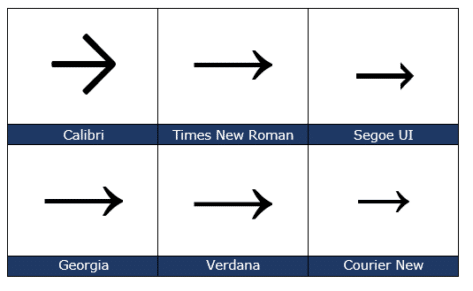
Right arrow → symbol in Word, Excel, PowerPoint and Outlook
Insert the Right arrow → into Microsoft Word, Excel, PowerPoint or Outlook. Both in Office for Windows and Office for Mac. The official Unicode name is ‘Rightward Arrow” → but it can be called ‘Right pointing’ ‘Right facing’ or just ‘Right Arrow’. Want more arrows or pointers? Check out all 200+ Arrow or Hand pointing […]

All the right pointing hand symbols in Word and Office
Word and Office have several right “pointing hand” symbols available in some fonts. Here’s the Unicode options, index, backhand, sideways in white or black, all explained and shown. Want more arrows or pointers? Check out all 200+ Arrow or Hand pointing symbols and more in a searchable list. Index, Backhand or Sideways? The Unicode system […]

Microsoft Word vs Spelling Bee quiz
How does Microsoft Word’s spell check work against ten difficult or unusual words from a New York Times spelling bee quiz? What’s in a Word is an interesting quiz of words used in past Scripp’s Spelling Bee’s and, as usual, we’re interested in how many of the words are recognized in Microsoft Word’s spelling. Word […]

Three ways to run an Office macro direct, from the ribbon or toolbar
There are three main ways to run a macro in Microsoft Office (Word, Excel, PowerPoint or Outlook). From the Macros list, from a button on a ribbon or from the Quick Access toolbar. We previously spoke about how to install an Office VBA macro, here’s how a macro can appear on the ribbon or Quick […]

Make the Office ribbon more useful, add your choice of buttons
Any Office ribbon tab can be more useful for you. By trimming some of the buttons you don’t need, making room for the buttons you want. We’ll show you how to remove some of the less needed ribbon sections (likely from the Developer tab) to make more room for your own buttons. Previously we’ve explained […]

Add Chess Piece symbols to Word, PowerPoint and Office
Insert any of the chess piece symbols available in Word, Excel, PowerPoint and other Office apps. King, Queen, Bishop, Knight. Rook and the lowly Pawn all with different looks, depending on the font plus three pieces available in Microsoft Office icons and the single chess piece emoji. Chess Pieces – the full list Here’s the […]

Visio Online is available more (paying) customers
Did you know that you have Visio Online with your Microsoft 365 subscription? Most business or school users already have this amazing tool. Visio Online lets you create and share diagrams on the web ready for your Office documents. What is Visio Online ‘Visio Online’ is a lightweight version of Visio that’s for all users […]

Changed link handling in Outlook for Windows
You may have noticed that opening a link in Outlook behaves differently and not in your chosen browser. That’s because Microsoft wants to push their Edge browser, though they have some excuses for the change. When you click on a link in Outlook for Windows, it might open in the Edge browser, even though you’ve […]