Microsoft 365 – the subscription / annual fee plan for Microsoft Office on Windows, Mac, iPhone, iPad and Android.
Includes Word 365, Excel 365, PowerPoint 365, Outlook 365 and many other ‘365’ programs, apps and services.

Add Santa Hats to your Xmas photos and emails
There are many red and white Santa hats that you can quickly add to any photo using Word, Outlook, PowerPoint or any Microsoft Office app. I’ll explain where to get some Santa hats and how to add them to a picture. A Santa Hat can add a little festive fun to a photo, like this […]
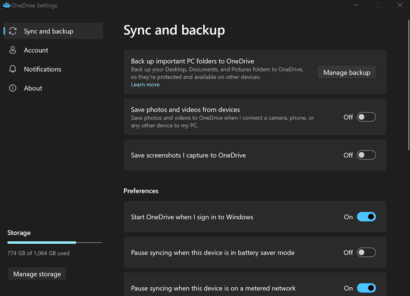
OneDrive gets a new look in Windows with one (tiny) new feature
The OneDrive app for Windows 11 and 10 now has a new look that makes settings a little easier to manage. The change also includes one, tiny, new feature. The change is to the Settings menu which now looks like the modern Windows settings panes. That means there’s more room for explanation of settings than […]

Airplane ✈ symbol in Word, Excel, PowerPoint and Outlook
Type the Airplane ✈ symbol, icon, emoji into Microsoft Word, Excel, PowerPoint or Outlook. Both in Office for Windows and Office for Mac. Airplane ✈ symbol is often used for signs, directions or an itinerary, possibly in combination with symbols for other transport like train, car, walking. For more ‘airplane’ related graphics see Even more […]

PowerPoint 365 Recording Studio in depth
Recording Studio lets you make a video of your entire PowerPoint presentation. Not just the slides but hear the presenter talking and even seeing the presenter/s on screen, pointing or drawing on slides. The video you make can be shared and streamed just like any other video. gives users the ability to easily share their […]
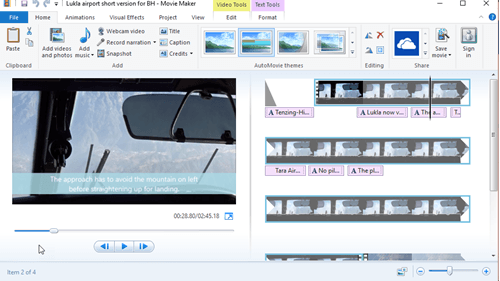
Windows Movie Maker is still available
Windows Movie Maker is a simple and free video editor from Microsoft that still works in modern Windows. Officially it’s no longer available but it’s still available if you know the magic spell. We’ve explained how to get the much-loved Office Picture Manager even though it’s been officially removed from Office. Movie Maker was part […]
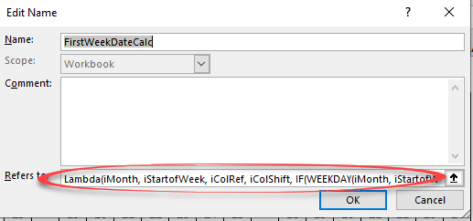
Lambda() downsides and their workarounds
The Lambda() feature in Excel 365 is great, when you try using it the downsides quickly become obvious. Happily there are workarounds. Lambda() itself is fine. It’s a welcome addition which more advanced users will make Excel do amazing things or simplify complex formulas. See Lambda – strange name for a really good extra in […]

Add Games to Microsoft Teams
There’s now a Games for Work addon for Microsoft Teams so you can either connect or waste time with your fellow staffers <g>. Games app for Teams is a combination of a few well-known Microsoft Games: Buried down in the footnotes of Microsoft’s announcement is an important limitation … “Available for Microsoft Teams Enterprise and […]
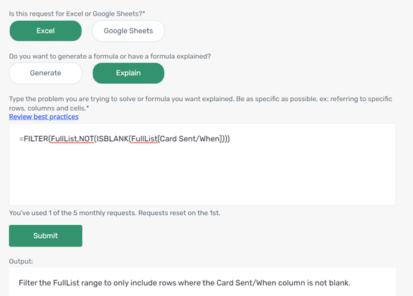
Add the Excel Formula Bot into Excel itself
The excellent Excel Formula Bot is now available as an Excel addin for subscribers to the Bot service and now can explain a formula in plain language. Excel Formula Bot is a wonderful service which converts human-speak into Excel formula-speak or vice-versa. Since we last reported, David Bressler has added an ‘Explain’ option which takes […]
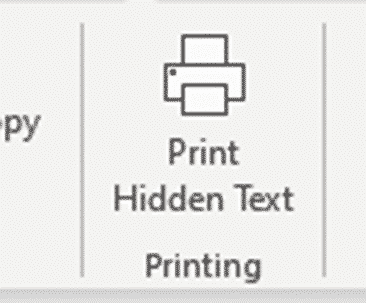
Hidden Text Printing options and workaround for Word
Hidden Text Printing in a Word document is possible but is more complex than it should be. Here’s how to change the setting quickly from the ribbon or change the print setting just for one print job. By default, the hidden text will not be printed, but you can choose to print it if you […]

Two “Quick Quotes” extras for Word
Two simple Word add-ons to put quotes before and after a block of text – either pasted from the clipboard or selecting some text already in the document. Your choice of ‘single’, “double”, smart or some other quotation marks. “For me and, I am sure, many other writer, quotes are a time consuming nuisance. It […]
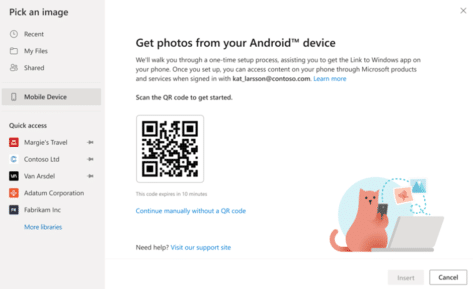
Grab photos from Android direct to Word or PowerPoint
A new way to insert a picture directly from an Android device into a Word document or PowerPoint slide on a Windows or Mac computer. Plus alternatives you can use now and might be more reliable. How it’s (supposed) to work In the online (browser) versions of Word and PowerPoint, Microsoft is gradually rolling out […]

How to fix #BLOCKED! errors in Excel
What to do if you see a #BLOCKED cell error message in Microsoft Excel. The fix is simple, if you can get past Microsoft’s unhelpful, er, ‘help’. Open uṗ a workbook and see #BLOCKED in some cells. The message ‘Check privacy settings’ is typical Microsoft message. It’s strictly correct but not very helpful. There are […]
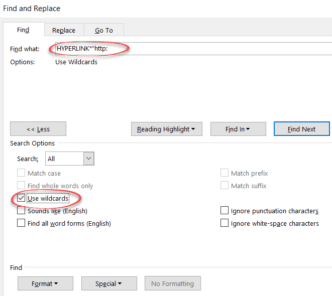
Two tricks to Find or Replace web links in Word
Find or change many web links in Word documents using the Replace command, here’s the two tricks – one is good and the other not so effective. For example, you might need to change the domain name due a corporate restructure or update links so they are secure (https) instead of regular (http) links. Reveal […]

Set your own Shape default settings in Microsoft Office
You’re not stuck with the Microsoft automatic settings when inserting a new shape. Change the defaults to whatever you like for faster shape formatting in Office; Word, Excel, PowerPoint or Outlook. When you Insert | Shape, something like this probably appears. Blue fill, 1pt black single line outline, no effects and Text Wrapping in front […]
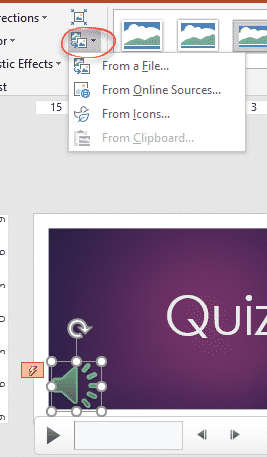
Change the PowerPoint audio/music speaker icon
In late 2016, Microsoft removed the PowerPoint audio ‘Change Picture’ option from the right-click menu for the music icon and they show no interest in bringing the choice back. The feature hasn’t gone away, it’s just not on the right-click menu where it should be. The workaround is on the Audio Format | Adjust ribbon where the Change […]

Bypass Office Backstage and get to ‘real’ Open or Save dialogs
If you don’t like the large Office Backstage pane, the older and more powerful Open and Save dialog boxes are still available via shortcuts or changing a Microsoft Office setting. Microsoft has spent a lot of time and effort changing the Word, Excel and PowerPoint File panes to add more features and unsubtle hints to […]









