Microsoft 365 – the subscription / annual fee plan for Microsoft Office on Windows, Mac, iPhone, iPad and Android.
Includes Word 365, Excel 365, PowerPoint 365, Outlook 365 and many other ‘365’ programs, apps and services.

Viva Magenta! Pantone’s 2023 color in Word, Excel and PowerPoint
Pantone has announced their “Color of the Year” for 2023 is “Viva Magenta” and, as usual, we’ll explain how to use that exact color in Word, Excel, PowerPoint and Outlook. And we’ll look at the purple prose that’s become a hallmark of Pantone’s annual promotion. The color of 2023 is … Viva Magenta As usual […]

Which Microsoft 365 plan have you purchased or using?
How to tell which Microsoft 365 plan (Personal, Family/Home, University etc.) you’ve bought and the expiry date. Or maybe you’re sharing a Microsoft 365 Family/Home plan. The Microsoft 365 plan, status and expiry doesn’t appear in the Office software (that would be too easy). See: Microsoft 365 which email address am I using? Instead, go to […]

Find and edit trick in Microsoft Word
In Microsoft Word you can use Find combined with your own actions and easily switch between the Find and editing. That’s great for situations where a simple Replace command isn’t enough. Find results show up in the left-hand pane or dialog box, you can move between find results and editing, change the text in or […]
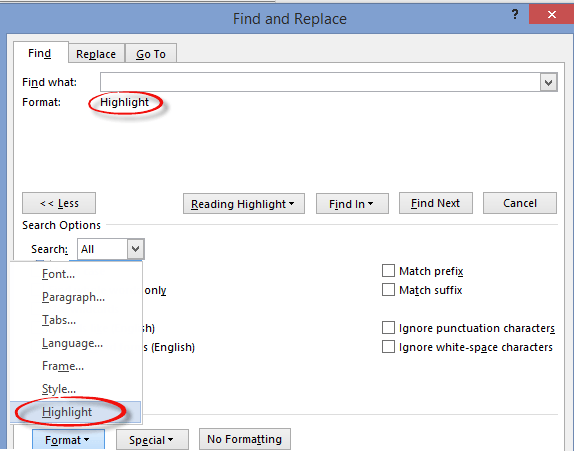
Word: Finding and Fix Highlighted text
One major use for Find and Do in Microsoft Word is to find highlighted text and let you change them. Highlighted text is often used to mark parts of a draft that need more work. There’s always the risk that the final document will go out with highlighted, unfinished, text still in place! This […]
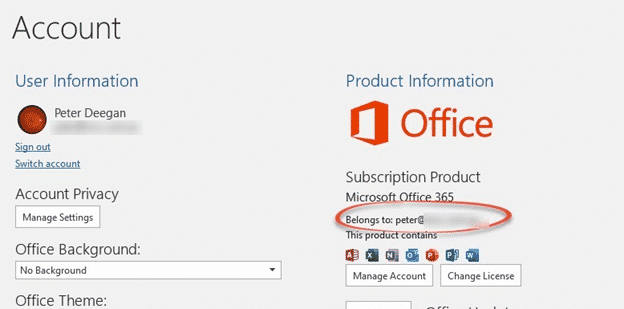
Microsoft 365 which email address am I using?
Each Microsoft 365 (aka Office 365) account is linked to a specific email address, how can you find out which address you’re using for your Microsoft 365 login? This might seem like a strange question but we hear it quite often. Most of us have multiple email addresses and it’s easy to get confused about […]

Use PowerPoint to make a quick photo collage
Powerpoint is a quick way to make a photo collage or presentation that you can use as a separate photo for any purpose, including as a virtual background! Today is the 80th birthday of an amazing man. We’ll be meeting up on Zoom to celebrate the big day and we’d like to make a special […]

Does an Office licence work for two users on a computer?
Microsoft Office rules might let two users or more use the same copy of Office on a computer. It depends on which type of Office you have on a Windows or Mac computer. Office can work for multiple separate users on the one computer. Most commonly, there are separate Windows or Mac logins for the […]

Outlook Profiles, important, useful but little known
Outlook profiles is one of the most important but least known parts of the program. Profiles can be very useful, sometimes essential to getting Microsoft Outlook working. An Outlook profile is a group of settings for connecting to the email server, and where to store the emails and other data. A profile is created when […]

Renaming an Outlook Profile
Outlook for Windows doesn’t have a direct way to rename an Outlook Profile but it’s still possible. Outlook for Mac, on the other hand, can rename a profile from the Manage Profiles list. Properly label a Profile instead of using the one or two word names Microsoft defaults to. This is a Windows registry change […]

Excel Function Keys explained
Function Keys in Excel are a convenient and quicker way of doing tasks by using keyboard instead of mouse. Here’s the Excel function keys (F1 to F12) and their many tricks. F1 – Help, Ribbon, Chart, new sheet F1 – Displays the Excel Help pane Ctrl +F1 – Displays or hide the ribbon of Excel. By hiding […]
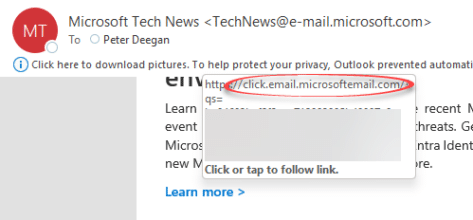
Make sure an email link is real not phishing, why does Microsoft makes it easier for criminals?
There’s a simple trick to ensure that an email is real, not a phishing trick to get your personal information. But Microsoft makes it easy for phishing attacks to pretend that are the real thing.. Hover over a link in an Outlook email to see the real url that you’ll visit if you click. Look […]
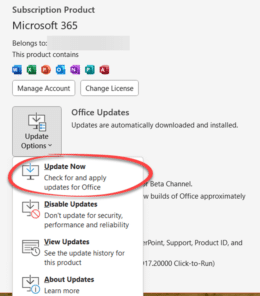
Having Microsoft Office problems? Try these tips first
If you’re having trouble with Office for Windows, try these tips first. They might fix the problem or help narrow down the cause. You’ll often get these suggestions from Microsoft Support or forums. They are things to try before asking for help with a Microsoft Office problem for two reasons: Support staff might make these […]

Fixing a broken Reuse Slides feature in PowerPoint
What to do if you get the “Sorry, something went wrong” error message trying to use PowerPoint’s Reuse Slides feature. This error message might appear if you’re trying to use PowerPoint’s Reuse Slides feature. It seems to happen only for non-business users (for example Microsoft 365 Family/Personal plans). The current error message is both non-specific […]

Reuse slides in PowerPoint, the good and the annoying
There’s a faster way to clone or reuse slides from existing PowerPoint presentations. Reuse Slides lets you pick a slide and copy it in a flash. Which sounds great unless you’re an unlucky person who hits a useless and unhelpful Microsoft error message. Reuse Slides is mostly promoted as a tool for organizations with shared […]
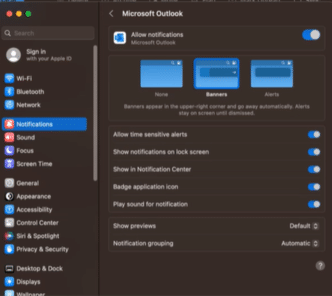
Choose meeting reminders style in Outlook for Mac
Choose from two ways to display event notifications or reminders in Outlook for Mac. Either familiar Outlook display or integrated with macOS Notifications. There’s a catch which Microsoft buries in their fine print. You have to use the ‘New Outlook 365 for Mac’ which is still very much a crippled ‘work in progress’ and the […]

New way to switch apps in macOS Ventura and Office for Mac
The 2022 ‘Ventura’ release of macOS has a new way to switch between apps called ‘Stage Manager’. It works well with Office for Mac, making it easier to see what’s open and available. But Stage Manager has its frustrations in this first release. Stage Manager appears on the left side, showing the most recently used […]









