
Microsoft Forms live example
Wanna jump in and see a Microsoft Forms in action? We’ve made a sample Microsoft Form one for all our Office Watch readers to try. Below is the embeded version (using an <iFrame) or click here to see it on a separate page. Our simple form serves three purposes. The first two questions are serious. […]
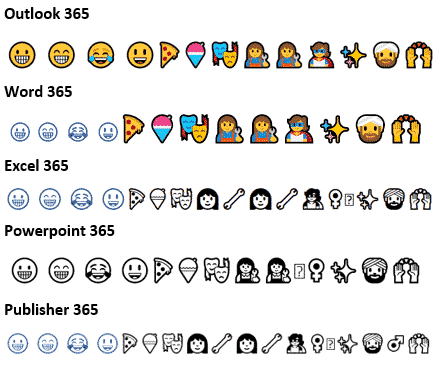
Color Font support in Microsoft Office – the story so far
Color fonts are coming to Microsoft Office and Windows but progress is slow and patchy. Here’s a quick summary of color fonts and the occasional, erratic support in Outlook, Word and other Office programs. What are color fonts Since the beginning of Mac and Windows we’ve had single color fonts. Usually black but can be […]
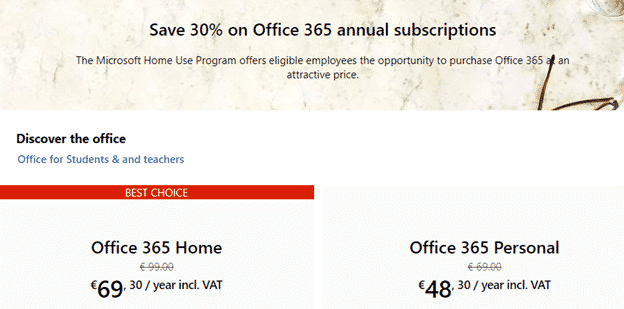
Big savings with the new Office Home Use Program – 2019 style
The Microsoft Office Home Use Program (HUP) is a great way to save on Office 365 or Office 2019 for employees of many companies, organizations, governments and even some military personnel. Here’s details on the savings possible with the recent changes to the HUP. What’s changed? The Home Use Program (HUP) is changing to the […]

Home Use Program for Microsoft Office 365 – who can get it and how?
Here’s who can qualify for cheaper Office 365 Home or Personal under the revised Home Use Program and how to get the lower prices. Employer qualification Your employer must have a Microsoft Office Volume Licence agreement with Software Assurance Maintenance (SAM). If Office is widespread in your organization it’s likely they have a volume licence, […]

You’d better hurry if you want discounted Office 2019 for $15
The current Home Use Program with Office 2019 sold for a mere $15 is about to end. If you want the perpetual licence Office 2019 for Windows or Mac, you’d better hurry. The full impact of the changed Office Home Use Program (HUP) is becoming clear. We’ve already noted that Office 365 subscriptions are becoming […]
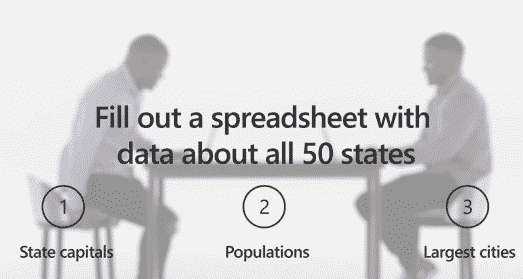
Microsoft highlights how they shortchanged Office customers
The latest Microsoft Office promotion is a rare example of an ad which shows how a product was deliberately crippled with less features. The ‘Twins Challenge’ is a series of very selective videos that are supposed to highlight differences between Office 2019 (single purchase, less profitable for Microsoft) and Office 365 (annual payment, highly profitable). […]

New Office 365 Save option ain’t so bad
Office 365 is getting yet another way to save a document and it’s not as bad as the advance publicity suggested. We’ve now had a chance to use the new Save dialog ourselves and it’s not another attempt to force customers to OneDrive. The change is now available for Office Fast Insiders and eventually all […]

Wiping drives or shredding files in Windows
Here’s a quick and easy way to totally erase file, folders or free disk space so there’s no trace of the original data. Also erasing an entire drive before handing over or selling. As you may know, deleting a file doesn’t really remove it from your computer. Even after deleting from the Recycle Bin, the […]

Have a happy Year of the Pig emoji in Word and Office
It’s the Chinese Year of the Pig and there are some symbols in Word, Excel and PowerPoint to mark the occasion in Office for Windows or Mac. The Unicode standard has three Pig related emoji, Pig, Pig Face and Pig Nose. Once you know the names or hex value, they can be found with the […]

Google Translate with Office documents
If the Translation options in Microsoft Office don’t do it for you, try the Google Translate full document translation option instead. For a long time, Google has a word and text translation between languages. The app is a godsend to travelers around the world, and the locals dealing with them! Entire Office documents can also […]

Stock data type search tips in Excel
Finding the right stock or index among the tens of thousands available in Excel’s Stock data type isn’t always easy. Here’s some stock search tips that might help with some advice about a changing situation. Stock data type is available in Excel 365 for Windows and coming to Excel 365 for Mac (currently only Insiders). […]

Stock and Geography Data Types coming to Office for Mac
Great news for Mac Office 365 users, the Stock and Geography data types in Excel 365 for Windows have started rolling out to Excel 365 for Mac. At the moment it’s only Excel 365 for Mac, Fast Insiders v16.22 build 190112 or later. It means it’s coming to Slow Insiders and Office 365 customers generally […]

Office memory leak finally patched by Microsoft
An astonishingly simple security breach in Microsoft Office has finally been patched two months after Microsoft confirmed the problem. The unanswered question, why did it take so long to discover it? Mimecast.com discovered the ActiveX memory leak back in November 2018 and told Microsoft. Two months later Microsoft fixed the problem in their January 2019 […]
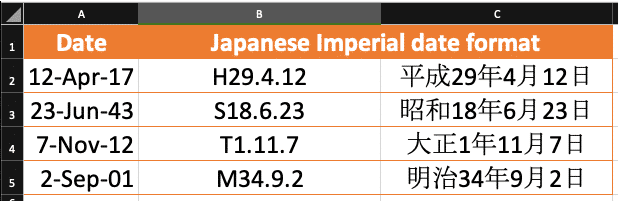
Show Japanese Imperial Era dates in Excel and why it’s wrong
Excel can display dates in many different formats including Japanese Imperial Era. You don’t need the Japanese version of Excel. Office-Watch.com shows how to display an Era date and how Excel knows which Era to use. You don’t ‘convert’ a date from western format to Japanese Era. Like any date in Excel, just change the […]

Microsoft pulls Office 2010 update, won’t say why, but we will
Feature updates for Microsoft Office 2010 have been withdrawn but Redmond won’t tell customers why, beyond the usual vague platitudes. The KB4032217, KB4461627, KB4032225, and KB4461616 updates for Office 2010 released 2 January 2019 were withdrawn after a few days after complaints. Microsoft won’t admit what the problem is beyond saying customers “may experience difficulties in Microsoft Excel or […]

New Office app coming to Windows 10
Microsoft is replacing the current ‘My Office’ gateway app with a new ‘Office’ app for Windows 10. The Office app is a gateway to your Word, Excel, PowerPoint documents plus Outlook, OneDrive and SharePoint. Source: Microsoft The official Microsoft blurb: ” Quickly switch between apps. See all your Office apps in one place and switch […]









