
2019 Calendars from Excel
If you’re looking for 2019 calendar options, open up Microsoft Excel. Excel has a wide range of calendar templates to choose from. Go to File | New and type ‘calendar’ into the search box. There’s a proverbial embarrassment of riches. Pick a year All the Excel templates apply to any year. Enter the year you […]
Play music via Excel
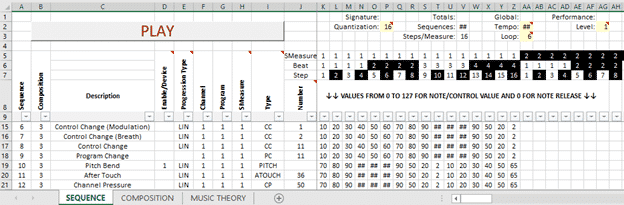
Musicians with Excel skills might like to try Excel MIDI an Excel file with a simple sequencer that plays MIDI music. Made by ruiseixas from Portugal, Excel MIDI is an Excel worksheet downloadable from SourceForge. It’s an .XLSM file so you’ll have to enable VBA content to let it work. We tried it on Excel […]
Why can’t you buy individual Office programs?
Office Watch reader, Meredith M. asks a question we’ve heard many times before. Why can’t you buy individual Office programs instead of paying for an Office bundle with programs you don’t need? “My issue: I need ONLY Word, Excel and Access–but I NEED them. I know that I cannot buy them separately but does anyone […]

Bonus for ‘Real Time Excel’ readers
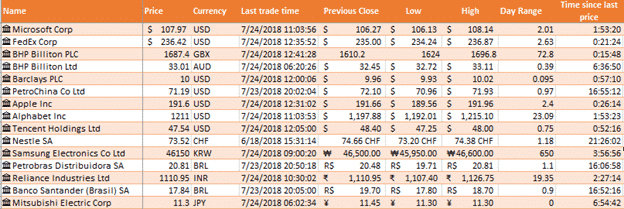
Our article Track the largest companies Market Caps in real time got a lot more interest than we expected. Maybe because Apple and Microsoft are so close in value at the moment. So we’ve made the worksheet available for Real Time Excel readers. Market Capitalizations.xlsx also includes an example of the upcoming function Sortby() which automatically re-sorts a […]

New Icons for Microsoft Office 365
It’s been five years since the Word, Excel, PowerPoint and other Office icons were given a new look. Now they’ve been announced and, frankly, we could not care less. New look icons don’t make any difference to anyone’s daily use of Office. It’s like supermarket groceries that boast ‘New Packaging’ as if any customers care? […]

Microsoft’s Excel’s Stock data type is premature
Microsoft can’t help itself from releasing a product or feature before it’s ready. They’ve done it again with a premature public release of Excel 365’s Stock and Geography data types. Excel 365’s Linked Data Types feature promises to be a great innovation. At long last there’s a simple way to get current financial information into […]

Refinitiv financial and markets data to be integrated with Microsoft applications and services
It’s not specified in this press release but the announcement means a change in the financial data source for Excel 365’s Stock data type. ” 16 October 2018 Collaboration brings financial data to the masses with simple, direct access to trusted financial data within Microsoft Excel, MSN Money and Bing. Refinitiv, formerly the Financial and […]
Excel 365’s Stock data type, watch the ticker code!
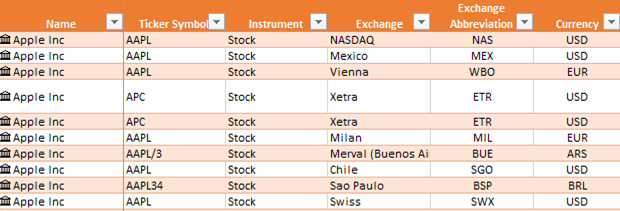
We like Excel 365’s new Stock data type but it’s far from perfect. It’s vital that you make sure you’re tracking the correct stock and exchange by checking the ticker code. Microsoft has been having a difficult time ‘data wrangling’. They rely on outside contractors to supply the price and stock information from about 60 […]
Getting Started with Excel 365’s Stock Data Type
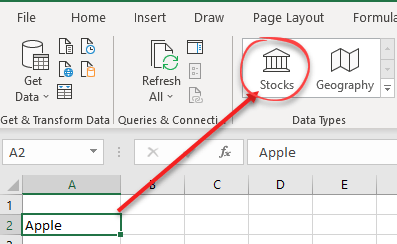
Give Stock or Geography linked data types a try in Excel 365 for Windows. It really is a great innovation and will be better once Microsoft sorts out the data issues. Getting started At its simplest, type in the name of a company and click on Data | Data Types | Stocks Excel goes off […]

Excel 365 Stock data type – how to report problems
Excel 365’s new Stock data type has the potential to be really great. Here’s how to report problems to Microsoft so they can fix them. Real people read the bug reports, especially for a new and developing feature like Linked Data Types. The bug reports help Microsoft staff identify problems and also give them a […]
Stock and Geography for Excel is live, give it a try
A truly interesting new Excel feature is now going public. Stock and Geography are the first two Linked Data Types (LDT) that bring stock prices and geographic info direct into Excel 365. Stock data type gives you information on stocks and indexes from over 60 global stock exchanges. No messing about with PowerQuery, ‘Get and […]

Online Video hack now ‘in the wild’ and Microsoft won’t do anything
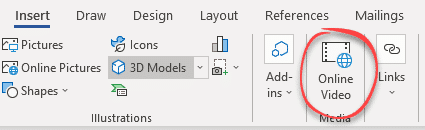
A previously theoretical way to misuse Office documents to infect your computer is now ‘in the wild’ and Microsoft isn’t interested in stopping it. Last week we told you about a new way for Office documents to get malware onto your computer. Cymulate discovered that the Online Video feature could be manipulated to download malware […]
Replacing text or separators in selected Excel cells
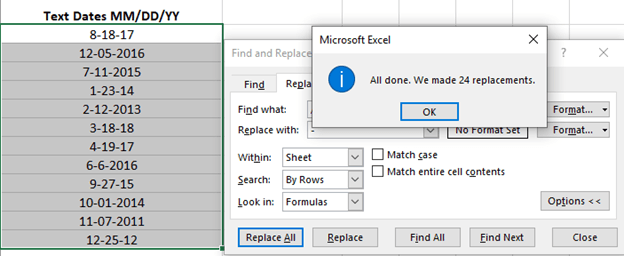
A little side-trick for converting text dates to Excel dates is replacing the text separator. Excel lets you replace text within the selected cells only. If the text dates are in the correct order (e.g. m/d/y ) but use the wrong separator for your Windows regional setting (e.g. m-d-y ). Excel’s Replace function will replace […]
Online Video now a risk for Office users
Cymulate is reporting how embedded video in Word or other Office documents are another way for criminals and hackers to infect your computer. It’s yet another example of how Word, Excel or PowerPoint documents can be used to get malware onto computers to steal data, becomes bots or other nasties. This trick uses the relatively […]

Convert Excel formula into fixed values or text
Changing an Excel formula into the values is amazingly easy. It’s just a copy and special paste. Another way to think of it is deleting the formula but leaving the results in the cells. Select the cells. In this case from our article on converting text cells into Excel dates. Copy them, using Ctrl + […]
Monthly and Yearly Date Arithmetic with Edate() in Excel
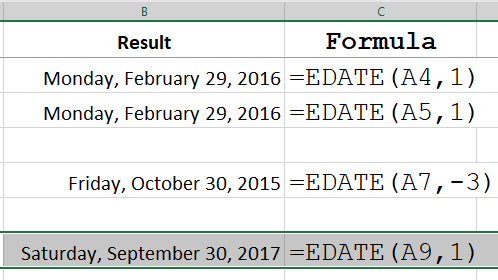
Adding or subtracting months in Excel is easier with the Edate() function. As you probably know, Excel uses whole numbers to calculate dates. Add 1 to an Excel date adds a day. How to add a whole month? How to make Excel jump a whole calendar month? For example from 1 January to 1 February […]









