Copilot is not as popular as Microsoft says, Customers Aren’t Buying the hype
Microsoft’s Copilot is NOT the wildly popular, world class AI product that Microsoft says it is. That’s not just an opinion; there are hard facts to back it up. The recent sharp price drop and ignored user frustration suggest otherwise. From intrusive integration to privacy concerns, Copilot’s rollout has backfired.
Of course, nothing could be as great as the Microsoft hype…. Copilot would have to be the software equivalent of The Beatles and Taylor Swift combined <g>.
The massive Copilot price drop earlier this month is tangible evidence that customers aren’t buying Microsoft’s AI hoopla. You probably haven’t seen any headlines about the savings because most outlets just accepted Microsoft’s PR spin which barely mentioned the price drop.
It’s not a small price drop. The new Microsoft 365 Premium plan replaces the Copilot Pro add-on leading to a saving of at least US$140 a year for many customers.
That means Microsoft could not sell enough Copilot Pro for US$20 a month ($240 a year) so they’ve had to drop the price. They’ve done it in a round-about corporate face-saving way but it’s still a significant discount.
If Copilot was as popular as Microsoft pretends, they would not be reducing the price. You don’t need an MBA to understand that.
About AI, babies and bathwater
AI has a place and can be incredibly useful. Please don’t throw the proverbial “AI baby” out with the bathwater.
Like any tool, especially one that’s still a “work in progress”. Copilot or any other AI tool has to be used carefully.
Price isn’t Copilot’s only problem
Copilot has rapidly become a toxic brand name, especially when compared to “ChatGPT” which has become a by-word for AI technology.
Microsoft only has itself to blame for this. They’ve been way too pushy, overselling the benefits of AI and offering only lip-service to the legitimate privacy concerns.
Nowhere to hide
Putting Copilot “in your face” with few or no options to disable or hide it has been a bad move by Microsoft. The result is customers so annoyed with Copilot that they won’t try it, the opposite of what Microsoft intended.
In Word 365, Copilot appears at the start of documents (new or not), the margin of Word documents, menus and mini-toolbars. Anywhere that Microsoft can think of, gets their AI rammed into it, like it or not. Excel is just as bad while the PowerPoint team has, so far, shown some restraint.
I have various versions of Microsoft 365 on Windows and Mac, regular public and Insiders releases. All have Copilot in Office apps but none have a way to turn it off. In one Excel release, there’s a Copilot control section (under File | Options) but only a choice to vaguely reduce the appearance of Copilot does not hide it entirely.
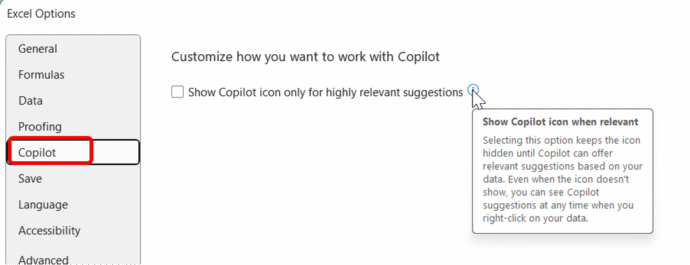
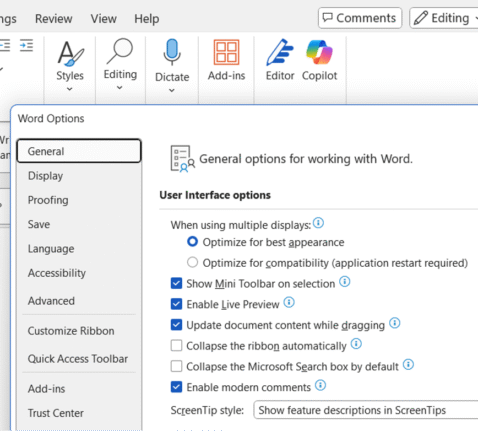
Sometimes there’s not even an Options | Copilot section that’s supposed to be there. See this build of Word 365 with Copilot on the ribbon but no choices at all!
At the very least, all Office apps with Copilot should have a clear option to turn Copilot OFF in that app.
Ideally, there should also be choices to disable Copilot for a specific file (doc, sheet or deck) either just in the current session or persistent for that file. But given Microsoft’s arrogant push of Copilot, that would be expecting far too much.
There are few detailed options to hide or disable parts of Copilot that customers don’t want to clutter up their screens.
Word’s Copilot Summary – like it or not
The worst example of this is Word’s Copilot Summary that appears at the start of any opened document with no way to stop it in that document. There’s supposed to be a “Hide” option for the summary, but that doesn’t appear for all paying Copilot customers.

Any Word document gets this Copilot Summary at the top, like it or not. It makes no sense in some cases, like the above where the first paragraph IS the summary or an incomplete “work in progress” document. Microsoft mustknow this but their focus is on selling Copilot, not customer’s daily needs.
Excel’s lack of Copilot choices
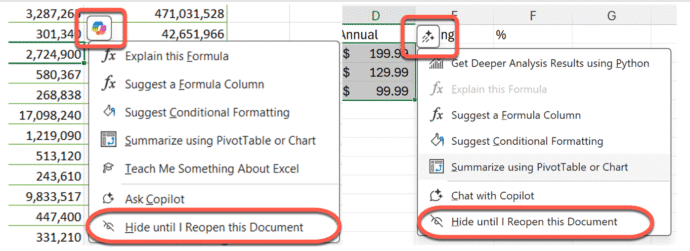
So many places where Microsoft gives no proper option to hide Copilot. Excel’s “Hide until I Reopen this Document” option (see below) but no “Hide Copilot for this document” choice. Owners of collaborative documents or sheets would like the choice to disable Copilot within those files, but Microsoft has been stone-deaf to that type of customer feedback.
Microsoft’s only (tiny) concession has been to change the ‘in document’ Copilot icon from the bright colored look (left) to a single-color less intrusive one (right).
Privacy? “Trust Us”
There are legitimate concerns about privacy and use of customers work that’s sent to Microsoft’s servers. Redmond doesn’t like to talk about that, probably because their fancy words all amount to just “Trust Us”.
Use free Copilot to summarize Word documents
Collective Nouns – Copilot to the rescue.