All about Microsoft Office Word, Excel, PowerPoint and Outlook, Microsoft 365, Office 2021 and earlier versions.

New default font, Aptos, in Microsoft 365 and Word
Microsoft has released a new range of fonts called ‘Aptos’ that are the new default fonts in Microsoft 365. Here’s what you need to know about the new fonts. Firstly – as Douglas Adams (much missed) reminded us: DON’T PANIC. Despite what you may have read, your documents should not change before your eyes to […]

Aptos fonts and making a PDF from Office
The new Aptos fonts in Microsoft 365 are installed and licensed in a different way from most fonts. How does that affect making a PDF either saving or printing. Can it be done at all? There are two broad ways to make a PDF file from an Office document. Save As PDF or Print to […]
Add pictures to your Excel PivotTables
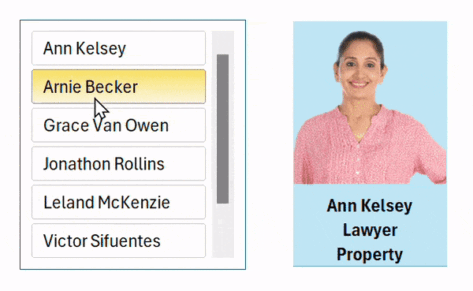
Images can now be included in Excel PivotTables which not only makes for better looking PivotTables but more interesting Slicers too. A great contribution from Office Watch reader “AllanC” in New Zealand. With pictures in a PivotTable you can easily make cute slicers like this to show one record (person) at a time Here’s the […]
What happens when Aptos fonts aren’t available?
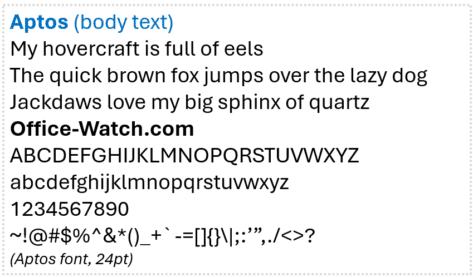
The new Aptos range of fonts is only available on Microsoft 365 apps. We investigate what happens when a document, sheet, slide or email with an Aptos font is opened on a computer without Microsoft 365 and the Aptos font range. In short: if Aptos fonts are not available, it’s not possible to say, for […]

All the Office theme changes in Microsoft 365
Microsoft is changing more than just the font in Microsoft 365, there are also default color scheme and even line changes coming too. Here’s all the proposed changes and how to reverse them. New Default Fonts We’ve already talked about the new default fonts, Aptos and Aptos Display. New default font, Aptos, in Microsoft 365 […]

Mt Fuji 🗻 symbols in Word, Excel, PowerPoint and Outlook
How to insert the Mount Fuji 🗻 or snow-capped mountain into Microsoft Word, Excel, PowerPoint or Outlook. Both in Office for Windows and Office for Mac. Mount Fuji (富士山 or Fujisan) is a Japanese Holy Site and World Heritage Listed. The symbol or emoji 🗻can be used for the famous mountain or any time you want […]

Crucial changes to low/no cost Microsoft Education licenses
Microsoft is making crucial changes to their Microsoft Office 365 Education licenses that will increase costs to many schools and colleges. Office 365 A1 plus – gone! The Office 365 A1 Plus program for Education will be retired by Microsoft on August 1, 2024. A1 Plus included Office desktop apps for qualified schools that purchased […]
Hidden license info reveals good news for Microsoft 365
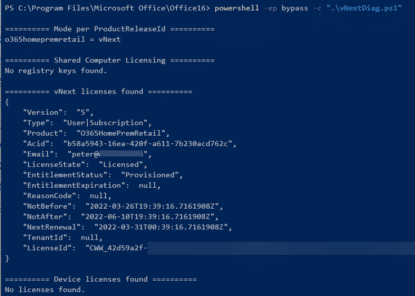
Like to know some more about your Microsoft 365 for Windows software license? How long the Office apps will run without an Internet connection? Here’s how to see that hidden license info, how it’s changed and a little good news too. Microsoft 365 software occasionally checks with Microsoft servers to see if the customer still […]

Hidden Microsoft 365 License details revealed
Here’s how to find out what type of Microsoft Office 365 licence you have with details hidden from the usual About dialog box. We recently showed it’s important for for perpetual non-subscription versions of Office like Office 2021 or Office 2019 to know if the purchase is Retail/Volume or OEM. That’s a vital detail for […]

Two unusual Page Break options in Word
In addition to Manual, Paragraph and Style page breaks there are two unusual ways that Microsoft Word can insert a page break where you might not expect one. Keep with next and Keep lines together. Learn about Word Page Breaks: Visible and Invisible Page Breaks in Word and Add a Manual Page Break in Word Word’s Paragraph […]
About Word’s Page Breaks – Visible and Invisible
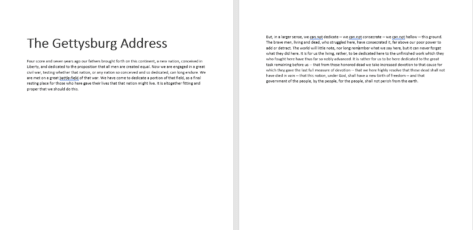
There are many different ways to insert a page break into a Microsoft Word document, some are visible and others invisible even with Show All turned on. Luckily, Word has a straightforward way of doing this with a manual or separate Page Break. It’s also possible to associate a page break with the paragraph, which is a lot easier manage page breaks but they are somewhat invisible and it’s not obvious why the page break […]

Add a manual or forced Page Break in Microsoft Word
There’s a simple way to manually insert or force a page break in Microsoft Word. Also delete a page break later. Word will automatically insert page breaks in your text depending on the size of paper you have selected; they may not be in the place you want them. You can’t delete an automatically inserted page break, […]
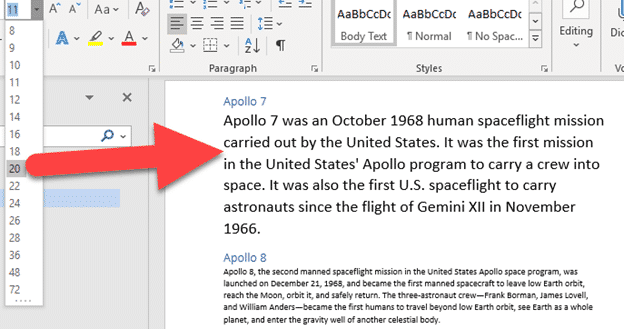
What does Word style ‘Automatically update’ really mean?
Every Microsoft Word Style has an option to ‘Automatically Update‘ which sounds great, but can lead to more confusion. Here’s what ‘Automatically Update’ really means, why it’s wise to turn it off and the better alternative. There are many ‘Automatic’ options in Word that are spread all over the place. Here we’re talking about Modify […]

Change Word style reliably to match current paragraph
A quick and reliable way to update a style within a Microsoft Word document. It works only when you ask it and you can apply a series of changes before updating the style. Update Style to Match Selection We’ve made a series of changes to a paragraph; font size, color and indent. Then right-click on […]

Which Microsoft Office feature badly needs a fix?
For all the changes Microsoft has made to Search (aka Tell Me), they continue to ignore one basic that would make Word, Excel, PowerPoint and Outlook a lot easier to work with. Here’s some examples of how Microsoft Office search badly needs fixing. Search (formerly called “Tell Me”) usually appears in the title bar as […]

Changes to Sharing options in Microsoft Office
The Sharing options in Office are changing, yet again with a new ‘sharing experience’ in all Microsoft Office 365 apps for desktop, web and mobile. We’ll explain the changes, including a few options that Microsoft hasn’t mentioned. All the usual Microsoft buzzwords have been recycled to describe these changes; “streamlined”, “simplified”, “free of distraction”, “experience” […]









