All about Microsoft Office Word, Excel, PowerPoint and Outlook, Microsoft 365, Office 2021 and earlier versions.

Handwrite into docs on Office apps for iPad
Handwrite direct into Office apps for iPad, converting your writing into text right away, courtesy of the iOS Scribble feature. What you’ll need, how to setup and the new thing to look for on the Draw tab of the Word, Excel and PowerPoint apps. Microsoft has integrated the Scribble feature into some Office for iPad […]

“Word Window” in trouble with Microsoft
Microsoft has dropped down hard on a UK teacher with a little bit of plastic helping dyslexic students read. It seems the company can’t learn from past mistakes. “Word Windows” is a small plastic reading tool which makes a little window so readers can focus on a word or letters without distraction. All great until […]

Make transparent images in Office for Windows
Microsoft 365 and Office 2021 for Windows can make images transparent in Word, Excel, PowerPoint and Outlook. Text or other graphics can show through the picture. Pictures can be made transparent to reveal what’s behind in lower layers of the document, slide or worksheet. For any image go to Picture | Format | Adjust | […]

Get the Game of Thrones look in Word and PowerPoint
Here’s how to get the Game of Thrones or House of the Dragon look in Word documents and PowerPoint slides. Plenty of people have borrowed the Game of Thrones or GoT look, including a certain US President. All these uses are contrary to various trademarks by HBO. Despite legal complaints there are many ‘tip of […]

Understanding the \s switch in Word’s {SEQ} code
The \s n switch inside the { SEQ } field code isn’t easy to understand so here’s an example of how it resets numbering after a Heading style. Use {SEQ \s n } to restart numbering from 1 after a chosen Heading style. E.g. { SEQ Identifier \s 1 } to reset after Heading 1 […]
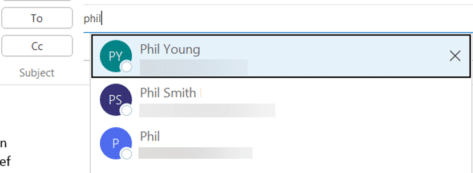
Why do old addresses remain in Outlook?
Old email addresses or people have an annoying habit of appearing in Outlook, even after you’ve deleted the address or person from the Contacts list. Here’s why obsolete emails keep appearing and how to remove these unwanted and dangerous strays. Here’s an example of Outlook’s problem with ‘sticky’ and unwanted addresses or names. Make a […]
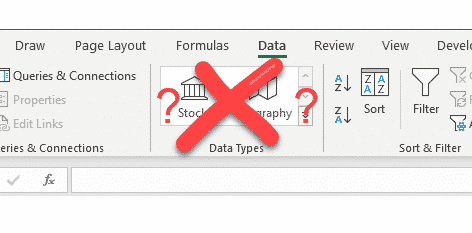
Fix Excel when Stock and Geography data types go missing
When the Stock and Geography data types disappear from the Data ribbon in Excel here’s how to fix and restore Linked Data Types. The Data ribbon is missing the entire ‘Data Types’ section. We’ve had several reports from Office-Watch.com readers who start Excel 365 and find that their Stock and Geography linked data worksheets won’t […]

Orthodox Cross ☦ in Word, Excel, PowerPoint and Outlook
Type the Orthodox Cross ☦ into Microsoft Word, Excel, PowerPoint or Outlook. Both in Office for Windows and Office for Mac. Orthodox Cross or Russian Othodox Cross ☦ symbol is widely seen in Russia and in particular the Russian Orthodox Church. There’s also a Christian or Latin Cross ✝ symbol available. How Orthodox Cross ☦ […]
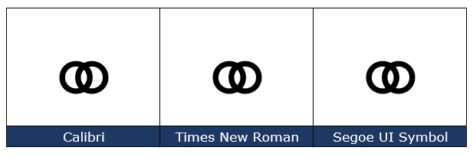
Marriage Symbol ⚭ in Word, Excel, PowerPoint and Outlook
Type the Marriage Symbol ⚭ into Microsoft Word, Excel, PowerPoint or Outlook. Both in Office for Windows and Office for Mac. Marriage Symbol ⚭ symbol is two interlocked circles with obvious symbolism. It can be used for any situation you like, perhaps when two items or groups merge or an alternative bullet symbol. How Marriage […]
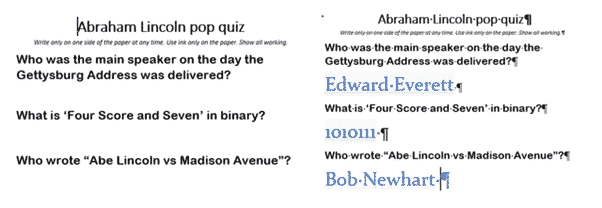
Hidden Text, Images and objects in Word
We have recently discussed how to show hidden formatting characters in Word, but it is also possible to hide text and even images in Microsoft Word, as long as you are using Word desktop on Windows or Mac. See Find and Remove Hidden Text in Word Hidden text positioning and formatting tricks in Word Why hide? […]

Table Cell Margins and Spacing Options in Word
Cell Margins and Cell Spacing are two important settings in any Microsoft Word Table but they aren’t used much and not well understood. Cell margins are the spaces between your text and the edge of the cell. They can be set separately for the top, bottom, and either side of the cells. To change the […]

Which countries pay more for Microsoft 365 Family?
Microsoft charges quite different prices for Office 365 Home/Microsoft 365 Family, depending on the country. Some countries residents pay more for Microsoft 365 than others and the differences can be large. We decided to see how cheap or expensive Office 365 Home/Microsoft 365 Family plan can be, depending on where you live. In 2018 Maya […]
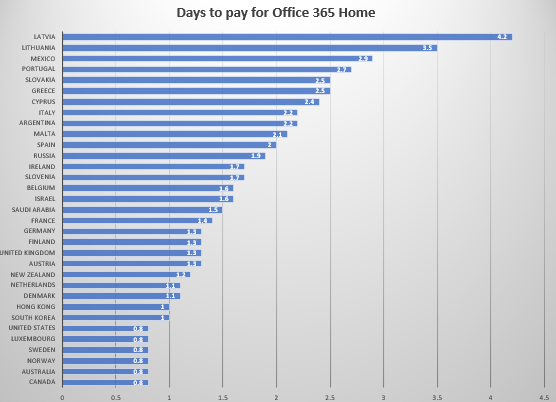
How many days does Microsoft 365 cost?
How long do you have to work to afford Microsoft Office? That’s the question we asked after compiling a list of Office 365 prices across the globe, Office 365 Home and Office 365 Personal. For most people it’s not long but there’s a lot of variation from less than one day to over four days! […]
The new Symbols in Microsoft Office aren’t what you think
Microsoft has announced a new Symbols Server for Microsoft Office which is a good move but not what most people think of when they see the word ‘Symbols’. These symbols are NOT characters like £ € ™ nor emoji such as ❄️❤️🎂 or the infamous eggplant🍆 😁 The new symbols are a technical resource for […]
Four ways to put Microsoft Office on your iPad
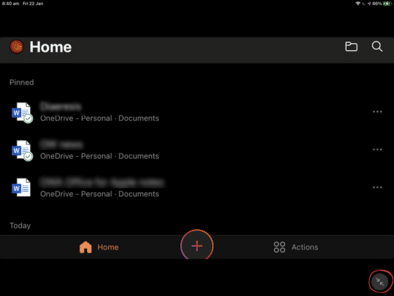
You have an Apple iPad but do you know all the different ways that Microsoft Office can run on an iPad. There are four different options, some free and others you have to pay for. Why bother? Surely you just install the Office mobile apps and that’s it? Sadly no, and there are advantages to […]

Three ways to make an auto-update unique list in Excel
Making unique (not duplicated) list in Excel is possible in three ways that update automatically. One is headspinningly hard. One has some minor quibbles. The best option is a lot easier and relatively new in Excel. We’re talking here about making a list of unique (non-duplicate) values which update automatically if the source list changes. […]