
How to open Word 6 and other ‘old’ documents
One reader uses OpenOffice to bypass ‘features’ in Word 2003 SP3.Julie P writes, “I read the articles on “Problems opening ‘old’ documents” and thought they didn’t pertain to me. The earliest version of Word I had ever used was 6.0, which was supposed to be okay. Today I tried opening some files I’d saved in […]

Klingon = Clinton
There’s always another joke at the expense of Word’s spell checker. Last year we had the politically charged question of Obama and Osama then later the omission of Michael Palin (or was it Sarah Palin?) from the Word dictionary. We’ve noticed another one that will offend Democrats and Star Trek fans, perhaps in equal measure. […]

Print a booklet from a Word document – free!
A clever option to print a foldable booklet that won’t cost you anything. One of the eternal requests for Microsoft Office is the ability to make a booklet. That is a set of two pages on one side of paper but double-sided and ordered so you can fold the lot up to make a booklet. […]
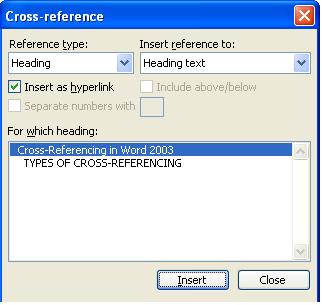
Start Cross Referencing in Microsoft Word
Cross-referencing is an imposing name for something we’re all familiar with in books, especially reference books. Microsoft Word makes it much easier to do. A cross-reference is simply a mention or link in the text to another part of the same document. In olden days (thirty years ago ) you could put references like these […]

Fitting a Word or Excel doc to your printer
How to print a document when the paper sizes are different. On our new Twitter account we saw this question: “When I send an Excel file to someone, should I have to set it up so they can print? I don’t know the printer/size they use.” Part of that answer is preparing the document but that’s […]
Paper sizes on another computer
How to format a Word or Excel document to print on someone else’s computer. On our new Twitter account we saw this question: ” When I send an Excel file to someone, should I have to set it up so they can print it? I don’t know the printer/size paper they use. “ It should […]

More MRU magic
How to remove single entries from the most recently used list. In Office for Mere Mortals we recently covered the basics of the most recently used (MRU) list in Office. Removing individual entries It is possible to an individual ‘recently used document’ but it’s not obvious and a far cry from a simple right-mouse click […]

Full-Screen editing in Word 2007
There is a full screen editing mode in Word 2007, if you know where to look. We’re obliged to Rob G from Pennsylvania who found the full screen mode in Word 2007. Full screen editing is great on smaller displays like laptops or netbooks as well as anyone who likes to type without the distraction […]

Using Office on netbook computers, part 3
Getting the most from the small screen. We look at options for making Office 2003 or Office 2007 work better in the smaller netbook screens. In the final part of our series, we’ll look at options for making Office 2003 or Office 2007 work better in the smaller netbook screens. While we’ve focused on netbooks, […]
Understanding Sections in Word
Sections are in every Word document – here’s how to use them to make Word do what you need. In the last issue I described how to omit the page number on the last page of a document by using a section break and “de-linking” the header/footer between the sections. You use sections to accomplish […]

Got Windows 7? You can open / save Office 2007 and ODF documents
If you’re trying out the beta version of Windows 7 then you can open Word 2007 documents (.docx) and OpenDocument ODF (.odt) just using Wordpad 7. But you can’t open the older .doc files used by Word 2003 and earlier versions. If you’re trying out the beta version of Windows 7 then you can open […]
Word 2007 document hotfix for the sake of Word 2003 users
Microsoft has released a Word 2007 patch for a problem with .docx files being opened in Word 2003. Microsoft has released a Word 2007 patch for a problem with .docx files being opened in Word 2003. Confused yet? It’s a problem when Word 2003 (with the Office Compatibility Pack installed) tries to open a Word […]
Word 2007 bug fixes
Microsoft has released a December 2008 patch for a grab-bag of problems with Word 2007. Microsoft has released a December 2008 patch for a grab-bag of problems with Word 2007. You have to apply to Microsoft for the patch – details here – but unless you have one of the specific problems it’s probably not […]
December 2008 security patches for Office
More security patches for lapses in Microsoft products including various versions of Office from Office 2000 to 2007 plus some incarnations of FrontPage. More security patches for lapses in Microsoft products including various versions of Office from Office 2000 to 2007 plus some incarnations of FrontPage. As usual, we’ll list the updates according to product […]
How to get formatted text out of the Access database into a Word Bookmark
Q: Dawn Crosier writes: I read through your “Access 2007 VBA For Data-Centric Microsoft Office Applications” and have questions about how to get formatted text out of the Access database into a Word Bookmark without bringing all the HTML code. A: I did some experimentation, using my Rich Text Demo sample database from Access Archon […]
Omitting page numbers in Word
From: Rose Vines How do you omit the page number on the final page of a Microsoft Word document? How do you omit the page number on the final page of a Word document? I was asked this recently by someone who is using Lulu.com’s self-publishing service. Lulu had asked her to resubmit her book […]









