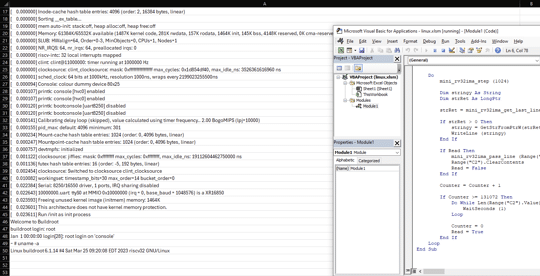
Common programming tools can be used to make malicious Office workbooks which bypass both online security checks and Microsoft’s own protections in Word, Excel, PowerPoint or Access. We’ll explain what’s happening and what Microsoft could do better. VBA Purging or VBA Stomping are clever tricks to make an Office documents
There’s a change in the way Microsoft 365 works with a sign-in to a Microsoft account. This applies to Word 365, Excel 365, PowerPoint 365 and other Office apps. Up to recently, Microsoft 365 / Office 365 has worked normally either when signed into a Microsoft account or not. Having
There was a big change to Office 365 / Microsoft licenses on 1 October 2018. Microsoft 365 counts logins not installations It’s a totally new way of counting and limiting use of Microsoft Office. As long as there’s been Office, licenses have been based on installations of Office. A single
Fake login pages for Microsoft 365, OneDrive or Outlook.com are now the second most common phishing targets. Links in emails or messages to these bogus pages which grab your email and password for hackers to steal your secrets, or those of your company. Ironside reports that Microsoft related fake login
The latest ebook from Office-Watch.com is a little different, it’s a heartfelt ‘Thank You’ to our Office Watch donors. Peter Deegan has been quite astonished and humbled by the generosity of readers to our reader appeal. Both the money and kind remarks have been a considerable morale boost quite beyond
Stop duplicate names, email addresses or product SKU’s from being added to an Excel list or Table. Adding more rows to an Excel Tables can be done while preventing accidental duplicates creeping into the list. Excel Tables or lists can grow to hundreds or thousands of rows, there’s a risk
Microsoft is releasing a ‘Quick Poll’ option in Outlook ignoring the very similar, voting buttons, option that’s already in Outlook for Windows and Outlook for Mac. Use Voting Buttons to ask a question and Outlook will automatically collect responses. Office Watch also explains how recipient see the voting options and
Dictate now has formatting commands with two ways to apply bold, italic, underline and other text formatting as you speak. Dictate with formatting is now available in Word Online (in a web browser) for Microsoft 365 customers. It’ll spread to other Word releases (for Windows, Mac etc) later. To use
Setting up and testing a microphone to work with Windows 10 is necessary before using Dictate in Office. Go to Windows settings to control which microphone is used by Word 365’s Dictate. Dictate has no microphone settings of its own (in Word for Windows or Word Online). Both use the
Inside Project Moca is a collection of many items starting with Bucket then Notes, File, Tasks, Goal, Weather, Location, Person, Email or Calendar items. Here’s how all of them work and their options. Bucket Bucket is a container or ‘drawer organizer’ for one or more items. It lets you group together
Just one example of why people use Google’s tools over Microsoft’s Bing. It’s a little thing but an example of Microsoft’s wider problem with Bing. While exploring Project Moca, we tested the Location object that uses Bing Maps. Stupidly we typed ‘London’ thinking Bing would show one of the world’s
Outlook for Windows is getting a different way to ask questions of people via email – a quick poll. Quick Polls use Microsoft Forms, the online quiz or polling system. Start in any new message, Insert | Include | Poll. It’s more likely you’ll just see a small bar graph
Everyone with Microsoft 365 can get a ‘quick poll’ now with any email account or software. No need to wait for the Outlook Quick Poll option, now in preview for Microsoft 365 customers with Outlook for Windows. As we’ve already explained, Quick Poll is a simple and very limited way
Click on Dictate in Word Online (in a web browser) and it looks like nothing happens. Don’t worry, you can still speak to Word and it’ll type but the interface has been minimized. Instead of opening a Dictate pull-down list, it’s now a trio of icons at the bottom of
Type the Left Right arrow ↔ into Microsoft Word, Excel, PowerPoint or Outlook. Both in Office for Windows and Office for Mac. How Left Right arrow ↔ looks in different fonts. Here’s some examples of how Left Right arrow ↔ looks in common Office fonts. Left Right arrow ↔ codes
Microsoft is making an important step towards cloud storage security with the public preview of Double Key Encryption. That means, for the first time, Microsoft customers can secure their data from access, even by Microsoft itself. All the ‘secure’ cloud storage from Microsoft can be accessed by Microsoft. For all
With all the subscription offerings available (Netflix, HBO, Disney, CBS, Apple, Google, Amazon, Office 365 etc), here’s a way to manage them all from Excel. Along the way we’ll show you some interesting Excel features. We were inspired by Brian X Chen in The New York Times, writing about how
We’re happy to release a new version of our Subscriptions Manager that’s compatible with Excel 2007-2016. Subscriptions Manager is a way to list and manage the many online plans we sign up for; HBO, Netflix, Amazon, Spotify and so many more. You can track who pays (in a family) and
Microsoft 365 Translator now has the language Odia (or Oriya), taking the list of Indian languages supported to 11. in Odia, according to Microsoft …. Microsoft 365 ଅନୁବାଦକ ବର୍ତ୍ତମାନ ଓଡ଼ିଆ ଭାଷା (କିମ୍ବା ଓଡ଼ିଆ) ଅଛି, ଯାହା ଦ୍ୱାରା 11ଟି ଭାରତୀୟ ଭାଷାର ତାଲିକା ଗ୍ରହଣ କରାଯାଇଛି । Microsoft Translator is a cloud-service so Odia
Microsoft has a Microsoft 365 offer for students and recent graduates that’s worth a look but watch out for the fine print. The offer is Microsoft 365 Personal for $12 instead of $69.99 which is a good deal if you qualify. It’s available to students and recent graduates of colleges/universities
There are strange and worrying reports of double billing, disconnection of service and other anomalies that leave some Microsoft 365/Office 365 paying more or getting less than what they paid for. Here’s what to do if your Microsoft 365 account and billing has gone wrong, Just some of the troubles
The names of genes are being changed just to stop Excel confusing them with dates during the import process. We’ll explain two ways Excel already works to avoid the geneticist’s problem. Genes named like MARCH1 and SEPT1 which Excel converts into dates when imported the wrong way, usually directly via
Why does Excel change what people type or import, sometimes in ways they don’t want? It’s the General cell format that messes with what you type or import. It’s the default cell format ‘General’. It’s top of the Formats list and most of us haven’t given it a second thought.
It’s easy for forget when your Microsoft 365 (Office 365) plan is up for renewal or even which plan you’ve purchased. These are vital points if you want to avoid being overcharged for Microsoft 365 renewals, which is what Microsoft will do if you’re not careful. Go to https://office.com and