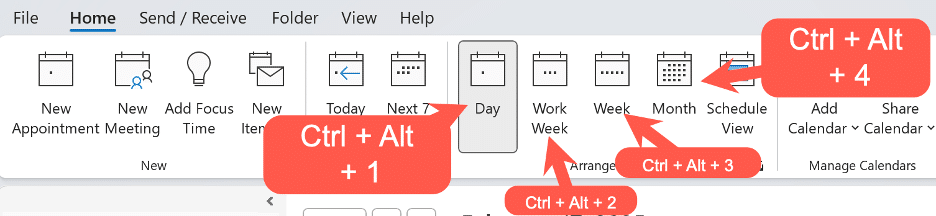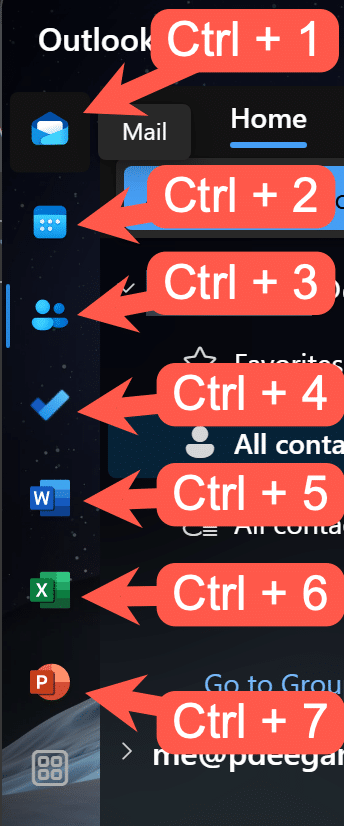
Despite all the possibilities for importing or sharing appointments, most of the time we have to manually type in new appointments or events. Here’s some tips to do it faster and get it right. We’ve all been there, a web page or email (below right) with details that need copying
The Format Cells dialog can be accessed from Home | Alignment | Orientation, or by right-clicking on selected cells and selecting Format Cells. See Excel’s text and number alignment choices Text formatting in Excel with wrapping, line breaks and merging This dialog gives you more detailed options to choose from than
Under Excel’s Home | Alignment ribbon you can change the indents, alignment or angle of the text in selected cells. As usual, a seemingly simple set of buttons have some hidden tricks. See Text formatting in Excel with wrapping, line breaks and merging Alignment Adjust alignment of the text, both
Here’s this months list of bug fixes and updates for Office 2016 and Office 2013. These apply only to the older ‘MSI’ Windows installs not the modern ‘Click to Run’ Office including all Office 365. For most people, these patches will be installed automatically via Microsoft/Windows Update. PowerPoint 2016 –
As Office Watch noted back in July, Office 2019 (Professional Plus or Home & Business) are no longer available in the Home Use Program. Until last month, Office 2019 Professional Plus or Office 2019 Home and Business could be had for the trivial price of $14.99 instead of well over
Microsoft and Samsung have a long announcement about Windows, Office and the new Samsung Note10 but there’s little really new. Under the bland title “Microsoft and Samsung partner to empower you to achieve more” is a carefully worded press release which mostly goes over existing Microsoft products which are available
If you thought that Microsoft’s move to multi-platform apps and cloud computing was hype, think again. The latest filing with the US Securities commission has a notable change in Microsoft’s policy. For a long, long time, Windows has been the core of Microsoft’s strategy. There’s been support for other operating
A report commissioned by the Dutch Ministry of Justice and Security warns government departments NOT to use Microsoft Office Online or the apps for Apple or Android. The Privacy Company report was made public with the Ministry’s permission via two blog posts short and long. Many governments and organizations have
Office-Watch.com reader Jeffrey J. offers this look at Emailmerge.cc an add-on that fixes some limitations in the Word/Excel/Outlook mail merge system. “ Outlook email merge function does not allow multiple To line addressees, nor allows creating any cc or bcc addressees. And you cannot customize the Subject line. Manually adding/modifying
Microsoft is improving (fixing?) the activation system for Office 365 Home and Personal customers. This comes a few weeks after they announced the same changes for Office 365 Enterprise customers. The per device activation limit will be handled in a much better way. Each Office 365 user is limited to login/activations on
Word allows you to insert other files with data and functionality from another document or program directly into your Word document. Microsoft calls these additions ‘Objects’ which makes it sound overly technical and difficult but it’s not. Don’t get fazed by all the nerd talk about ‘objects’, that’s programmer speak
The latest release of Excel 365 for Windows is a right mess with missing Dynamic Arrays and, for a while, Stock and Geography data types disappeared too! We received some reports late Friday, US time that Excel 365 for Windows v1907 build 11901.20176 wasn’t showing Stock or Geography data types
It’s quite easy to tell if your Excel 365 has the new Dynamic Arrays. No need to setup a table and use the new feature – just three keypresses are enough. Some people are reporting that they have the right Excel 365 but with no dynamic arrays. Checking the program/app
After many months of testing, all Excel 365 apps now have dynamic arrays (except Excel Online) though some are just for Insiders at present. Dynamic Arrays are a major and powerful expansion of Excel’s powers. The new abilities, functions and error messages might seem scary but are a great leap
A new option in Office 365 for Windows is the ability to choose how hyperlinked Office files are opened. Inside Word, Excel or PowerPoint or in the default browser. The new option is at File | Options | Advanced | Link Handling Open supported hyperlinks to Office files in Office
A newly promoted UK politician has his own special style guide for staff, here’s some Word features that can help ensure your documents are approved by the boss. The Right Honourable Jacob William Rees-Mogg (to give his new full title) proudly affects an old-fashioned demeanor and has been described as
Hackers continue to trick people into giving away their Office 365 login details with a little help from Microsoft. The criminals are getting cleverer by not only stealing passwords but checking immediately and hiding the theft while they copy your mailbox. Avanan has the details on this latest type of
Word is getting reminders for accessibility before making a PDF. When Word makes a PDF version of a document, it includes accessibility tags. These tags help screen readers (spoken for blind and the visually impaired) and also adjusting the PDF for small and large displays. When saving a PDF (File
Yea, gods. Clippy is a persistent little beggar. Over 20 years since it infested our screens and it’s now being used as a dating meme by people not born when Office 97 annoyed us. The infamous Office paperclip, Clippy, continues to pop up just like it did in Office 97.
Microsoft says we should stop calling the browser-based version of their apps ‘Office Online’. It’s now just ‘Office’. ‘Word Online’ is now just ‘Word’. ‘Excel Online’ is ‘Excel’, ‘PowerPoint Online’ is merely ‘PowerPoint’. Make sense? No, we don’t understand either. Microsoft’s explanation of the name change doesn’t help. According to
In August there’ll be some good changes to Office 365 activation for commercial customers. The per device activation limit will be handled in a much better way. Each Office 365 user is limited to login/activations on five each of desktop programs, tablet apps and smartphone apps. That’s a total of
Microsoft’s Home Use Program is a great way to get Office cheaply including Office 2019, Visio Professional 2019 and Project Professional 2019. The Home Use Program (HUP) has been a way to get Microsoft Office for less than retail for a long time. It’s available to many companies, organizations and
A new Windows 10 (October 2018) patch fixes a bug with Office 2010 and updates Brazil time zone data used by Outlook. The patch KB4505658 fixes a long list of Windows 10 v1809 bug fixes. Sorry, they aren’t bug fixes, the euphemism is ‘quality improvements’. Two changes stuck out for
Microsoft Word for Android has reached a billion installs. That’s a real Billion not a Microsoft hype billion. It’s even more impressive than it seems. The billion number is counted by Google on Google Play. Microsoft loves quoting high numbers especially ‘Billion’ even when it makes little sense. But this