Office 2021 is the personal and small business ‘perpetual licence’, non-subscription version of Microsoft Office. For Windows and Mac.
Office LTSC (Long Term Servicing Channel) is the volume licence ‘perpetual licence’, non-subscription version of Microsoft Office for organizations, companies and governments. Also for Windows and Mac.
The features in Office 2021 and Office LTSC are very similar, if not the same.
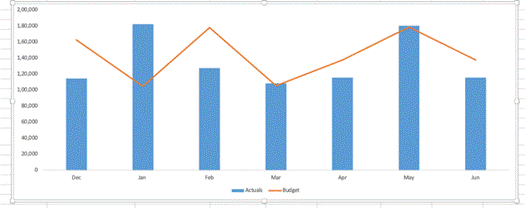
There are better ways to chart differences between matching values like budget vs actual than the simplistic one offered by Excel. A variance chart in Excel shows differences and trends at a glance and is easy to make. In Excel, a variance chart visually compares data sets, such as actual
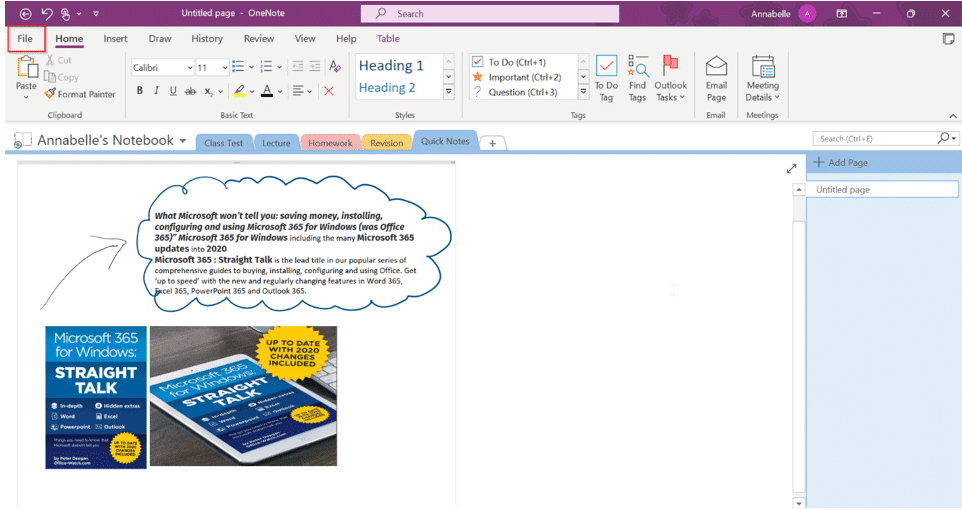
There are a few ways to quickly tell which OneNote app you have on Windows. The OneNote that will continue development or the OneNote for Windows app which is gradually being allowed to die. Previously we’ve explained about the upcoming changes for OneNote, including how Microsoft have decided to keep
The Pie, Pizza and Pie Chart icons in Microsoft Office are boring and dull. Jazz up those SVG to look a lot better in Word, Excel or PowerPoint. Just part of our tongue-in-cheek Pi 𝜋 Day and Pie series of articles. Icons (SVG graphics) at Insert | Illustrations | Icons
Three Pie emoji 🥧 🍕🍰 in Microsoft Office (Windows or Mac) plus some Stock Images, one for ‘Pi’ and a lot more for ‘Pie’. Just part of our tongue-in-cheek Pi 𝜋 Day and Pie series of articles. Pi 𝜋 emoji There is no emoji for 𝜋 because it’s a text symbol
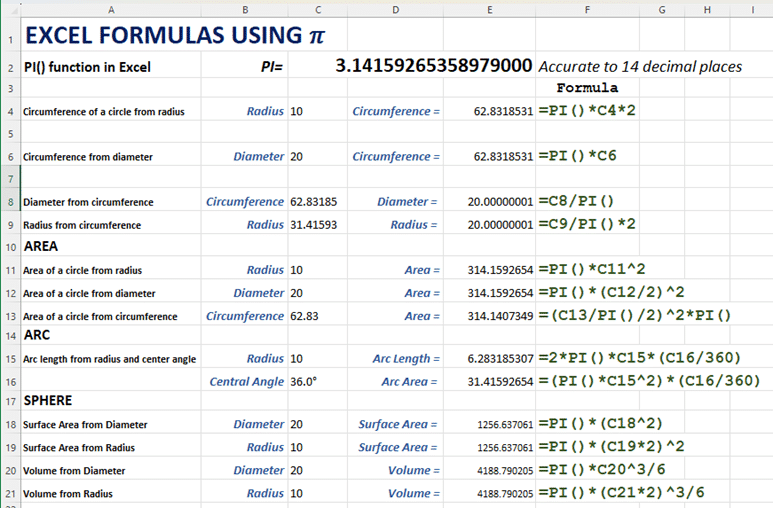
Use these handy Excel formulas for circle and sphere calculations! Whether they’re a distant memory from school days or a recent discovery, you can easily compute them using Pi (π), or as Excel dubs it, PI(). Many formulas rely on Pi 𝜋 so Excel has a simple function Pi() which
Trying to convert a Microsoft Publisher (.pub) file to Word (.docx)? We test Microsoft’s official recommendation, exporting the Publisher file to PDF and then importing that PDF into Word. It technically works but produces poor results in real-world tests. The conversion often ends up nearly unusable for typical editing tasks.
The reason Microsoft Word prefers ‘corporate speak’, phrases and language but there is more than one way to change Word’s grammar and style suggestions to suit you. Quite often on social media there are complaints about Microsoft Word’s grammar and style suggestions like this one. “MS Word suddenly dislikes the
Check out this headline ‘ramen’ font that looks great and has a clever name – Times New Ramen. Seine Kongruangkit made a font from photos of noodles, nifty use of Photoshop and an undying love of Ramen noodles <g>. Times New Ramen – you have to love it, just for
Shapes, images, and other items can be grouped together and often should be in Word, PowerPoint and other Microsoft Office apps. When you group shapes or objects, you can move, resize, rotate, flip them all at once, as if they were a single object. If you’ve ever had trouble moving
Microsoft will stop Publisher 365 software working completely on the October 2026 deadline, not just end support. They will aggressively ‘kill switch’ Publisher for Microsoft 365 subscribers. Microsoft now says the Publisher in Microsoft 365 will completely STOP WORKING on 13 October 2026 or It was believed that Publisher would only
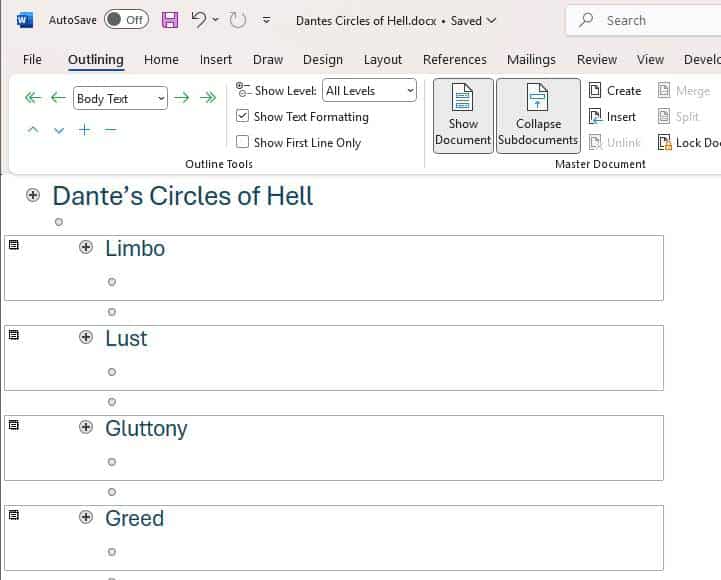
Don’t be scared of Master Documents – just very, very careful. Master Documents is useful and sometimes essential but it’s not the most stable or reliable part of Microsoft Word. What is a Master Document? In Microsoft Word, a Master Document is a Word document which has links to other
Back in 2015 we were amazed and dismayed to discover a privacy gap in Microsoft Office. Seven years later Microsoft has done nothing to fix or warn customers about. The problem is with images inserted into Office documents (Word, Excel, PowerPoint). The image ‘meta-data’ including GPS coordinates are retained with
QR Codes are those funny little boxes you see in apps and signs. They were once a bit unusual but COVID have made them part of our lives. You can add them to your Word, Excel or PowerPoint documents. Scan that code with your smartphone camera and it’ll read information,
Adding barcodes and QR codes into Word documents and mail merges is remarkably easy though hidden from view for no good reason. There are two unlisted field codes that drop barcodes or QR codes into a Word document. No need for special fonts, calls to web sites, VBA code or
Create and save custom sort orders for Word, you easily apply them when list changes. You can also set up different sort orders that can be applied with a single click, streamlining your workflow and enhancing efficiency. Brian D writes with a question about custom sorting a table, in his
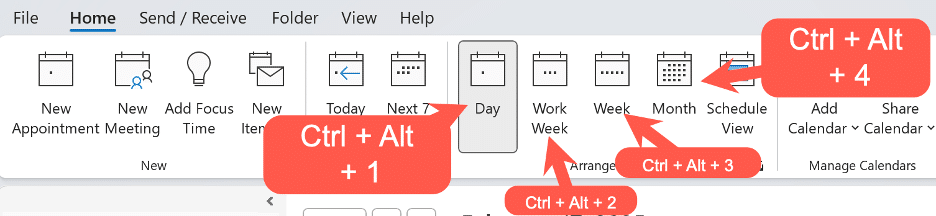
The Outlook Calendar views can change quickly with some shortcuts that work for both Outlook for Windows (classic and new) plus Outlook for Mac. The shortcuts follow the order of the Home | Arrange buttons in Outlook for Windows. Day – Ctrl + Alt + 1 Work Week – Ctrl
Fast access to important Outlook features! The ribbon in Outlook isn’t the only way to efficiently things done. Use the keyboard shortcuts that have been available in Outlook (Windows or Mac) for Microsoft 365 or Office 2024 and many earlier versions. Outlook for Windows Here are some keyboard shortcuts that
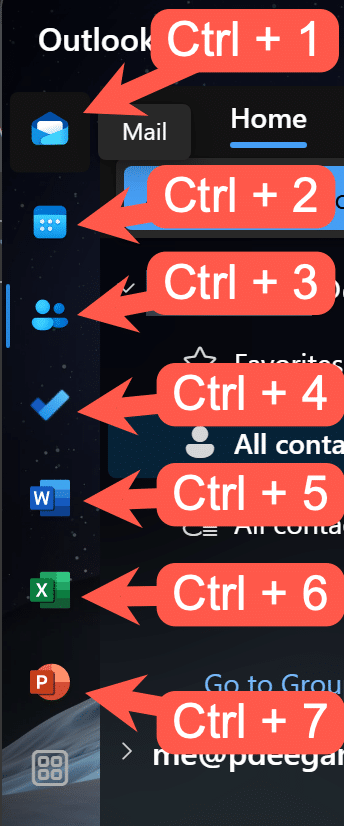
Quickly change between Outlook views using these keyboard shortcuts that work for three different Outlook’s, Windows classic and new plus Outlook for Mac. With all the changes in Outlook for Windows or Mac, it’s nice to see that some keyboard shortcuts have survived all the upheavals. This works with both
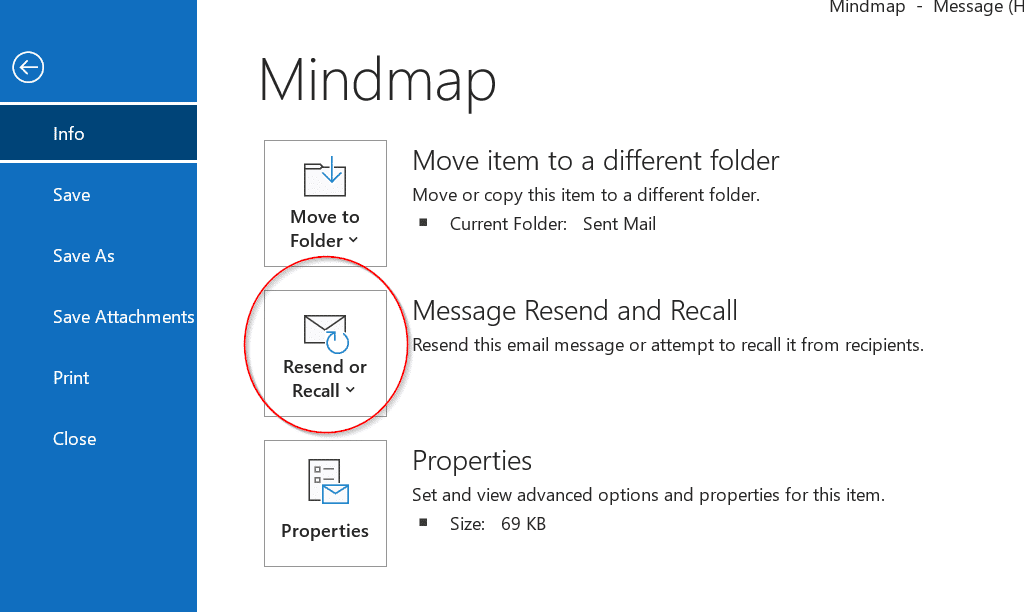
Outlook for Windows and now Mac have a ‘Recall Message’ option for messages already sent but is now not needed, been replaced or you’ve realized was a mistake. But Recall isn’t all that Microsoft says it is. A ‘recall’ request message either to delete the message or sometimes replace it.
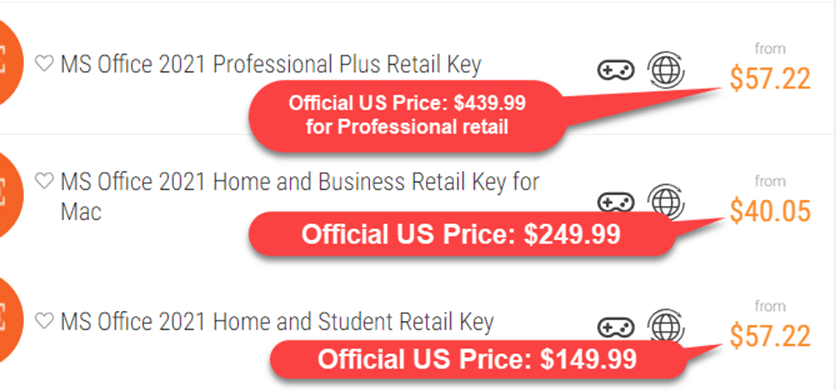
Those low-priced offers for Microsoft Office, under $60 for software that typically retails for hundreds, questions about their legitimacy. Are they genuine deals or scams designed take your money? We have examined some of these offers and their sources. We’ve all seen these offers for cheap software and games. We’ll
Word’s grammar checker is good, very good but it’s not perfect. Here’s the latest example of wrong advice under that blue underline. Office Watch reader, Simone J from Berlin sent us this English language anomaly in Word. “Your Latin and calligraphy skills are some of the best I’ve even seen”
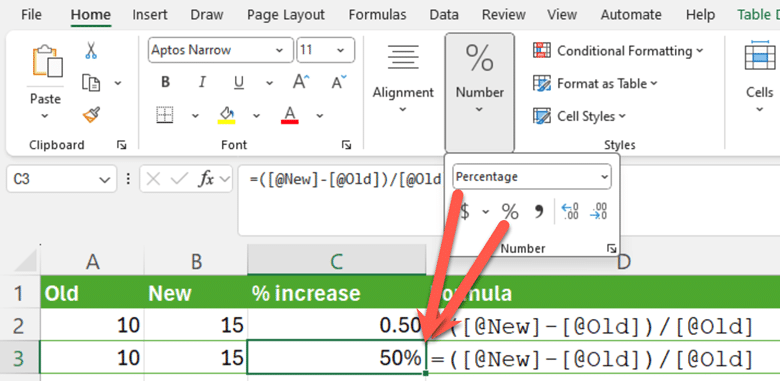
Calculating a simple percentage increase in Excel seems simple but, as usual, there’s a traps for the unwary. Here’s a smarter and more consistent way to figure out % change. First we’ll go over some basics which you’re welcome to skip … The formula for calculating a percentage change is
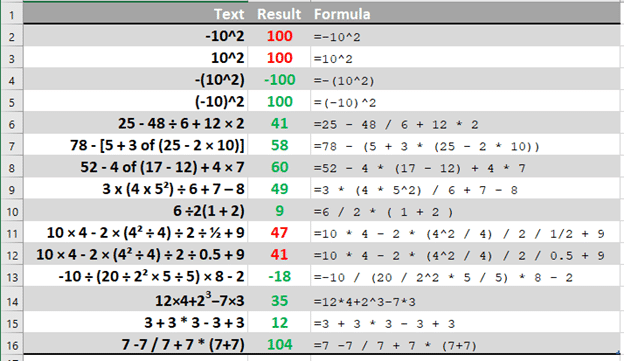
Excel has a slightly different order of calculation to the BODMAS rule taught to us at school. Those variations are important and can give a result you didn’t expect. Ray E from Iowa asked about one of those tricky algebra questions that appear on social media and generate heated arguments
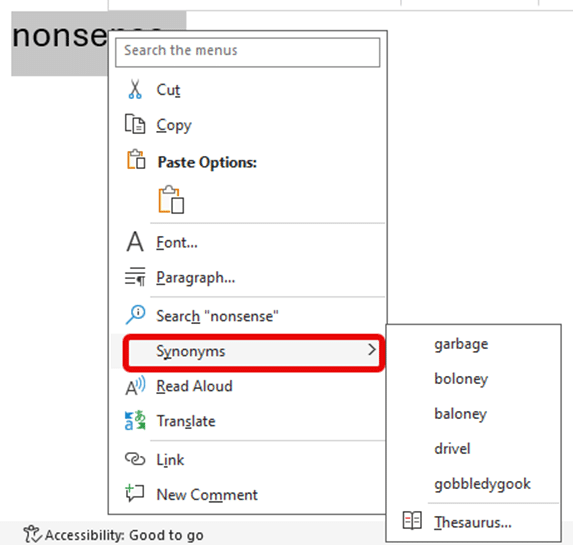
Ignore the clickbait headlines and social media experts, Microsoft Word still has a Thesaurus feature. A slightly related feature has gone but Synonyms is still alive and kicking. Here’s Word’s Thesaurus or “Synonyms” still in Word 365 using Microsoft’s example word. And here’s Synonyms in Word 2024, using a more