If you often hit the CapsLock key by accident,sending part of your text into unwanted ALL-CAPS mode, you’re not alone. But rather than letting it stay a nuisance, you can repurpose it or disable it altogether. Stop accidentally turns CAPS ON when you don’t want it. On Windows or Mac you can remap CapsLock to a more useful function, like Play/Pause or “nothing”.
Maybe I’m getting clumsy in my old age but on some keyboards I keep hitting the CapsLock key when typing the left-side letters like a or q. Then I have to waste time fixing the LETTERS typed in the wrong case … grrrr.
Caps Lock might be useful for some people but it’s really a hold over from the manual typewriter days when it was a lot harder to hold down the “Shift” key for many letters.
How holding down Shift isn’t hard and it’s easy to change case of text already typed. In Word there’s now five different ways to change case
Consider disabling the Caps Lock key completely. I was dubious of this trick but after a day or two, I’m a convert.
Windows
In Windows you need PowerToys (available free from the Microsoft Store). PowerToys has many goodies. Our books Windows 11 for Microsoft Office users and Windows 10 for Microsoft Office users have chapters devoted to PowerToys.
We’re interested in the Keyboard Manager part of PowerToys which lets you remap or change what any key does.
In this case we’ll disable the CapsLock key so it does nothing. You could change it to something else like a Play/Pause button?
Open up the Keyboard Manager and choose Remap a key’

Click Select then press Caps Lock as the key you want to change then OK.

Now open up the long “To Send” list and scroll to the very top for “Disable”.
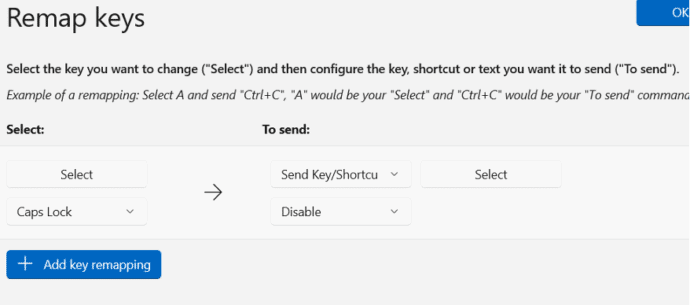
Now the CapsLock key does nothing.

Mac
Changing the Caps Lock key is a lot easier on a Mac because there’s an inbuilt tool. Go to Apple | System Settings and search for “Modifier” to quickly find Keyboard | Customise Modifier Keys.
Unlike Windows Keyboard Manager, the macOS settings let you choose the keyboard that the modifications apply to. Either the Apple Internal Keyboard or an external one.
Change Caps Lock key to “No Action” or one of the other Mac special keys.

How to disable the Windows shortcut key to Office apps
Why keyboard shortcuts are harder on Office for Mac
