More than ever, users of Outlook (classic) are running into friction — even when they select it. The newest updates from Microsoft cause the email-client designated “Classic Outlook” to start New Outlook for Windows instead. What once was a stable, always-available legacy interface is increasingly disrupted, making the once-familiar Classic Outlook experience harder to maintain.
Microsoft has changed so that new Outlook starts even if you choose Outlook (classic)! It’s yet another trick to force people onto new Outlook now, whether people like it or not.
Ignore what Microsoft says about “switching” or “changing” to new Outlook. Both Outlooks for Windows can run on a computer at the same time. It’s a sign of how different “New Outlook” is that it can exist and run alongside the “Classic” version without any conflict.
What’s happening
Choosing Outlook classic from the Start Menu will start Outlook new, like it or not.
That’s very annoying for the many people who still need classic Outlook.
At top right of either Outlook is a “New Outlook” toggle. Deselect that.
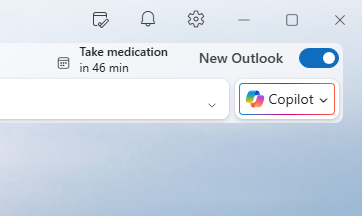
Now there’s a choice to return to using classic Outlook or just this time. Notice that Microsoft persists in talking about a “Switch” between new and classic Outlook, despite knowing quite well that both programs can run on the one computer.
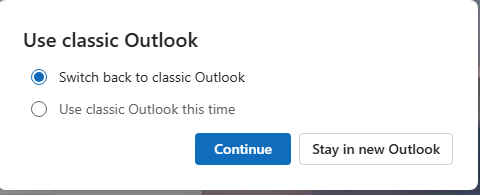
Use classic Outlook
- Switch back to classic Outlook
- Use classic Outlook this time.
How to use both Outlook new and classic
It’s still possible to run both Outlooks, despite Microsoft’s trickery.
- If you’re in new Outlook, deselect the “New Outlook” toggle.
- Then choose “Switch back to classic Outlook”
- Start classic Outlook (if it doesn’t run automatically)
- Note: Outlook (new) is still on the computer.
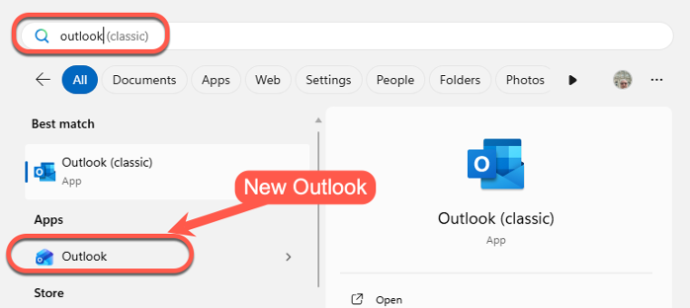
- On the Windows Start Menu search for “Outlook”
- There’ll probably be two useful results. “Outlook (classic)” and “Outlook” which is really “New Outlook”.
- Finally, click on “Outlook” to start new Outlook.
Now both Outlooks are running at the same time, with different icons (barely) on the taskbar.

All about Outlook new for Windows
How to get ‘real’ Outlook (classic) instead of new Outlook
