OneNote Finally Opens Office File Links in Desktop Apps, Not the Browser
OneNote finally lets you open Office file links in the desktop apps instead of a browser tab. A new setting in OneNote for Windows and Mac decides where Word, Excel and PowerPoint links go when you click them from inside a notebook. Choose Desktop and your spreadsheet opens in full Excel, your slide deck in full PowerPoint, and your document in full Word, with every feature, every add in, and full offline access. Here is what is rolling out, which builds you need, and the catch buried in the small print.
This sounds like a small tweak. It is not. Anyone who clicks a SharePoint or OneDrive link inside a OneNote page and gets dumped into a browser tab they did not want has been asking for this fix for years.
It’s been on the customer wish list for at least four years. The Link Handling option in Word, Excel and PowerPoint was never extended to OneNote until now.
How to change where links open
The new setting lives in OneNote itself, not in Windows, Mac or in your browser.
Open OneNote for Windows then File | Options | Advanced
In OneNote for Mac the same choice is at Preferences | Navigation | Link open preference
Choose Desktop or Browser.
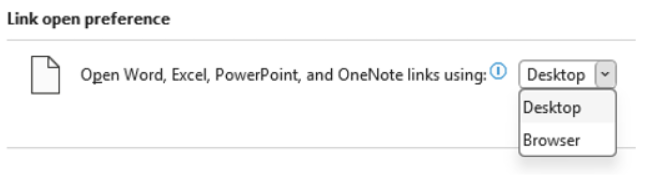
If you’re getting a little Office app déjà vu, it’s because the same choice is already at Options | Advanced in Word, Excel and PowerPoint.
Office on the web is the default
The default is still the browser, so nothing changes for you until you flip the setting. Microsoft is clearly nudging users toward the web apps, which is consistent with how it has handled link defaults across the rest of Microsoft 365.
However that’s not how many people want to work.
Which versions you need
The feature is first rolling out to these builds or later:
- Windows: Version 2603, Build 19820.20000
- Mac: Version 16.110, Build 26050124
This is rolling out first to Microsoft 365 Insiders, and Microsoft says it may pause, adjust, or pull the feature based on feedback. In other words, treat it as preview behavior for now.
What does this mean for me?
If you live inside OneNote and use it as a hub that points to spreadsheets, decks, and Word docs, this change is worth turning on the moment your build supports it. The payoff is real:
- Fewer browser tabs. Click a linked Excel file, land in Excel desktop. Done.
- Faster editing. Desktop apps still beat the web apps for power features like pivot tables, complex formulas, advanced PowerPoint animations, and any addins you rely on.
- Offline access. Browser links fail when your connection drops. Desktop apps do not.
If you mostly use the web apps anyway (lighter editing, shared coauthoring, Chromebook style workflows), leave the default alone. The browser path is fine, and it keeps cross device behavior predictable.
The catch
This is a OneNote setting, not a system wide one. It only governs links you click from inside OneNote. Click the same SharePoint link from Outlook, Teams, or Slack and the existing rules apply, which means you may still get sent to the browser.
This is progress, not parity. OneNote users finally get the same kind of choice their colleagues in Word and Excel have had for years. The fact that it took this long is the real story.
Open Office Files in Browser or Desktop App: How to Take Control
How to Install Outlook Classic on Windows Instead of New Outlook
Native Markdown Editing now in OneDrive and SharePoint
Copilot Floating Button Now Hovers Over Word, Excel and PowerPoint
Microsoft buries the Copilot button and floats a nag in its place
AutoSave vs AutoRecover in Microsoft Office: What Each One Actually Does to Save Your Work
Microsoft 365 Classic Explained: A Lower Cost, No AI Subscription Option