French Flag in Word, Excel and PowerPoint: Get the Colors Right
Adding the French flag 🇫🇷“Le Tricolore” to Word, Excel or PowerPoint looks like the easiest job in Office. It is three colored bands. What could go wrong? Quite a lot, as it turns out. There are two official French blues in circulation and the French state has switched between them, the white middle band disappears on a white page, and the French flag emoji shows as two plain letters, FR, for every Windows colleague who opens your file. Here is where to get a proper scalable flag graphic, the exact hex codes for both the dark navy and the lighter 1976 blue and the flag rules worth knowing before you send that document.
Get the French flag image
The best free source is Wikipedia, because it offers an SVG (scalable) version plus PNG versions for older software.
Go to https://en.wikipedia.org/wiki/File:Flag_of_France.svg .

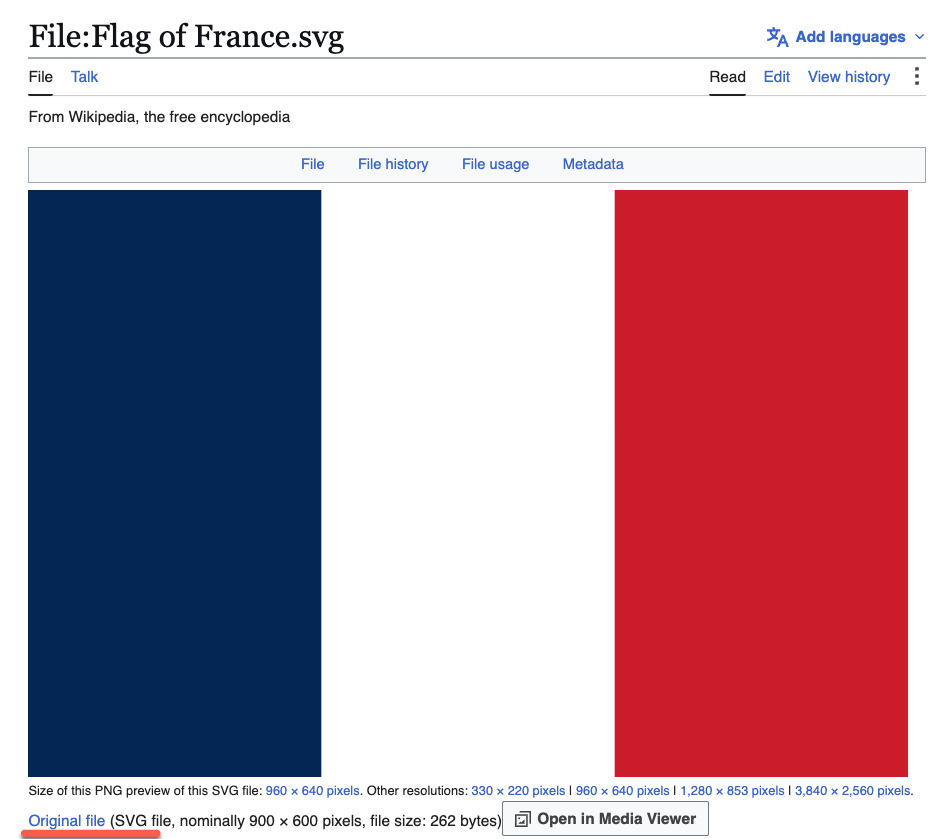
Below the image is a list of download choices. Right click and choose “Save link as…” (or whatever your browser calls it).
- Microsoft 365, Office 2024, 2021 and 2019: choose “Original file”, which is the SVG. SVG stays sharp at any size, and Office lets you recolor it later.
- Older Office: choose one of the “PNG preview” sizes. Pick a resolution larger than you actually need, then shrink it in the document. Never enlarge a PNG.
Colors
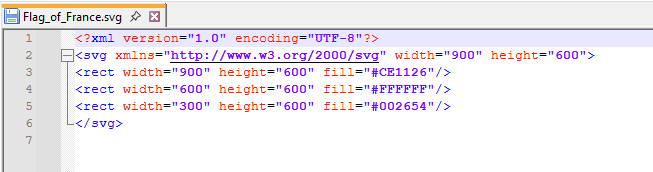
One warning about the Wikipedia file. The exact shades in it have been changed by editors more than once over the years and they do not precisely match either of the official color sets (see below). If the colors have to be right, recolor the SVG in Office.
That’s easy to do. Open the SVG file in any text editor (e.g. Notepad) and change the Hex color codes. See Make simple changes to SVG graphics
Insert the French flag into Word, Excel or PowerPoint
Once the file is saved, it is the usual routine. Insert | Pictures | This Device, choose the image, then resize and position like any other picture.
Excel users, one extra step. By default a picture floats above the grid and will drift when rows or columns change. Right click the image, choose Size and Properties, open Properties and pick “Move and size with cells” so the flag stays where you put it.
Two things to always do with the French flag
Lock the aspect ratio. The flag is 2:3, meaning it is one and a half times wider than it is tall. Go to Picture Format | Size, open the dialog and tick “Lock aspect ratio”.
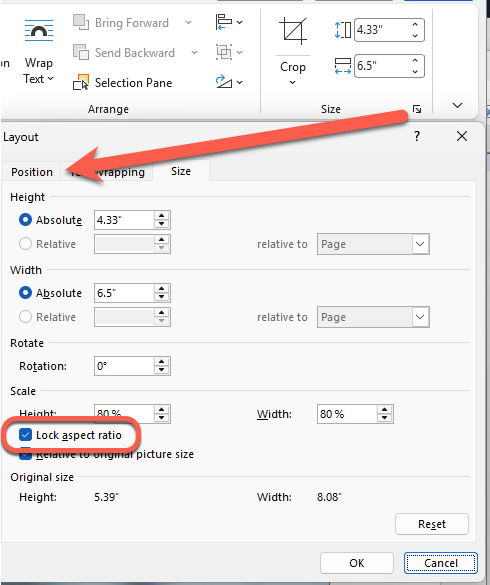
A stretched tricolore does not look as obviously broken as a squashed English cross, which is exactly the problem. People sense that something is off without being able to say why.
Add alt text. Right click the image, choose “Edit Alt Text” and write something like “Flag of France, vertical bands of blue, white and red”.
French flag colors and the navy blue switch
This is the part almost everyone gets wrong. There are two French flags in regular use and they have been running side by side for decades.
No law fixes the shades. Article 2 of the 1958 Constitution simply says the national emblem is the tricolor flag, blue, white and red, and leaves it there. The blue was traditionally a dark navy. In 1976 President Valéry Giscard d’Estaing introduced a lighter blue and a lighter red, closer to the European flag, and both versions stayed in use.
Then on 13 July 2020, President Macron quietly switched the flags at the Élysée Palace back to the darker navy, a nod to the Revolution. There was no announcement and no instruction to anyone else. Nobody noticed until Europe 1 reported it in November 2021.
Both differ from the Wikipedia SVG, which currently uses red #CE1126, white #FFFFFF and blue #002654.
What this means for you: if the document is about modern France, the French state, or anything post 2020, use the dark navy set. If you are matching an existing French logo, brochure or website, sample their colors first because plenty of organizations still use the lighter blue.
Darker version
These are the darker colors published by the French government, and what you want for anything current and official looking.
Red: 225, 0, 15 or #E1000F (Pantone 485 C)
White: 255, 255, 255 or #FFFFFF
Blue: 0, 0, 145 or #000091 (Pantone Blue 072 C)
In an SVG graphic:
<?xml version="1.0" encoding="UTF-8"?>
<svg xmlns="http://www.w3.org/2000/svg" width="900" height="600">
<rect width="900" height="600" fill="#E1000F"/>
<rect width="600" height="600" fill="#FFFFFF"/>
<rect width="300" height="600" fill="#000091"/>
</svg>
Lighter version
In use since 1976, a lighter set of colors, and still seen on plenty of official material, including some French embassy branding.
Red: 239, 65, 53 or #EF4135 (Pantone Red 032)
White: 255, 255, 255 or #FFFFFF
Blue: 0, 85, 164 or #0055A4 (Pantone Reflex Blue)
In SVG format:
<?xml version="1.0" encoding="UTF-8"?>
<svg xmlns="http://www.w3.org/2000/svg" width="900" height="600">
<rect width="900" height="600" fill="#EF4135"/>
<rect width="600" height="600" fill="#FFFFFF"/>
<rect width="300" height="600" fill="#0055A4"/>
</svg>
The white stripe trap
The middle band of the French flag is white. Put the flag on a white page or a white slide and the middle simply disappears (see below left), leaving two floating rectangles that look like a mistake.
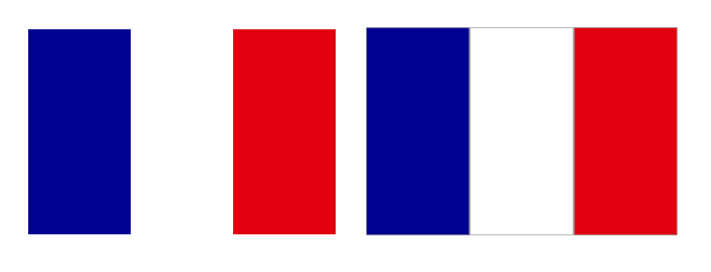
Fix it by selecting the picture and adding a thin outline (see above right). Graphics/Picture Format | Graphics/Picture Outline, choose a light gray color and a thin weight (1 pt or less). On a dark PowerPoint slide the problem goes away by itself. This one small step is the difference between a flag and an accident.
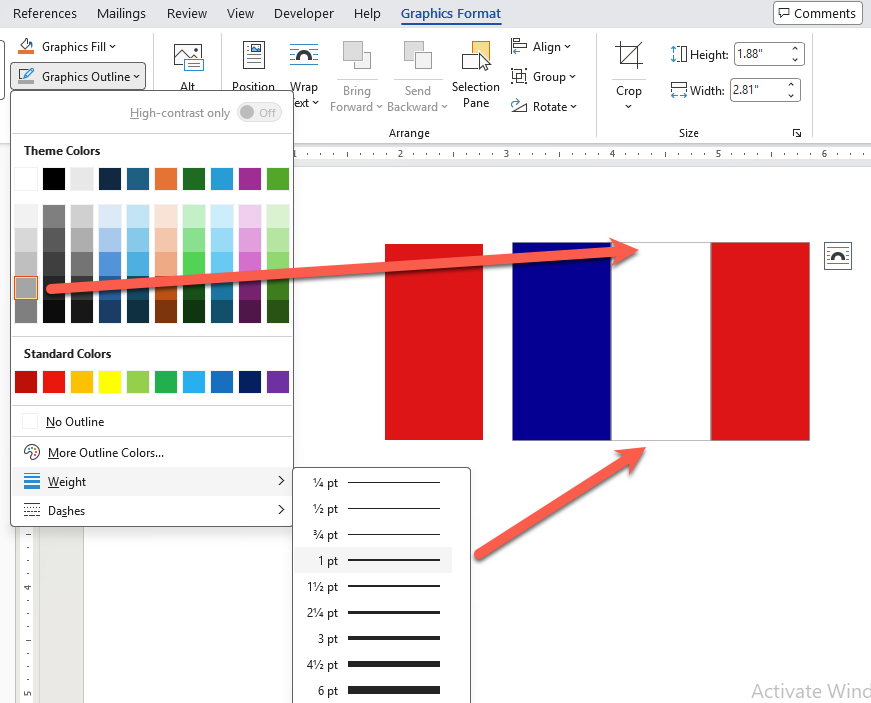
Flag effects
With the image in place, all the usual Office picture tools are available. An SVG gives you a Graphics Format tab on the ribbon, while a PNG or JPG gives you Picture Format.
Shadow. Graphics Effects | Shadow | Outer adds a subtle drop shadow to the right and below. Open the side pane for finer control. This is also a neat way to solve the white stripe problem, since the shadow defines the edge.
Reflection. A small reflection under the flag works well on a title slide and looks silly in a report. Choose accordingly.
Beveled edges. A slight 3D lift. Keep it gentle. Heavy bevels on a national flag look like a 2003 PowerPoint template.
The French flag emoji: mostly a waste of time
There is a proper Unicode flag emoji for France: 🇫🇷 . It is built from two regional indicator letters, F and R (U+1F1EB and U+1F1F7).
Here is the catch. On Windows it does not display as a flag. The Segoe UI Emoji font used by Word, Excel, PowerPoint and Outlook on Windows contains no national flag glyphs at all. Your reader gets two letters, FR, in a box style font, instead of blue, white and red. Mac, iPhone and Android render it perfectly, which is what makes this such a good trap: the emoji looks fine while you are writing and looks broken the moment a Windows colleague opens the file.
What this means for you: never use the flag emoji in a document that other people will open. Use an SVG, a PNG or your own grouped shapes instead. Emoji is fine in a chat message to someone you know is on a phone or a Mac. It is not fine in a report, a slide deck or a spreadsheet header.
Flag rules in France
Unlike England, France does have laws protecting its flag, but none of them will trouble you in Office documents.
Article 433-5-1 of the Penal Code, added in 2003, punishes publicly insulting the flag or the national anthem during an event organized or regulated by the public authorities. A decree of 21 July 2010 goes further, fining people for destroying, damaging or degrading the flag in a public place with intent to insult it, and for circulating images of doing so, even when the act happened in private
None of the laws restricts putting “Le Tricolore” (“The Tricolor”) in a document, a slide or a spreadsheet. Ordinary and commercial use of the flag in France is free, and you will see it on cheese labels and car ads. Three practical points:
- Blue goes at the left. It sounds obvious, but the original 1790 flag had red nearest the flagpole. The order was flipped to blue, white and red on 15 February 1794.
- Keep the bands equal. The French Navy ensign uses unequal bands, 30:33:37 with the blue narrowest, so the stripes appear even when the flag is flapping at sea. That is a fix for cloth in the wind, not for paper. Never copy it into a document.
- Do not stretch it. A tricolore at the wrong ratio still reads as a French flag, which means the error goes unnoticed by you and noticed by everyone else.
Finally, the fun fact for the caption under your flag: the idea that blue, white and red stand for liberté, égalité and fraternité is a popular story, not an official one. Blue and red are the colors of Paris and white was the color of the king.
England Flag in Word, Excel and PowerPoint: The Right Way
US Flag in Word PowerPoint Excel: Download High-Quality
Insert the Spanish flag into Word, Excel or PowerPoint
Get flag emoji in Microsoft Office with Windows workaround
Hex Color Codes in Microsoft Office: How to Use Exact Colors Every Time
Choose the Perfect Match Color with Microsoft Office
Converting SVG code into a graphic for Office